

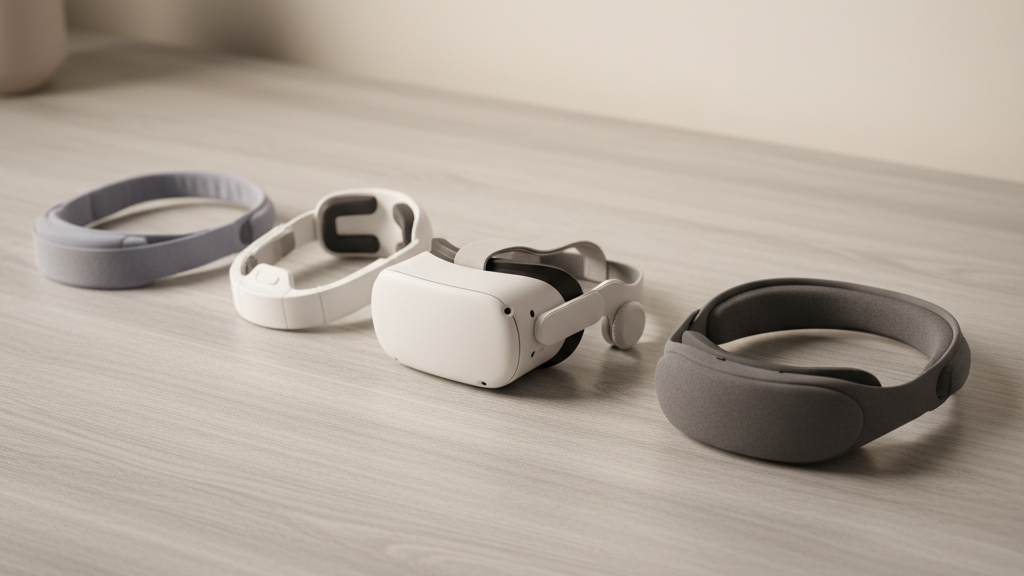
The Elite Strap Showdown: Can the Quest 2’s Official Comfort Strap Outperform Third‑Party Headbands for Marathon VR Sessions?
If you own a Quest 2 and have ever taken off your headset mid-session because of a sore bridge of the nose or an achy neck, you know the strap matters as much as the headset itself. This practical, data‑driven guide compares Meta’s official Comfort Strap and Elite Strap to popular third‑party headbands so you can choose the best solution for long play, glasses, and movement-heavy titles. ⏱️ 10-min read
We’ll evaluate cushions, adjustability, balance, installation, maintenance, and long‑term value, then give clear recommendations for different use cases. No marketing fluff — just hands‑on insights and actionable tips to help your next VR session stay comfortable from start to finish.
Official Quest 2 Comfort Strap vs. Elite Strap and Third‑Party Options
“Official” means Meta’s two main strap families for the Quest 2: the stock soft strap that ships with the headset, the upgraded Official Comfort Strap (padded, two‑piece with a rear cradle), and the comfort-strap" rel="nofollow noopener noreferrer">Elite Strap (a more rigid, metal‑reinforced option, sometimes bundled with an attachable battery module). “Third‑party” covers a wide range of aftermarket bands — from low‑cost neoprene headbands to premium memory‑foam or gel padded rigs with alternative clamp systems.
We judge comfort by four practical criteria: cushioning (material and density), weight and balance (how the strap moves the headset’s center of gravity), adjustability (both macro and micro tuning for varied heads), and stability (how well the headset stays put during movement). Stability ties to attachment points and frame stiffness; adjustability ranges from simple velcro to dial systems. The official Comfort Strap trades bulk for a breathable padded crown and quick‑release convenience. The Elite Strap swaps softness for rigidity and a dial tightening system, and optional battery modules extend play at the cost of added rear weight. Third‑party bands try to win on padding upgrades, different weight distributions, or finer micro‑adjustments, but quality varies widely.
Key comfort factors for long sessions
Long sessions turn small irritations into distraction. The core of any comfortable strap is how it spreads pressure. A well‑designed pad distributes load across the brow, cheeks, and crown so no single hotspot develops. Denser foams and layered constructions perform differently: a firm, dense foam resists collapse and preserves seal, while softer memory foam reduces immediate pressure but may compress over hours, concentrating force in new areas.
Breathability is often underappreciated. Mesh covers, perforated layers, or ventilated foam move air and cut down on sweat buildup and lens fog — critical during two‑hour runs. The official Comfort Strap uses a breathable fabric over dense foam to prevent hotspots, while many third‑party options add gel inserts or thicker memory foam for a plush feel; those can trap heat without ventilation.
Adjustability is the other half of comfort. A top strap that’s too tight pushes the headset forward, increasing nose pressure; too loose and the headset wiggles. Official straps generally offer straightforward top and rear adjustments; third‑party bands frequently add micro‑adjusters or multiple clamp points to better match unusual head shapes. Finally, stiffness versus flexibility matters: a rigid rear cradle (as with the Elite Strap) holds optical alignment during rapid movement but transfers a different set of forces to the skull and neck. The best systems find a middle ground — firm enough to prevent bounce, flexible enough to move with you.
Weight, balance, and how straps impact headset heft
Perceived weight isn’t just grams on a scale — it’s how the headset’s center of gravity (CG) sits relative to your eyes and neck. A forward‑shifted CG makes the lenses feel heavier and increases pressure on the nose bridge quickly. Conversely, moving weight rearward reduces nose‑pressure but can increase neck torque as your head tilts to compensate.
The official Comfort Strap is lightweight and keeps mass relatively centered; it reduces crown pressure compared with the bare stock strap without shifting much of the headset’s CG. The Elite Strap’s metal hardware adds noticeable heft but gains stability; combining it with the optional battery module moves mass to the back which increases runtime and shifts the CG rearward — a trade that reduces lens pressure but raises neck fatigue over long sessions. Third‑party bands can go either way: some add weight near the face (heavier padding), making lenses feel heavier, while others move mass up top or to the rear through counterweights or built‑in batteries.
Attachment design also affects perceived heft. Multi‑point attachment spreads forces and reduces wobble; a single clamp can create pivot points that amplify motion, making the headset feel heavier during quick turns. Cable routing matters too: any cable tug under the strap becomes perceived weight. If balance is your priority, look for straps that clearly state where added modules sit, and favor solutions that place bulk at the rear rather than the face.
Fit for glasses wearers and diverse head shapes
Glasses compatibility and universal fit are frequent reasons people swap straps. Comfort for glasses wearers depends on vertical and lateral clearance around the nose bridge and cheekbones, plus how padding interfaces with frame limbs. The official Comfort Strap offers generous adjustability and doesn’t tend to pinch the nose when set correctly; however, frame thickness and temple arm placement will change the experience.
Third‑party headbands sometimes add recessed padding or cutouts to accommodate nose pads and temple tips, which can be a game changer for certain frame styles. If your glasses sit high on the nose, prioritize designs with deeper face padding cutouts or adjustable cheek relief. For broad or oval heads, straps with wide rear cradles and extended tension range are better at spreading load; for smaller heads, ensure the rear band can tighten without creating a painful clamp behind the ears.
Anti‑squeeze designs — where the top strap relieves forward pressure by transferring load toward the rear cradle — help both glasses and non‑glasses users. In short: if you wear bulky frames, test for vertical clearance and look for padding cutouts; if your head is outside the “average” range, favor straps with both coarse (velcro/dial) and fine (micro‑adjust) options to prevent hotspots and slippage.
Installation, setup, and top‑tips for beginners
Most Quest 2 straps share the same three‑point quick‑release attachment pattern, so swapping is straightforward. But getting a snug, comfortable fit is a small ritual that pays dividends during long sessions. Below is a step‑by‑step sequence you can follow for the official Comfort Strap and most third‑party bands.
- Remove the existing strap: depress the quick‑release tabs at the top and sides, and gently pull the strap sections free.
- Align the new strap: line up the posts or clips with the headset slots, ensuring the rear cradle faces downward toward your neck.
- Snap into place: press until you hear or feel each quick‑release click. Give each anchor a light tug to confirm it’s seated.
- Initial positioning: set the top strap so the band sits just above the eyebrows and the rear cradle rests on the lower back of your skull, not the neck.
- Tighten incrementally: secure the rear strap until the headset feels steady but not clamped. Fine‑tune the top strap for seal and comfort.
- Glasses check: put on your glasses first, then the headset. If you get fog, raise the top strap a notch or adjust the tilt to increase airflow.
- Movement test: gently shake your head and do a few VR motions. If the headset shifts, tighten the rear strap slightly rather than over‑clamping the top.
Quick tips: always aim for even pressure distribution rather than brute tightness; small adjustments are better than big ones; and if using a battery pack at the rear, dial tension back a little to let the rear cradle carry more load. For third‑party bands with screw clamps or dials, make incremental changes and test with motion-heavy content to avoid surprises during play.
Durability, maintenance, and value over time
How a strap holds up after months matters more than a soft first impression. Foam compression, fabric fraying, and loose stitching are common wear patterns. Dense foams resist collapse longer but can degrade at the edges where skin contact is greatest. Third‑party bands vary a lot: premium models use higher‑grade materials and reinforced stitching, while cheap options may fray or lose elasticity after heavy sweat exposure.
Cleaning is simple but important. Wipe fabric and padding with a cloth dampened in mild soap and lukewarm water; rinse with a damp cloth and air dry away from direct heat. Never submerge battery modules or electronic parts; spot clean those components carefully. Avoid alcohol‑based cleaners on foam — they dry and crumple cushioning. Inspect connectors and plastic clips regularly for hairline cracks; replace any cracked clip before it fails mid‑session.
Warranty and parts availability shift the value equation. Official straps usually carry a basic manufacturing warranty and have replacement parts or straightforward reorders. Third‑party makers range from no warranty to generous two‑year coverage. Over 1–2 years, a mid‑range third‑party padded band can offer comparable comfort at lower cost, but replacement costs or degraded support can tip value back to official options. In practice: if you prioritize longevity and predictable fit, official or reputable third‑party brands are worth paying for; if you upgrade often and seek low initial cost, budget bands can be a stopgap.
Practical picks by use case: best value vs best comfort
No strap is perfect for every user. Here are practical recommendations based on real use cases:
Best overall comfort for long sessions: Elite Strap (with or without the battery). The Elite’s rigid frame and dial tightening give a very secure fit that minimizes wobble and keeps optics aligned during vigorous play. Add the battery if you need extended runtime and are willing to accept more neck torque for reduced nose pressure.
Best balanced option: Official Comfort Strap. It’s the sweet spot for most owners — breathable padding, reduced crown hotspots, quick‑release convenience, and broad adjustability. It’s lighter than the Elite and preserves headset balance well for mixed sessions of seated and standing play.
Best budget value: mid‑range third‑party padded headband. For players who want more cushion without spending on the Elite, many aftermarket bands with memory‑foam or gel inserts significantly reduce perceived pressure for a fraction of the price. Expect less precision in fit and varying material longevity.
When to pick official vs third‑party: choose the official Comfort Strap if you want reliable compatibility, quick releases, and moderate upgrades without adding heavy hardware. Go Elite if you need maximal stability and plan to use a battery pack for long sessions or streamed experiences. Pick a respected third‑party band when cost is primary and you’re willing to trade some long‑term durability for plushness and immediate comfort.
Cross‑ecosystem compatibility and accessories: Vision Pro and more
Headset mounting systems aren’t standardized. Quest 2 straps use side lugs and a rear clip geometry specific to Meta’s design; other headsets use top bars, rails, or different clamps. That means straps seldom move seamlessly between ecosystems without adapters or custom hardware. Third‑party “universal” bands exist, but they often rely on aftermarket adapters and can introduce slight misalignment, extra wobble, or compromised seals.
Vision Pro and similar devices use proprietary mounting and crown pad approaches that aren’t openly compatible with Quest 2 hardware. Manufacturers generally recommend device‑specific accessories to preserve fit, seal, and tracking. If you try to adapt a Quest 2 strap to another headset, expect to troubleshoot balance and ensure no strain on the headset’s sensors or shell.
Accessory ecosystems do offer helpful add‑ons: padding upgrades, silicone face interfaces to reduce skin contact, and battery mounts that pair with Elite‑style rails. If you plan to experiment across devices, prioritize straps with modular attachments or third‑party adapters that specify headset compatibility. Keep in mind that unofficial adapters may void warranties or affect tracking if they shift the headset’s optical alignment.
Next step: try the official Comfort Strap first if you haven’t already — it’s the least risky upgrade. If you experience persistent wobble during movement or need longer battery life, consider stepping up to the Elite Strap (and a battery). If price is the barrier, choose a well‑reviewed third‑party padded band, but check return policies and warranty before buying.







Share:
Quest 2 Comfort Strap Installation Guide: A Step-by-Step Fit Tutorial
Vision Pro vs Meta Quest Ergonomics: Weight, Straps, and User Comfort