

Apple Vision Pro vs Third-Party Comfort Straps: Pros, Cons, and Compatibility
If you own—or are considering buying—an Apple Vision Pro, comfort quickly becomes central to enjoying extended mixed-reality sessions. This article explores how dedicated third-party comfort straps and accessories can transform the Vision Pro experience, what they solve (and what trade-offs they introduce), and how to choose and install solutions that preserve performance and compatibility. ⏱️ 11-min read
Understanding Apple Vision Pro's Native Comfort Design
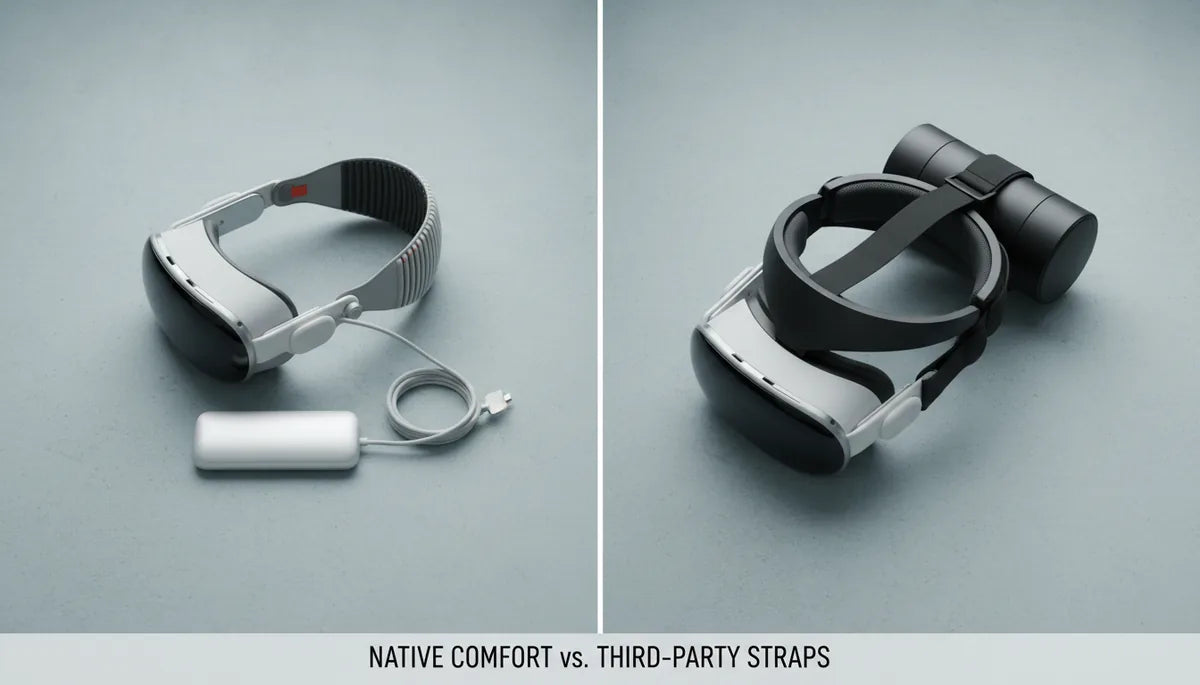
Apple designed the Vision Pro with a clear emphasis on optics, spatial computing, and a premium materials approach to ergonomics. Out of the box, Apple provides two band options: the Solo Knit Band and the Dual Loop Band. The Solo Knit Band is meant to be lightweight and breathable, wrapping around the back of the head for a snug fit; the Dual Loop Band offers additional adjustability and a more traditional over-ear loop. Both are engineered to prioritize a secure optical seal and to keep the displays aligned with the eyes.
The intended ergonomics center on a balance between stability and minimal interference with the device’s sensors, cameras, and passthrough capabilities. In practice, Apple’s designs emphasize a low-profile silhouette and precise alignment, which works well for many short-to-medium sessions like watching content or trying spatial apps. However, the Vision Pro’s hardware—its array of cameras, sensors and battery distribution—creates a front-heavy center of mass that the native bands are designed to counter through tension and head contact.
User feedback across reviews, forums, and early-owner reports has been consistent: the Vision Pro is comfortable for many tasks but can become tiring during longer sessions. Anecdotally, many users report that pressure builds on the nose bridge, forehead and cheekbones after 20–45 minutes of continuous wear, especially during more active interaction or when users lean forward. These pressure points are less about the comfort materials and more about how the headset’s weight is distributed relative to the head.
It’s also worth noting that Apple’s approach intentionally favors a close optical seal and precision alignment over extreme cushioning or heavy counterweights. This design choice keeps reflections and light leaks lower and the viewing experience sharp, but it means that users who want to extend session length and reduce facial pressure often look to accessories to rebalance forces without degrading the core optical performance.
Addressing Comfort Gaps: The Need for Third-Party Vision Pro Straps
The Vision Pro’s front-heavy architecture—necessitated by front-facing cameras, sensors, and the display assemblies—makes it prime for aftermarket comfort innovation. When a device is heavier at the front, the body naturally produces torque that presses the front against the face. The native bands compensate with tension across the skull and cushioning at contact points, but that compensation can translate into forehead and cheek pressure, skin indentation, and neck strain during prolonged use.
Many owners seek third-party straps specifically to redistribute that forward torque. Third-party solutions aim to move load paths from the face to the top and rear of the head, or to introduce counterweights and halo-style supports that neutralize the forward pull. This is particularly relevant for users who plan multi-hour sessions—developers, enterprise users, or VR/AR enthusiasts—because small differences in how force is distributed compound quickly over time, turning an otherwise promising device into a source of discomfort.
Other drivers behind third-party adoption include stability during active interaction (reaching, twisting, or standing), personalization of fit for varied head shapes, and the desire for materials that better handle sweat and movement. Some buyers are also motivated by ergonomics for glasses-wearers—seeking straps and facial interfaces that maintain the optical seal without additional pressure on eyeglass frames.
Finally, form-factor preferences matter: some people prefer the minimalist look and feel of Apple’s bands, while others trade aesthetics for function. That willingness to trade off appearance for comfort has fueled a market of third-party manufacturers offering alternatives tuned specifically to the Vision Pro’s unique balance challenges.
The "Pros" of Upgrading to Third-Party Vision Pro Comfort Solutions
The most tangible benefit of an aftermarket strap is improved weight distribution. Third-party halo-style and top-strap systems can redirect forces away from the face and toward the crown and rear of the head, which reduces direct pressure on the forehead, nose, and cheekbones. For many users this translates to a perceptible reduction in facial fatigue—enough to extend continuous sessions from under an hour to multiple hours in comfort.
Beyond reduced facial pressure, aftermarket solutions often improve stability. A better-balanced mount reduces micro-movements of the headset relative to the eyes, maintaining optical alignment during active tasks like hand-tracking gestures, mixed-reality drawing, or light physical activity. That enhanced stability means fewer re-adjustments and a smoother interaction experience—particularly valuable for developers and content creators who need consistent alignment to test and build spatial apps.
Third-party accessories also expand customization options. Users can choose from softer padding, different materials that breathe better, adjustable halos for varying head shapes, or modular systems with detachable counterweights. Some solutions—like counterweight kits—allow precise tuning: adding small weights to the rear to offset the front assembly can be adjusted for the user’s head shape and session type. This degree of tuning is difficult to match with the standard bands.
Finally, third-party solutions can unlock new use cases. For instance, streamers and enterprise users who need to present while moving benefit from straps that prioritize stability. Alternatives like the FlitLift GraviPro and other specialized stands or harnesses can transform stationary sessions into “weightless” experiences, offloading the device entirely during seated work while preserving alignment—useful for fatigue-sensitive workflows or long development sessions.
Potential "Cons" and Compromises of Third-Party Vision Pro Accessories
No accessory comes without trade-offs. One common downside to third-party comfort systems is added bulk or perceived weight. Halo frames, counterweights, and thicker padding increase the headset’s overall footprint, which may interfere with the sleek aesthetic many buyers expect from Apple products. That visual and physical bulk can be off-putting for users who prioritize a minimal profile for social or professional demonstrations.
Compatibility concerns are another real issue. The Vision Pro’s design integrates sensors, optical seals, and tether points that third-party manufacturers must respect. Poorly designed attachments can disrupt the optical seal, block infrared sensors, or create light leaks that degrade image quality. There’s also the possibility of physical interference with Apple’s official accessories—cases, docks, or the native bands—meaning some third-party options may not fit cleanly into Apple’s ecosystem items without modification.
Cost and perceived value can be a barrier too. High-quality third-party straps and systems—especially those with premium materials or engineering—often carry prices that are a noteworthy fraction of the headset itself. That makes buyers weigh whether extended comfort justifies the added expense. Additionally, there’s the warranty angle: using third-party hardware generally doesn’t void Apple’s warranty by default, but any damage caused by a non-Apple accessory could complicate service claims. The prudent approach is to use reputable accessories and avoid forcing or permanently altering the headset.
Finally, installation complexity and maintenance matter. Some third-party systems require careful setup, periodic adjustment, or additional cleaning when commuting sweat and oils move into custom pads. Users should be prepared to invest a little time in fitting and caring for aftermarket straps to maintain hygiene, performance, and longevity.
Exploring Third-Party Vision Pro Comfort Strap Categories and Beyond
Third-party comfort solutions fall into several broad categories, each solving different aspects of the comfort equation. Halo-style full head straps create a rigid or semi-rigid ring around the crown and rear of the head. These distribute the headset’s torque across a wider area, generally reducing facial pressure and improving stability. Halo systems can be minimalist (thin frames with padding) or robust (padded rings with integrated ratchets for fine adjustment).
Top straps and vertical relief systems focus on lifting the headset slightly and transferring vertical load to the top of the head. These are typically low-profile and pair well with other accessories, offering a compromise between the minimalist Apple look and improved weight distribution. Top straps are especially helpful for users with higher forehead sensitivity or who want to reduce bridge-of-nose contact without adding much bulk.
Counterweight systems provide rear-mounted weights that balance the front-heavy optics. They’re attractive because they’re simple to tune: adding or removing small weights changes the center of mass without altering the device’s contact points. Counterweights are popular with people who rotate between short and long sessions because they can be clipped on and off as needed. However, they do increase the total mass the neck must support—alleviating facial pressure but potentially adding neck fatigue if overused.
Beyond wearable straps, specialized stands and harnesses offer alternative approaches to “weightless” experiences. The FlitLift GraviPro—one example—is designed to cradle headsets and transfer weight to a frame or table-mounted arm, effectively suspending the device so the user feels far less mass. These solutions are ideal for stationary workstations where mobility isn’t required and can make extended development or viewing sessions far more comfortable. They do sacrifice portability, however, and require a dedicated space.
Ensuring Seamless Compatibility and Easy Installation for Vision Pro Comfort Straps
Compatibility should be the first checkpoint when considering any third-party accessory. Start by verifying that the product explicitly states Vision Pro compatibility. Good manufacturers will describe how their strap interfaces with the headset’s attachment points, optical seals, and sensor array, and they will provide photos or videos demonstrating a clean fit. If that documentation is missing, contact the vendor to confirm whether their design avoids obstructing cameras, LiDAR (if present), or sensor windows.
Installation tips matter. A safe, effective installation generally follows these steps: 1) power off the Vision Pro and place it on a soft, clean surface; 2) remove or loosen the native band if the third-party system requires it; 3) align any mechanical connectors carefully, ensuring no force is applied to the glass or optical housing; 4) attach padding or facial interface adapters per the manufacturer’s instructions; and 5) perform a fit check and sensor test—ensure passthrough cameras and head-tracking work as expected before full use.
Adjustment is where comfort is tuned. Take time to balance the headset front-to-back rather than simply tightening straps. A well-balanced headset sits with minimal forward pull and with padding lightly contacting the forehead, cheekbones, and crown without uncomfortable pressure. For counterweight systems, start light and incrementally add weight until you find the sweet spot—this minimizes neck strain while reducing facial pressure. Keep a small mirror or ask a friend to watch for light leaks or slippage during movement.
Finally, validate functionality after installation. Run calibration routines, test face and eye tracking if applicable, and do a short session in a variety of postures—standing, sitting, leaning—to check for slippage or sensor occlusion. If any tracking anomalies or image artifacts appear, re-evaluate the attachment points and pads; if problems persist, remove the accessory and consult the vendor or community reviews for solutions.
Selecting the Best Third-Party Comfort Solution for Your Vision Pro
Choosing the right accessory comes down to matching needs to design trade-offs. Start by clarifying how you plan to use the Vision Pro: short media sessions, long development or work periods, active demonstrations, or stationary “weightless” use. Each scenario favors a different category of accessory. For long development sessions or enterprise training, halo-style systems and stands that provide excellent balance and stability are often best. For intermittent users who want simplicity, a top strap or soft padding upgrade may be all that’s needed.
Budget is another major factor. Entry-level pads and top straps are affordable and provide reasonable gains. Mid-tier halo systems and counterweight kits cost more but offer better adjustability and build quality. High-end solutions—engineered materials, custom-fit pads, or integrated stands like the GraviPro—are premium purchases that can dramatically change comfort for power users and warrant the investment if you spend hours per day in the headset.
Consider head shape, hair style, and glasses use. If you wear glasses, prioritize pads and straps that maintain the optical seal without pinching eyeglass frames. Users with smaller or larger-than-average heads should look for systems with broad adjustability ranges. Read community reviews for real-world fitting notes: that feedback often reveals issues not obvious from specs alone, such as how straps behave with long hair or hats.
Finally, prioritize reputable vendors and return policies. Because comfort is highly personal, select accessories with generous trial or return windows, and buy from manufacturers that document compatibility and installation. That lowers risk and lets you test multiple configurations if needed. Combine that approach with careful installation and periodic readjustment, and you’ll be able to extend your Vision Pro sessions with markedly improved comfort while preserving the device’s optical performance and sensor functionality.
Conclusion
Third-party comfort straps and accessories can materially improve the Apple Vision Pro experience by redistributing weight, reducing facial pressure, and increasing session stability. The best choice depends on your use case—whether you need portability, extended comfort, or stability for active use. Weigh the trade-offs carefully: increased bulk, cost, and potential compatibility concerns are real, but when chosen and installed properly, aftermarket solutions unlock longer, more enjoyable mixed-reality sessions while maintaining the core strengths of the Vision Pro.







Compartir:
How to Fit Oculus Quest 2 with Glasses Without Pinching or Slipping
Counterweight Solutions: Balancing Quest 2 Weight for Less Fatigue During Extended Play