

Choosing the Right Quest 2 Head Strap for Long Gaming Sessions
If you play the Quest 2 for hours at a time, the stock strap can become uncomfortable fast. This guide walks through strap types, fit and balance, glasses considerations, installation tips, comfort features to prioritize, a clear Elite Strap vs third-party comparison, and care advice so your headset stays comfortable and durable through marathon sessions. ⏱️ 6-min read
Choosing the strap type for Quest 2: official Elite Strap, standard, and third-party options
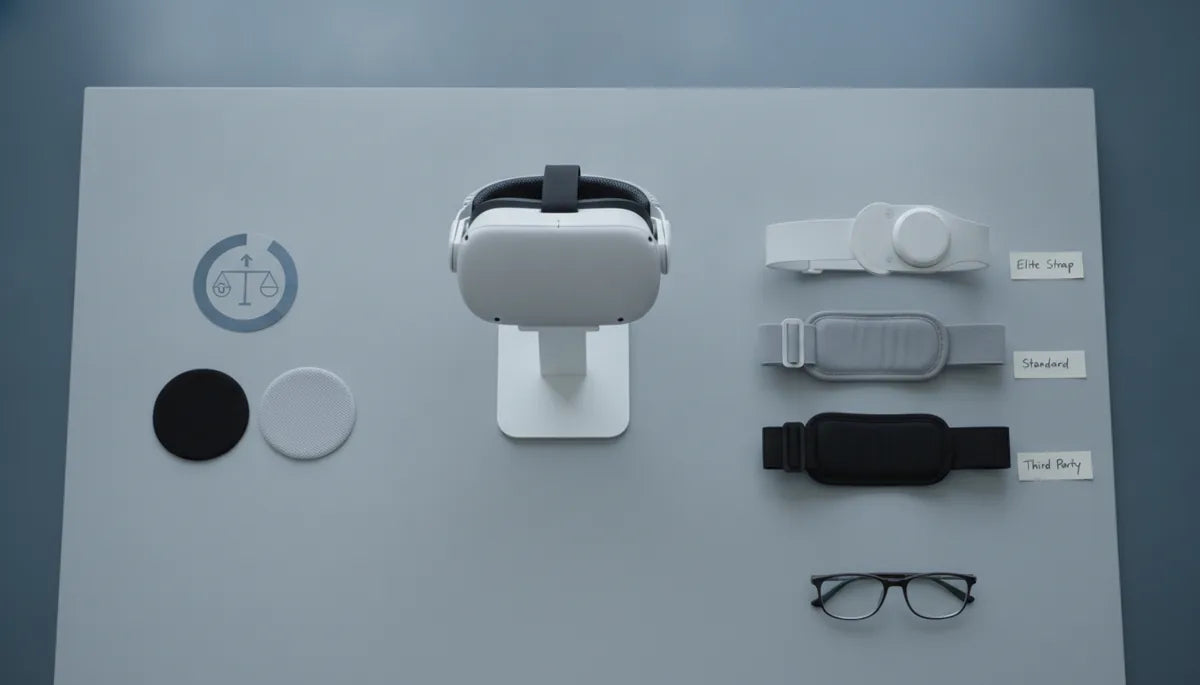
Start by picking the style that matches how you use your Quest 2. The stock (standard) strap is lightweight and simple, but it lacks firm rear support and padding for long sessions. The official Elite Strap (and Elite Strap with battery) adds a rigid back plate, thicker padding, and improved adjustment mechanisms. Third-party options vary widely: some mimic the Elite Strap design with lower cost, others add cradles, suspension systems, or integrated battery packs.
- Stock strap — Pros: light, low profile, cheap/standard. Cons: poor long-session support, more pressure on face.
- Official Elite Strap — Pros: solid rear support, good build quality, straightforward install. Cons: higher price; Elite + battery adds weight but improves balance if designed well.
- Third-party straps — Pros: range of designs and prices, accessories like quick-release, extra padding, or battery options. Cons: variable quality and fit; watch for compatibility and warranty.
When assessing each option, compare weight, padding type, adjustability range, whether it supports battery integration (and where it places the battery), and how hard it is to install or remove the strap.
Weight, balance, and long-session comfort: what to evaluate
Long sessions cause neck fatigue when weight is uneven or the headset tilts forward. The goal is even weight distribution across the skull and a firm back support that moves weight off your face.
- Balance — Look for a strap that positions mass toward the back of the head with a stable contact patch rather than a single pressure point.
- Padding density — Medium-to-firm foam maintains shape longer; very soft foam compresses and shifts weight to the face over time.
- Strap width and rigid backplate — Wider straps spread load; a rigid or semi-rigid backplate stabilizes the headset and reduces forward torque.
- Battery integration — Adding a battery increases runtime but shifts center of gravity. Ideally the battery sits low and centered on the rear plate or uses counterweight designs to balance the front-heavy display.
Try to test or see photos of a strap on a head similar to yours. If possible, demo for at least 30–60 minutes to feel how the padding compresses and whether the headset remains stable during head turns.
Glasses wearers: maximizing comfort and fit
Glasses add thickness inside the headset and create pressure points if the strap geometry pushes the display against your face. Choose a strap and facial interface combination that leaves enough nose and temple clearance.
- Facial gap — Check that the strap doesn't pull the headset tighter than a comfortable facial gap. Adjustable crown height or added spacer cushions can help.
- Cushion shape — Thin, contoured facial cushions reduce temple contact; replaceable cushions let you try different profiles for your frames.
- Temple space — Make sure the strap's rear and top tension don’t flex the headset forward when you move your head; a stable rear plate keeps the display position steady relative to your glasses.
For heavier frames, favor straps that allow small upward tilts or spacers and use anti-squeeze face pads. Always adjust the strap with glasses on to check real-world comfort.
Installation and daily-fit tips
Correct installation and consistent daily adjustments keep the headset aligned and reduce slippage during active gameplay.
- Install the rear plate or strap per manufacturer guidance and check that mounting clips snap fully into place.
- Start with the rear strap loosened so the headset sits on your face, then tighten the rear band until the weight transfers to the back plate.
- Adjust the top (crown) strap so the headset’s display sits level — not tilted up or down — and that the IPD and lens alignment remain steady when you move.
- Tweak side straps last for a snug but not tight fit; look for even contact all around the head rather than a single tight point.
Quick daily-fit routine: loosen, position display on face, tighten rear band until you feel support at the back, then fine-tune crown and sides. That sequence avoids over-tightening and keeps alignment consistent.
Comfort features that matter for long sessions
Certain comfort features meaningfully improve marathon play without turning into marketing fluff. Prioritize materials and design choices that show practical benefits.
- Breathable, sweat-wicking fabrics — Keeps skin cooler and reduces slippage during sessions.
- Replaceable cushions — Easy swaps extend the strap’s usable life and let you try different thicknesses or materials.
- Padding density and thickness — Look for medium-firm foam with a protective cover that resists flattening over time.
- Rigidity where needed — A rigid backplate or semi-rigid frame stabilizes the headset; flexible straps without rear support typically fatigue faster.
- Easy cleaning and reassembly — Removable covers or wipeable surfaces make post-session maintenance simpler.
Elite Strap vs third-party options: pros, cons, and fit tips
The official Elite Strap usually wins for build consistency and compatibility, while third-party straps offer diversity in price and features. Choose based on warranty, accessory compatibility, and personal priorities.
- Official Elite Strap — Pros: consistent fit, guaranteed compatibility, solid warranty and support. Cons: premium price; limited design variations.
- Third-party — Pros: can include extra padding, lighter alternatives, battery packs, or specialty mounts at lower prices. Cons: quality varies; check reviews and return policy.
Fit tips by user type:
- Small heads — Look for straps with a wide adjustment range and smaller rear plate options or padding that removes bulk.
- Large heads — Choose wider straps and longer adjustment ranges; a rigid backplate helps keep alignment.
- Competitive/active gamers — Prioritize straps with secure locking adjustments and minimal slippage during movement.
- Glasses users — Favor replaceable cushions and straps with adjustable crown height to reduce lens-to-glasses contact.
Care, maintenance, and longevity of Quest 2 straps
Routine care keeps straps comfortable and extends their life. A little maintenance goes a long way if you’re logging long sessions frequently.
- Cleaning cadence — Wipe down cushions and fabric after heavy use with a damp cloth and mild soap; allow full drying before storage. For sweat-heavy users, clean weekly or after every session that caused heavy perspiration.
- Inspection — Check straps, clips, and foam for stretching, tears, or compressed padding every 1–3 months depending on use.
- Replacement schedule — Replace facial cushions and any foam that’s permanently compressed or torn. For daily heavy users, cushions often need replacing every 6–12 months; light users may go longer.
- Storage — Store the headset with strap loosened to preserve tension and avoid deforming padding.
Keeping spare cushions and checking mounting points regularly preserves comfort and prevents mid-session surprises.
Final thoughts
For marathon Quest 2 sessions, prioritize a strap that shifts weight to the rear of the head, uses medium-firm padding, and offers breathable, replaceable materials. The official Elite Strap provides consistent, reliable performance; third-party options can match or exceed comfort and features if you choose carefully. Install and adjust methodically, clean and inspect regularly, and you’ll keep longer play sessions comfortable and distraction-free.
Powered by Trafficontent

Compartir:
DIY Counterweights for Quest Two: Safe Hack to Even Out Front-Heavy Headsets
The Best Oculus Quest 2 Comfort Strap for Long Gaming Sessions