

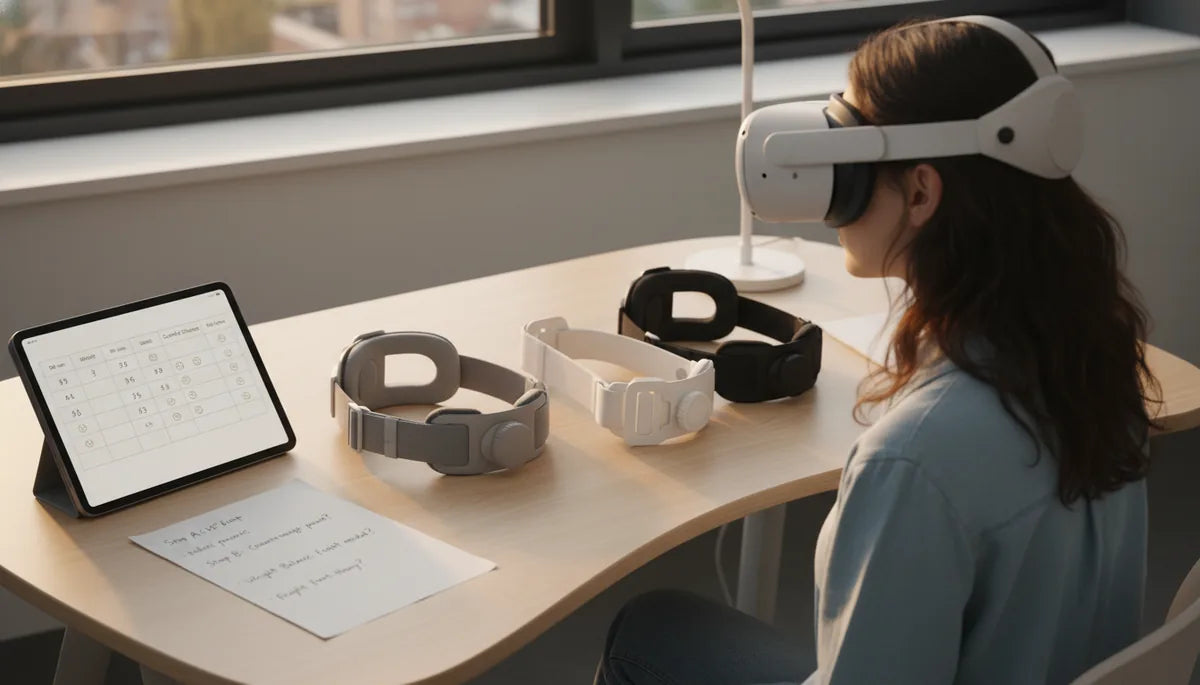
How to Choose and Tune Meta Quest 2 Head Straps for Long Sessions with Glasses: A Testing-Driven Guide
Wearing the Meta Quest 2 for hours at a time when you also need prescription glasses is a different kind of problem than a five-minute demo. It’s not just about soft foam or a pretty strap — it’s about where the weight sits, how pressure moves across your face, and how easy it is to make small tweaks mid-session so you don’t end a play session with a sore nose or a stiff neck. ⏱️ 10-min read
This guide walks you through choosing the right strap, creating a simple ergonomic test plan, installing and tuning a comfort strap for glasses, and managing balance, maintenance, and accessories. The advice is practical, evidence-driven, and tailored to VR gamers and regular users who want long-session comfort without compromising optical safety or clarity.
Choosing the right Quest 2 head strap for long sessions
When you evaluate head straps for extended Meta Quest 2 sessions, your decision criteria should center on three things: pressure distribution, glasses compatibility, and adjustability you can use during a session. The stock Comfort Strap is light and inexpensive, but it focuses retention more than redistribution of weight — fine for short bursts, less suited to multi-hour play. The Oculus Elite Strap (and Elite Strap with battery) moves in the other direction: a semi-rigid rear band and a stronger top strap do a better job spreading load across the crown and back of the head, which reduces nose and cheek pressure.
Third-party halo-style and rigid-frame straps deserve attention because they often combine a broad crown band with a rear dial and a back pad that you can pair with a small counterweight. Halo styles wrap around the sides and crown, shifting force from the face to a wider area. Rigid or semi-rigid top straps hold the headset steady with less slip, but watch the padding — insufficient crown padding creates hotspots.
When testing, wear your usual glasses and run a 20–30 minute play block. Note where weight concentrates: forehead, cheekbones, temple arms, or nose bridge. Prefer straps that let you micro-adjust tension via a rear dial or quick-release straps; being able to ease pressure on the nose without losing stability is a practical must for glasses wearers.
Glasses-friendly fit: space, pressure, and fog prevention
Small details make a big difference for glasses users. Start with the official Meta Quest 2 glasses spacer — it provides crucial clearance so your frames don’t contact the headset optics. With the spacer installed, tune the strap geometry so the headset sits slightly higher on the face and the rim of the facial interface clears the temple arms.
Strap geometry and foam cutouts interact with frame widths. Thick acetate frames need more lateral room; thin metal frames may press at the temple. If you feel frame pressure against your temples or the bridge of your nose after 15–20 minutes, loosen the top strap and tighten the rear anchor to shift load rearward. That small shift often removes the pinch without changing IPD or visual alignment.
Fog on prescription lenses can ruin immersion. To reduce fogging: keep a small gap for airflow by not overtightening the face seal; use a breathable facial interface or perforated covers; apply anti-fog wipes or drops to your glasses before donning; and take short ventilation breaks every 30 minutes. For heavy foggers, consider prescription lens inserts — they eliminate lens contact entirely, reduce fog risk, and often produce a cleaner fit for marathon sessions.
An ergonomic testing protocol for long Quest 2 use
Don’t guess — measure. A simple, repeatable testing protocol helps you compare straps and adjustments objectively. Use three standard session blocks: 30 minutes, 60 minutes, and 90 minutes. For each block, collect the same metrics so you can see how discomfort progresses and which adjustments make a real difference.
- Baseline checks: Before you start, note contact points (forehead, nose bridge, cheeks, temples) and rate perceived pressure 0–10 at each point. Also record any pre-session neck tightness.
- Timed checks: Pause every 15–20 minutes for a 60‑second quick check. Re-score pressure 0–10, note heat/sweat, and check for lens fog. If something jumps more than two points, make a single tied adjustment and continue.
- Document outcomes: Keep a short diary entry after each block: total discomfort score (sum of contact points), neck strain score, and whether you adjusted the strap. Over several sessions you’ll identify patterns — maybe nose bridge climbs quickly but forehead pressure holds steady, which signals a need to shift weight rearward or swap facial interfaces.
For pressure mapping, DIY approaches work: press a thin piece of transfer paper or a light dusting powder on the facial interface after a session to see where contact is heaviest. Neck fatigue is often the last symptom to appear; track it separately (0–10) after 30 minutes, 60 minutes and at session end. Use these numbers to decide whether a strap change, a counterweight, or a different interface is the right next step.
Step-by-step install and adjustment of the Quest 2 comfort strap
Installing and tuning a comfort strap for glasses wearers is straightforward when you follow an ordered approach. Begin with compatibility checks: confirm the strap’s attachment points match the Quest 2 pegs and that any included screws or clips are the correct size. Clean the headset and glasses before you begin to avoid scratching the lenses.
- Attach the side anchors: align each anchor with the Quest 2 slots, then secure with provided clips or screws. Ensure the anchor sits flush — any tilt can shift pressure unpredictably.
- Install the top strap: slide it into position and check that the padding faces the crown. Set it high enough to lift the headset slightly off the nose but low enough to avoid overly pressing the forehead.
- Set the rear dial (if present): start with the dial loose, put on the headset, then tighten until snug. The goal is stability, not compression. For glasses, aim for the minimal dial tension that prevents forward slide when you nod.
- Do an eye relief and IPD check: with the headset in place, verify lens centers align with your pupils and run the Quest 2 IPD adjustment if needed. Slightly alter top strap height if the lenses sit too close to your glasses.
- Micro-adjust for glasses clearance: if glasses press the nose or temple, raise the top strap a notch and re-tighten the rear to keep the headset secure without squeezing the face.
After the initial setup, run a 20–30 minute test block using the ergonomic protocol above. Expect to make 2–3 small adjustments before you find a sweet spot; long-session comfort is iterative, not instant.
Weight, balance, and strap height: optimizing comfort
The Quest 2’s forward weight is the classic problem — you’ll feel pressure on the cheeks and nose unless you move the center of gravity rearward. The simplest solutions are strap height adjustment and adding a small back counterweight. Raising the top strap a little shifts some load to the crown; adding weight to the rear shifts the center of gravity backward, reducing facial pressure without tightening the facial seal.
Practical adjustments:
- Top strap height: lift the top strap incrementally until the headset feels supported by the crown rather than the face. If you feel forehead hotspots, lower it a notch and add a lighter rear weight instead.
- Rear dial tension: tighten just enough to stop slippage. Over-tightening increases pressure and can transfer load back to the cheeks.
- Counterweights: many users add a 50–150 gram counterweight to the rear pad or battery attachment. Alex, a VR designer we tested with, uses a 120‑gram counterweight and reports steady reduction in nose pressure and fewer shoulder tugs during long demos.
Be mindful of accessories. Battery packs can be used as purposeful counterweights, but they add overall mass — make sure your crown strap and back pad distribute that mass. If you add weight and then feel increased neck strain, reduce the counterweight and explore a different strap geometry. The goal is to centralize the load around the middle of your head so your neck holds the headset with minimal effort.
Maintenance, replacement options, and evaluating strap reviews
Longevity is part of comfort. Foam compresses, fabric wears, and Velcro loses bite. Adopt a simple maintenance routine: wipe removable covers with mild soap and water weekly if you sweat, air-dry completely, and replace facial foam when it no longer springs back within a few minutes. Silicone or washable fabric covers are excellent for hygiene; cotton tends to hold moisture and may smell over time.
Material wear indicators include flattening padding, frayed stitching on straps, and rear dials that don’t hold tension. Replace the strap if you notice persistent looseness or hotspots that weren’t present when the strap was new. Reputable replacement options include the Elite Strap, halo-style third-party bands, and branded comfort straps with washable pads. Prescription inserts from VR Lens Lab and WidmoVR are commonly recommended — they often deliver better long-session comfort than glasses inside the headset.
When you read user reviews, look beyond star ratings. Search reviews for keywords that match your use case: “glasses,” “three-hour session,” “heat,” “counterweight,” and “neck.” Prioritize reviews that include the reviewer’s setup (e.g., “wears glasses,” “uses battery pack,” “plays seated/standing”) and photos showing attachment points and padding. Reviews describing long-term wear (weeks to months) are more valuable than single-session impressions because they reveal how materials perform over time.
Compatibility and integration with other accessories
Compatibility matters. Not every strap or cushion designed for modern headsets will fit the Quest 2. Most third‑party halo or Elite-style straps are built specifically for Quest attachments; adapters for other devices rarely give the same fit and can compromise safety. For example, Vision Pro straps are not designed for the Quest 2’s attachment geometry, so avoid trying to adapt them without a reliable adapter from a reputable maker.
When combining accessories, think integration: a breathable facial interface works best with a halo strap and rear counterweight because the wider contact area needs complementary airflow. Silicone interfaces are great for cleaning and reduce sweat buildup, but they can feel slippery against some strap pads — check that the strap’s back pad won't shift on a silicone face interface.
Prescription inserts deserve a separate note. Inserts free glasses from the headset entirely, eliminating temple pressure and fog. Ensure the insert brand supports the Quest 2’s IPD range and that the insert thickness doesn’t push the lenses too far from your eye plane. If in doubt, buy from companies that offer pupil-distance adjustments or easy returns so you can confirm optical clarity during a standard 30‑minute test block.
Best practices for all-day comfort and long-session performance
Long-session comfort is a combination of hardware, microhabits, and timely breaks. Make adjustments incremental and measurable: change one variable at a time and run a standard test block to see the effect. Use a checklist before long sessions: spacer installed, facial interface clean, strap attachments secure, top strap set, rear dial tensioned to prevent slippage, and anti-fog applied to glasses or inserts confirmed.
During sessions, perform short checks every 30 minutes: unzip tension (if needed), wipe sweat from the facial interface, and monitor neck posture. A quick cue to stop and reassess is any of the following: a two-point jump in nose or cheek pressure, persistent lens fog, or neck score of 5/10. Small posture changes help too: keep your shoulders relaxed, avoid forward-head posture, and position VR content so you don’t have to crane your neck for extended periods.
Practical stamina tips: alternate intensive play with seated or low-movement content to let the neck rest; use voice commands or controller shortcuts to avoid awkward head positions; and pack spare facial covers or a microfiber cloth if you go into multi‑hour streaming sessions. If you’re planning marathon runs (2+ hours), consider prescription inserts, a halo strap with a rear counterweight, and a breathable silicone or fabric-lined interface. Jamie, a competitive gamer we worked with, combined a lower-profile facial interface, prescription inserts, and a washable breathable cover to stay comfortable in marathon tournaments.
Next step: pick one strap option that fits your budget, run the 30/60/90 testing blocks described here with your glasses on, and use the recorded pressure and neck scores to decide whether small tweaks, a counterweight, or an insert will get you through the next long session without pain.







Compartir:
Glasses Friendly Quest Two Straps for Clearer VR Comfort
Beyond straps must have Vision Pro accessories that boost comfort and usability