

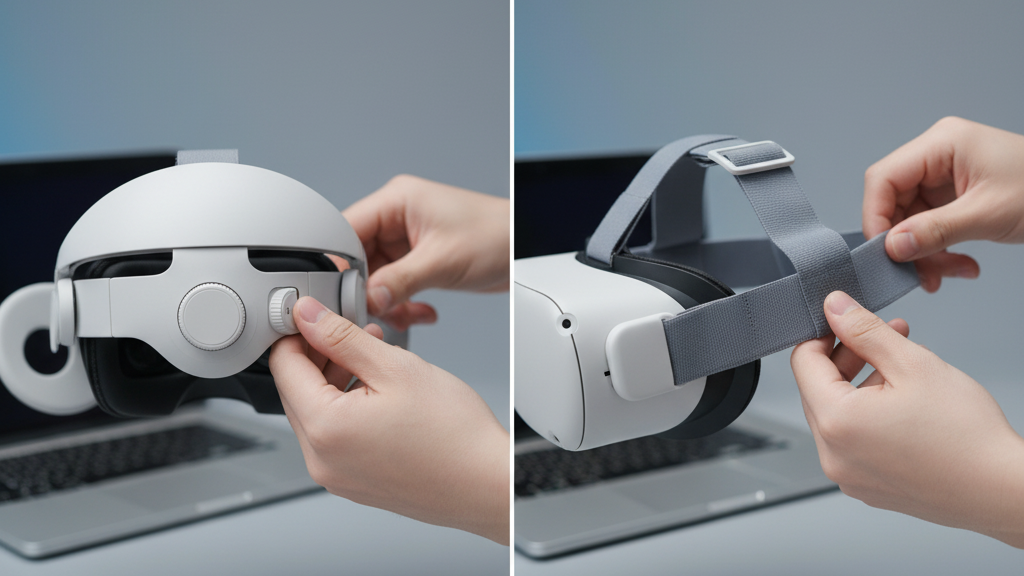
Is the Elite Strap Worth the Extra Cost for Quest 2 Owners? A Practical Guide to Value, Comfort, and Longevity
Upgrading your Quest 2 strap is one of the simplest ways to change how the headset feels over long sessions. The Elite Strap promises a firmer cradle, adjustable crown support, and optional power—features that sound great on paper, but cost significantly more than the standard Comfort Strap. This guide breaks down what the Elite Strap actually delivers, the trade-offs you’ll face, and who gets real value from the upgrade. ⏱️ 11-min read
Read on for clear comparisons, hands-on fit tips, and a decision framework that helps you choose a strap based on session length, glasses use, balance preferences, and lifecycle costs—so you spend on comfort where it truly matters.
Is the Elite Strap Worth the Extra Cost? Value, durability, and long-session comfort
The Elite Strap’s premium price buys more than a different texture of padding; it’s an engineering choice aimed at heavy use and tighter fit control. Key additions are an adjustable crown/top strap, a rigid rear support that can accept a battery pack on some models, and reinforced connectors that resist flex and sag. Those elements combine to produce steadier alignment and fewer micro-adjustments during extended VR sessions.
Value depends on how you use your Quest 2. If you routinely play for multi-hour blocks, stream, create content, or use the headset for precise tasks where even a small wobble breaks immersion, the Elite Strap’s steadier cradle often justifies the cost. The cost-per-hour math isn’t glamorous: higher upfront price versus fewer replacements and less time spent fiddling with tension. For glasses wearers, the Elite Strap can also be a win because its rear-weighted balance and tighter crown support reduce the helmet-like pull against the cheeks that can push glasses into your face.
That said, casual users who wear the headset for short sessions or share it across multiple people will likely see diminished returns. The Comfort Strap’s lighter weight and straightforward adjustment cover most daily scenarios, making the Elite investment unnecessary unless your habit pattern or comfort priorities demand it.
What the Elite Strap Actually Adds: Features, weight, and balance
At a component level, the Elite Strap is about changing geometry and control. Instead of flexible elastic and simple clips, it uses a semi-rigid frame and a dial or tensioner that lets you micro-adjust fit. The top strap or crown support distributes load across the crown of the head rather than relying primarily on forehead padding, and reinforced side connectors aim to keep the headset aligned with the lenses and facepad.
The trade-off is weight and a different balance point. Moving mass rearward with a rigid cradle or an optional battery pack reduces front-face pressure—cheeks and forehead feel less pinched—and provides a steadier image during motion. But the headset’s overall mass increases. That added weight can feel beneficial if you’ve experienced front-heavy drift; for others, especially those sensitive to neck tension, the Elite Strap can increase perceived effort unless tension and padding are tuned correctly.
How this plays out in practice: tiny dial adjustments change how the headset tilts and how much the strap pulls on the temples. Tightening the dial raises the headset slightly, which can relieve cheek pressure but may increase crown pressure. The Elite’s rigid frame also preserves even contact across the temples and sides, reducing lamp-posting and slippage in activities that involve quick head turns.
The Quest 2 Comfort Strap: Value and trade-offs for most users
The Comfort Strap keeps things simple—and that simplicity is its strength. It replaces the thin factory strap with thicker padding, easy-to-replace pads, and a more user-friendly pull-tab adjustment. It’s lighter overall, and because there’s no built-in battery or heavy cradle, it tends to feel less taxing over shorter or mixed-use sessions.
Where the Comfort Strap sacrifices is in rigidity and fine-grained control. Elastic components can slowly lose tension and introduce a small amount of sag over time. During intense gameplay or quick head movements, you might notice the headset shift a little more than it would on the Elite Strap. But for many people, those micro-movements are tolerable given the lower cost, lighter feel, and quick maintenance—pads can be swapped in minutes and third-party upgrades are widely compatible.
Who benefits most from the Comfort Strap? Budget-conscious owners, households sharing a single headset, travelers who need lighter gear, and creators who value fast adjustability when moving between seated and standing tasks. Glasses wearers often prefer the Comfort Strap initially because its lighter profile can reduce heat buildup and pressure around the temples, but heavier-use glasses wearers may prefer the Elite’s stability once they adjust fit.
Weight, Balance, and Long-Session Comfort
The way a strap moves mass around your head fundamentally changes how the Quest 2 feels over time. Two basic balance philosophies exist: front-heavy and back-weighted. The Comfort Strap keeps the headset relatively balanced around the facepad area, while the Elite Strap intentionally shifts weight rearward to counteract lens-forward torque.
Back-weighted setups can reduce that sensation of the display pulling forward, lowering cheek and forehead pressure. That steadier alignment reduces the need for small readjustments and can preserve immersion in long sessions. However, adding rear mass concentrates load at the neck and crown. If you don’t dial the strap in—using the top strap, crown support and tension dial—neck strain can build over hours. The remedy is not always to loosen; it’s to rebalance: tighten crown support so the crown and rear cradle carry more of the load, and ensure pads are placed to spread pressure.
Front-heavy configurations feel lighter at the crown but may require more frequent micro-adjustment and can push glasses into the face during motion. In 60–120 minute sessions, these differences become significant. Elite Strap users report fewer adjustments and steadier eye tracking in these windows, while Comfort Strap users often cite cooler, less restrictive contact points that feel physically easier for medium-length sessions. Your neck strength, posture, and how often you move while playing determine which profile will feel best over time.
Installation, Fit, and Adjustment Tips
Swapping straps and getting the fit right is half preparation, half tuning. Follow these steps for a reliable installation and fast on-the-fly adjustments that preserve comfort across sessions.
- Power down the headset and remove the current strap by pressing its side release buttons. Let connectors slide free rather than forcing them.
- Align the new strap’s connectors with the Quest 2 side rails, interior facing the skin and buckles toward the bottom. Push until you hear a clear click; gently tug to confirm seating.
- If using the Elite Strap, adjust the crown/top strap first so the weight feels borne by both the crown and rear cradle. Use the dial to tighten in small increments, testing balance after each quarter turn.
- For the Comfort Strap, seat the side pads evenly and adjust pull-tabs so the headset rests flush against your face without pinching the nose or eyes.
- Glasses wearers: sit upright and slide the headset on gently. Position the cheek pads so there’s clearance for temple arms, then tighten the crown and side tension until the headset is stable. If temples press into skin, back off slightly and retune the crown to carry more load.
- Perform a quick motion test—look left/right, stand and crouch. If the headset shifts, pause and micro-adjust the dial or top strap rather than over-tightening the forehead pad.
These small steps—proper seating, incremental dial changes, and motion testing—are what transform the Elite Strap from a heavy accessory into a precision fit system. With the Comfort Strap, the priority is even seating and moderate tension that prevents feel of slack without creating hotspots.
Durability, Maintenance, and Replacement Options
Longevity is where the Elite Strap tries to justify its price: reinforced connectors, a rigid frame, and denser padding resist the typical failure modes—strap sag, pad compression, and connector wobble. That said, no strap is indestructible. Expect pads to compress and elastics to loosen with repeated sweat-heavy use. Regular inspection and simple maintenance extend life for both strap types.
Cleaning is easy but critical. After each session, wipe pads and straps with a microfiber cloth to remove oils and sweat. For deeper cleanings, use a damp cloth with mild soap; avoid soaking parts or applying solvents that can harm adhesives and fabrics. Air-dry pads completely—do not use direct heat or sunlight to speed drying, as that will accelerate material breakdown.
When parts wear, genuine replacement kits—from face pads to full strap assemblies—are usually available from the manufacturer. Using factory parts helps maintain fit and warranty coverage. Third-party options proliferate too, often at lower cost, but quality varies: look for robust mounting clips, breathable padding, and clear return policies. For heavy users, plan to replace pads or elastic components roughly every 12–24 months depending on sweat exposure and cleaning cadence.
Practical Comparisons: In-Use Scenarios and Real-World Feedback
Real-world scenarios highlight where each strap shines. Consider three common profiles and how strap choice affects daily life.
Case A — Long sessions, stability first: Developers, streamers, and long-play VR fans report the Elite Strap keeps the headset steadier during multi-hour sessions. The rear-weight distribution and tighter crown support reduce micro-movements and onscreen drift—valuable for precise work or comfortable extended viewing.
Case B — Creator on the move: If your day alternates between sitting and standing, or you quickly switch users, the Comfort Strap’s lighter weight and faster adjustments let you get back into content without fuss. Being able to loosen or tighten in seconds saves time across repeated transitions.
Case C — Budget-minded reliability: Households with shared headsets or hobbyists who play in shorter bursts often prefer the Comfort Strap for predictable comfort at a lower cost. Easy pad swaps mean normal wear is an inexpensive, fast fix.
User feedback also shows that some glasses wearers switch between straps depending on session length—Comfort Strap for casual use, Elite for extended sessions when steadier balance matters. That hybrid approach can be the best of both worlds: buy the Elite if you plan to wear the headset for hours daily; stick with the Comfort Strap if most sessions are under an hour.
Cost of Ownership, Resale, and the Accessory Ecosystem
Total ownership cost goes beyond the sticker price. Consider upfront spend, replacement parts cadence, and resale value. The Elite Strap’s better materials and reinforced parts usually mean longer intervals between replacements, which reduces per-hour cost for heavy users. On the secondary market, well-maintained Elite Straps fetch higher prices than weary, flattened Comfort Straps; buyers look for intact connectors and clean pads.
Replacement parts availability matters too. Official pads and strap assemblies maintain warranty and fit, but lead times can vary. Third-party pads are abundant and inexpensive, but quality differences affect comfort and longevity—choose vendors with clear specifications and good return policies.
Accessories around the strap ecosystem—counterweight batteries, aftermarket cushions, and carry systems—also change cost dynamics. A battery-equipped Elite model, for example, alters balance in ways that may reduce front pressure but increases overall mass; that may require different padding choices. For frequent travelers or students, a lightweight Comfort Strap plus a spare pad is often cheaper and easier to manage than hauling an Elite package.
Decision Guide: Choose the Strap Based on Your Use Case
Make your choice by prioritizing how you use your Quest 2. Here’s a simple framework to match strap to need:
- Long, daily sessions (developers, streamers, heavy players): Invest in the Elite Strap. The firmer geometry, dial tuning, and optional battery/back-weighting reduce micro-adjustments and often lower cost-per-hour over time.
- Moderate to casual use, or shared headsets: The Comfort Strap is the smart start. It’s lighter, less expensive, and easy to maintain; replace pads as needed.
- Glasses wearers: If you wear glasses only for short bursts, the Comfort Strap can feel cooler and less intrusive. If you wear glasses during long sessions, try the Elite Strap to see if rear-weighted balance eases temple pressure—test before committing if possible.
- Frequent movers or creators switching postures: Comfort Strap’s quick adjustability often saves time. If steadiness matters during active motion, move up to the Elite.
- Budget constraints: Start with the Comfort Strap and add higher-quality pads or third-party options. Consider saving for the Elite only if you find repeated adjustments or sag unacceptable.
If you’re still unsure, a practical next step is to borrow or demo an Elite Strap for a 60–120 minute session. That single test often reveals whether the extra mass and adjustable crown provide a meaningful comfort improvement for your play style and body mechanics.
Decide based on how long you wear the headset, whether steadiness or lightness matters more, and how much you value long-term durability. If your sessions are long and repetitive, the Elite Strap can pay back its extra cost in comfort and fewer replacements; if your use is sporadic, the Comfort Strap delivers excellent value and flexibility.







Compartir:
Choosing a Strap for Different Use Cases on Meta Quest Two: Gaming, Fitness, and Social
Halo strap vs standard head strap: which enhances Quest 2 comfort for extended play