

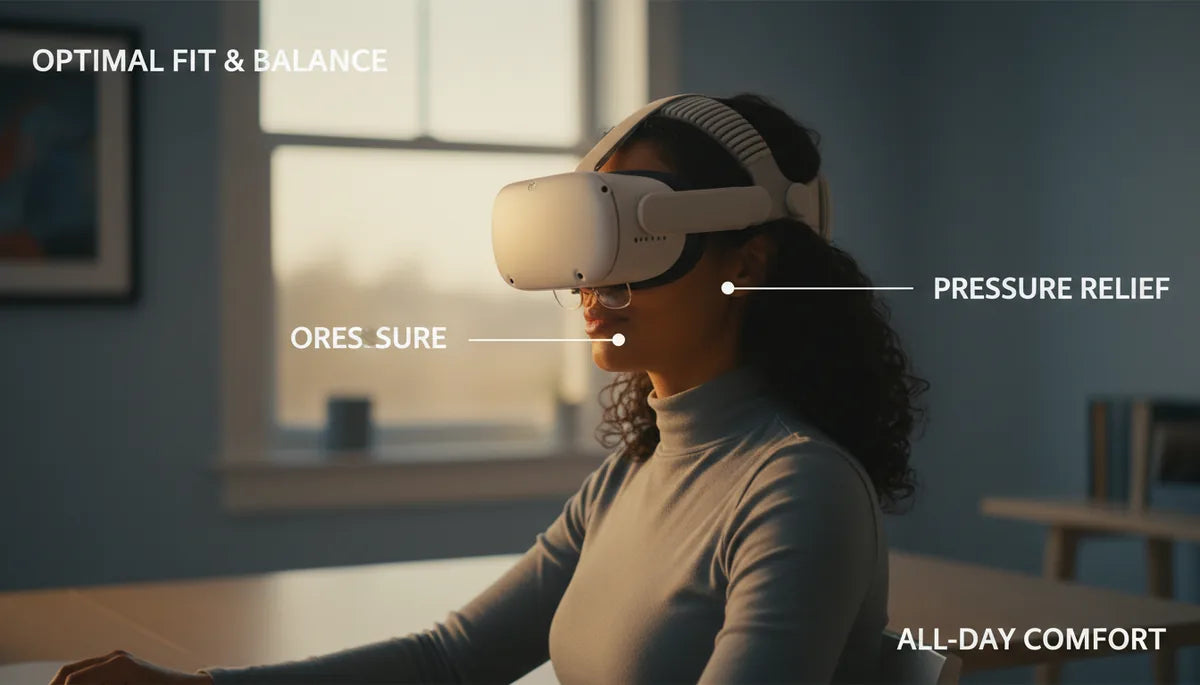
Glasses-Friendly Quest Two-Strap Setup for Clearer VR Comfort
Wearing glasses inside a VR headset can turn an otherwise immersive session into a tug-of-war between lenses, nose bridge, and foam. A glasses-friendly two-strap setup for the Quest 2 changes that dynamic: by moving support away from the face and distributing weight across the crown and rear of the head, it reduces nose pressure, stabilizes the headset during movement, and makes long sessions far more comfortable. This guide walks through why two straps work better for glasses wearers, vr-comfort/how-to-choose-a-quest-2-comfort-strap-that-fits-glasses-without-pressure" rel="nofollow noopener noreferrer">how to choose and install a system, and how to fine-tune it for marathon play or work sessions. ⏱️ 12-min read
Expect practical, hands-on advice—compatibility checks, material pros and cons, an install checklist, comparisons with Meta’s Elite Strap and the stock band, maintenance tips, and a buying guide that helps you pick a glasses-friendly option without trial and error.
Why two-strap designs improve comfort for glasses wearers
Glasses add bulk inside the headset cavity and push contact points into the nose bridge, brow, and temples. A single strap often focuses the entire headset’s weight on the face, which increases pressure where frames rest. Two-strap designs redistribute that load. By anchoring support at two distinct points—commonly a top/crown strap and a rear strap—the headset’s weight shifts away from the nose and upper cheeks toward the sides and back of the skull.
This redistribution has two immediate effects. First, it reduces pressure on the nose bridge and temples, lowering the chance of post-session headaches and the visible indentations left by nose pads. Second, with support at multiple anchor points the headset stays more stable during quick head turns or active play. That improved balance keeps the display aligned with your eyes, reducing the need to tighten the band and thereby avoiding the pinch many glasses wearers complain about.
Think of it like wearing a well-fitted pair of ski goggles: the body is cradled rather than clamped. For Quest 2 players who spend hours in VR, that steady cradle translates into less neck fatigue and a more natural, long-term fit for frames of most shapes and sizes.
Choosing the right glasses-friendly two-strap setup: compatibility, fit, and materials
Not every two-strap setup is created equal. The most effective configurations for glasses combine a top strap that lifts the headset slightly off the face with a rear strap that locks it in place. This top-plus-rear layout creates a triangular support system that keeps the lenses centered without squeezing your nose.
When evaluating compatibility, pay attention to three things: lens clearance, temple clearance, and attachment points. Lens clearance ensures your frames don’t push the headset forward or tilt your glasses inside the facial interface. Temple clearance refers to the space around the arms of your glasses—anchor points near the sides should not press on temple arms or snag slider hardware. Finally, make sure the straps attach securely to the Quest 2’s mounting points or to reliable adapters; cheap connectors can slide or pop loose when the headset shifts.
Materials matter for comfort and durability. Neoprene pads are plush and forgiving, but they absorb sweat and can take longer to dry. Silicone or rubberized grips help prevent slipping and are easy to wipe clean. Nylon is lightweight and strong, but lower-grade woven straps can stretch over time. Look for double-stitched seams and reinforced connectors—those small details extend the useful life of a strap without adding bulk.
Also consider replacement facial cushions and third-party foam that increase the eye box depth if you wear tall frames. Some two-strap systems advertise glasses-friendly designs explicitly—FlitLift’s messaging around “weightless comfort” and the GraviPro line prioritize a low-profile footprint and even load distribution, which can be especially helpful for larger or curved frames.
Step-by-step install and adjustments for glasses-friendly two-strap
Installation is simple but precise. The goal is a stable seal that avoids frame contact with foam and stops the headset from tilting. Follow this sequence and use the checkpoints to fine-tune fit.
- Gather and inspect the kit. Confirm the top strap, rear strap, adapters, and any sliders are present. Check for smooth adjustment mechanisms and soft edges that won’t scratch frames.
- Loosen or remove the stock strap. If the original band tightens around your frames, loosen it fully or remove it so you can install the two-strap system without crowding the glasses.
- Attach the top strap. Thread or clip the top strap through the crown attachment points and secure the adjusters. Position it so it rests above your eyebrows—high enough to lift the headset slightly but not so high it pushes the headset backward.
- Attach the rear strap. Connect the back strap to the rear frame points. Ensure the connector is seated and that the strap won’t slip when you move your head. Set the rear strap so it cups the lower back of the skull.
- Put on the headset with your glasses. Place your glasses first, then slide the headset over them. Center the lenses in the eye box and adjust the position of your glasses so frames don’t press into the foam at the nose.
- Dial in tension—start loose, then tighten. Begin with looser straps and gradually snug them until the headset sits flat on your face with no forward tilt. Check that the top strap bears some load and the rear strap prevents backward movement.
- Test motion and readjust. Rotate your head, nod, and mimic quick gaming motions. If the headset shifts forward, increase the rear strap tension. If it pinches the nose, raise the top strap or reduce its tension so more weight moves to the rear.
Small adjustments—tilt, strap height, and slider placement—make the biggest comfort difference. If you use aftermarket foam or a slim pad, re-check clearance for taller frames after any change.
Comparison: two-strap options vs Elite Strap and standard strap
Choosing between a two-strap setup, Meta’s Elite Strap, and the stock Quest 2 band depends on priorities: cost, install effort, adjustability, and how heavily you wear glasses. Here’s how they generally compare.
Two-strap setups: These distribute weight across multiple anchor points, reducing nose pressure and improving balance. They’re typically lightweight, relatively inexpensive, and good for glasses because they cradles rather than clamp. The downside can be different fit curves—some designs press slightly on temples if padding isn’t generous. Installation is usually straightforward but may require an adapter or a brief setup.
Meta Elite Strap: The Elite Strap replaces the stock band with a wider, single-piece band and often includes a rear tightening wheel. It provides solid stability and is robust for intense movement. Glasses wearers find it can reduce nose pressure compared to the stock strap, but because it centers support across a single band, some users report subtle temple pressure over long sessions. The Elite Strap can also add weight to the crown, especially with aftermarket battery packs.
Stock Quest 2 strap: Light and minimal, the stock strap is quick to adjust and works fine for short sessions. For glasses wearers, it often concentrates force on the face, leading to more frequent retightening and nose discomfort. It’s the most affordable and easiest to reinstall when you want a simple setup, but it’s the least ideal for extended play with glasses.
Cost and long-term comfort trade-offs matter: two-strap kits are often an affordable, low-effort upgrade for glasses wearers. The Elite Strap offers a premium, integrated experience but at a higher price and potentially more crown load. Choose based on how long and how intensively you use VR and how your glasses fit inside the facial interface.
Fine-tuning for long sessions: weight reduction, balance, and cushion add-ons
If you plan to stay in VR for hours, small weight and balance tweaks become significant. The two-strap design already reduces facial pressure, but additional fine-tuning will keep neck strain low and comfort high.
Start by minimizing added mass. Prefer lightweight hardware and thinner but supportive padding. Avoid bulky metal components unless they have a clear comfort payoff. Some accessory lines, like GraviPro, emphasize low-weight components designed for extended sessions. If you add a battery pack or audio accessories, try to position them near the rear strap to counterbalance front weight rather than attaching them high on the crown.
Balance is the key to feeling “weightless.” The ideal center of gravity sits close to the back of the head; adjust the rear strap so that when you nod the headset doesn’t tilt forward. If the front still feels heavy, add a small counterweight to the rear strap. Counterweights can be a simple fabric-wrapped coin or a purpose-built puck; keep them low-profile and centered.
Cushion choices matter for glasses. Use breathable memory foam or slim gel pads that increase eye-box depth while preventing frames from contacting foam. Fabric covers that wick sweat will extend comfort during long sessions. For very long blocks, consider rotating between two different pads—one softer, one firmer—to keep pressure points from building in the same spot.
Test in short blocks of 15–20 minutes after each adjustment. Small iterative changes—move the top anchor a centimeter, shift the rear cup slightly lower—add up and deliver a noticeably better all-day experience.
Maintenance, cleaning, and care for Quest 2 two-strap systems
Straps and pads take a lot of wear: body oils, sweat, and repeated stretching accelerate breakdown. A simple routine keeps components hygienic and extends their life.
- Daily wipe-down: After each session, use a soft microfiber cloth dampened with mild soap and water to wipe external webbing. Avoid alcohol, bleach, or harsh solvents that can degrade fabrics or strip adhesives.
- Spot clean padding: For the skin-contact surfaces, spot-clean with a diluted mild detergent and rinse lightly. Air-dry completely—never put foam pads in a dryer or use direct heat.
- Odor management: If odors appear, give the pads a gentle rinse and let them air in a ventilated area. For deeper cleans, remove foam inserts if possible and wash covers separately according to manufacturer instructions.
- Regular inspection: Check buckles, sliders, and stitching for fraying, cracked plastic, or weakened webbing. Replace straps if connectors show stress to prevent slippage during use.
- Storage: Store your headset and straps in a cool, dry place away from sunlight. If you have multiple strap sets, rotate them—this reduces constant stress on one set and slows material fatigue.
Replacing an assembly is cheaper than dealing with a mid-session failure. If straps stretch and don’t hold tension, or if plastic adjusters crack, swap them out promptly. Most reputable vendors and marketplaces carry replacement straps and pads for Quest 2 models.
Compatibility with Apple Vision Pro and other gear
Two-strap concepts translate across different headsets, but specifics matter. The Apple Vision Pro is a different form factor from Quest 2, with its own facial interface, sensors, and accessory points. When mixing systems—say, using Quest two-strap ideas with Vision Pro—you need to check clearance and sensor interference.
Key compatibility checks:
- Attachment and clearance: Ensure any strap attachment doesn’t block external sensors or cameras. Vision Pro’s sensors sit close to the facial interface; straps that press against the faceplate or overlay sensors can degrade tracking or fit.
- Facial interface compatibility: Two-strap systems that lift and cradle the headset often work well if they clear the vision-cavity and provide a soft rear anchor. Look for products explicitly tested or marketed for multi-headset compatibility.
- Adapters and accessories: Some two-strap kits include adapters designed for cross-platform fittings. Use official or well-reviewed third-party adapters rather than forcing incompatible hardware together; a poor fit can stress mounting points or cause sensor occlusion.
- Wireless accessories: If you use external head cushions, audio straps, or counterweights, keep their mass low and attach them where they won’t interfere with wireless antennas or tracking zones.
Brands like FlitLift and GraviPro highlight weight redistribution that mimics a “weightless” feel across platforms. Still, always confirm product pages for Vision Pro-specific notes or ask the seller. When in doubt, test fit with a retailer-friendly return policy or purchase from vendors that list exact compatibility dimensions.
Practical buying guide: affordable options, replacement straps, and reviews
Two-strap solutions range from wallet-friendly elastic bands to more engineered kits with memory-foam pads and reinforced connectors. Typical price bands fall into three tiers:
- Budget ($8–$25): Elastic or silicone straps with basic padding and quick-release clips. These often fit most head shapes and are the fastest way to reduce nose pressure without a large investment.
- Mid-range ($25–$60): Better materials—neoprene or reinforced nylon—improved padding, and sturdier fasteners. These offer a balance of comfort, durability, and ease of installation.
- Premium ($60+): Engineered systems with reinforced attachments, replaceable foam, and sometimes integrated counterweights or battery mounts. Ideal for frequent daily use or heavy-duty sessions.
Trusted vendors include VR specialty shops, official brand stores, and large marketplaces like Amazon. Look for listings that specifically mention “glasses-friendly” fit and show photos of frames inside the headset. Important review signals to watch for:
- Photos of actual users wearing glasses (not staged product shots).
- Comments on comfort after multi-hour sessions and whether users experienced nose or temple pressure.
- Reports of compatibility with Quest 2 (confirm model year) and whether adapters were required.
- Durability notes—especially about stitching, adjuster longevity, and foam resilience.
When shopping, prioritize adjustable tension, breathable padding, and clear return/warranty terms. A small upcharge for reinforced connectors or replaceable pads often pays off in longer lifespan and better long-term comfort.
Best practices for wearing Quest 2 all-day with two straps
Even with an optimized strap system, long VR days need mindful habits. A few routines will keep comfort steady and prevent cumulative fatigue.
- Follow a break schedule. Every 45–60 minutes, remove the headset for a 5–10 minute break. Use that time to realign glasses, recheck strap tension, and let skin breathe.
- Check strap height regularly. Slight shifts in top strap height can change pressure distribution. If you feel forward tilt, adjust the rear strap down slightly rather than over-tightening the crown strap.
- Maintain posture. Keep your head balanced over your shoulders rather than jutting forward. A neutral posture reduces neck strain when the headset has any weight.
- Rotate cushions. Swap between two different foam pads during long sessions to avoid localized pressure build-up.
- Reassess glasses position. Slight adjustments in how your glasses sit—pushing them a millimeter forward or back—can prevent temple rubbing and improve lens alignment.
- Keep emergency adjustments handy. Learn one quick tweak—usually loosening the top strap by a click and tightening the rear strap—so you can fix tilt without removing the headset mid-game.
Small, routine checks and gentle adjustments are far more effective than constant re-tightening. The goal is a steady cradle: the headset should feel supported, not clamped, and your glasses should sit naturally without being pushed into the foam.
Next step: if you’re curious, pick a mid-range two-strap kit that lists Quest 2 compatibility, install it following the checklist above, and test in short sessions while gradually increasing duration—most users notice immediate relief within their first hour.







Share:
How to Adjust the Oculus Quest 2 Head Strap for Different Head Shapes and Sizes
Ergonomic testing for long sessions with Meta Quest Two head straps and glasses