

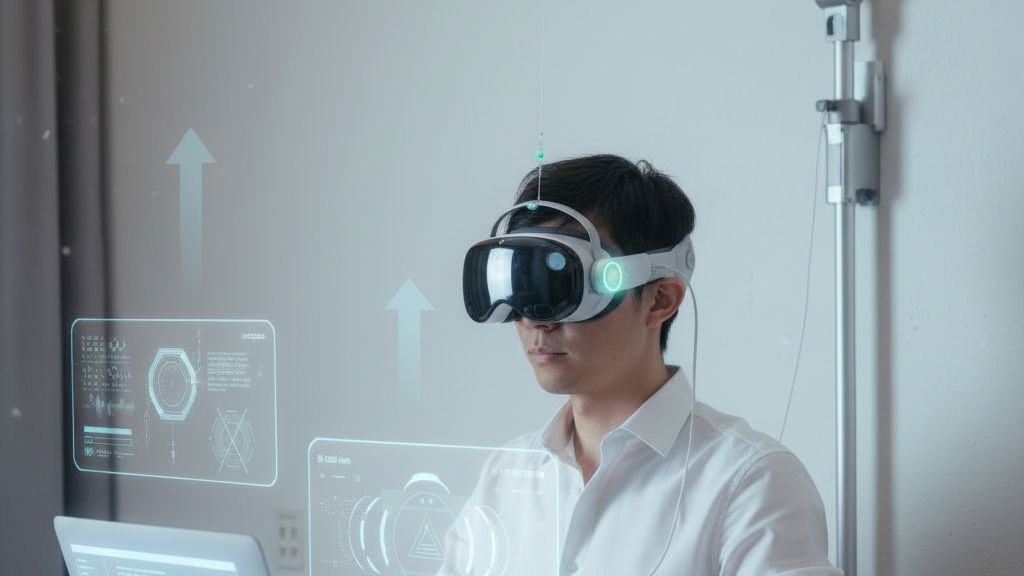
Long VR sessions expose a simple truth: even the best headsets can become burdensome when torque and pressure build on the neck and face. Flit Lift addresses that problem not by shaving ounces off a headset but by changing how weight is managed—using GraviPro’s dynamic lifting to create a sensation of weightless wear that preserves tracking and immersion. ⏱️ 10-min read
This article walks engineers, developers, and serious VR players through the technology, practical integration guidance, ergonomic benefits, deployment considerations, and real-world evidence behind Flit Lift. Read on for calibration workflows, safety checks, developer notes, and the metrics you should measure to verify comfort and ROI.
What Flit Lift Is and the Core Advantage
Flit Lift is a modular, cradle-style dynamic lifting system that mounts to VR headgear to counterbalance the headset’s weight in real time. Unlike static mounts that lock a device into a single position, Flit Lift uses actuated arms and a sensing module to continuously adapt lift based on posture and movement. The practical result is a headset that feels lighter because its mass is redistributed toward the crown and rear of the skull, lowering the forward torque that produces neck fatigue.
Think of the difference between carrying a backpack on your shoulders and wearing a balanced harness: the load is still there, but the muscles used to stabilize it change. Flit Lift reduces the neck’s “moment arm” by keeping the headset centered over the head’s natural pivot points during tilts, nods, and turns. That reduces the micro-adjustments users make to re-center their gaze and keeps optics aligned with less effort—especially important for marathon gaming, enterprise walkthroughs, or extended training scenarios.
Key hardware elements include compact actuated lifting arms, a quick-connect mounting interface, and a sensing module that reads posture and head position. The system is designed to be tool-free to attach, accommodate various frame geometries, and make the headset feel like it’s floating rather than pulling forward.
GraviPro Dynamic Lifting System: How It Works
At the heart of Flit Lift is the GraviPro Dynamic Lifting System: a control architecture that blends actuation options, a focused sensor suite, and a low-latency feedback loop to keep the headset balanced. Designers can choose from micro-motor cable-and-pulley setups, servo-driven belt mechanisms, or compact direct-drive modules depending on trade-offs for noise, weight, and responsiveness.
Sensors are deliberately pragmatic: an IMU captures orientation and quick motion, load cells measure lift tension and detect slippage, and headset-position tracking establishes the device’s spatial relationship to the wearer. These inputs feed a sensor-fusion layer that isolates intentional head motion from incidental wobble and then a control loop that adjusts lift quasi-instantaneously.
Control is tuned to be both gentle and responsive. The loop maintains a neutral lift baseline—enough to neutralize forward torque—then adds or reduces lift as the user leans, looks up, or reaches. To preserve immersion, GraviPro prioritizes minimal perceptible lag: the software strives for control latency well below human perception thresholds so adjustments feel supportive rather than corrective.
Power management is built in: efficient motor drivers, duty-cycling, and idle modes reduce average draw, so portable deployments get practical runtimes. Safety features such as max-travel limits, collision detection, and an auto-stop on abnormal load spikes protect users and hardware while keeping behavior predictable and easy to certify.
Ergonomic Benefits: Weightless Comfort in Action
Dynamic lifting changes the user experience in measurable ways. By shifting the effective mass toward the crown and occipital region, Flit Lift reduces pressure hotspots around the face and brow. The decreased neck moment arm means neck muscles do less counter-torque during natural motions—tilting, nodding, or leaning—so perceived effort drops and endurance increases.
Users also benefit from dampened micro-motions. Small jitters and instantaneous shifts—common when a streamer reacts or a gamer makes a quick head check—are smoothed, helping tracking sensors remain aligned and reducing the subjective sensation of drift. That steadier alignment translates directly into fewer mid-session adjustments, less visual discomfort, and more sustained immersion.
Practical inclusivity arises from a size-agnostic design: Flit Lift’s adjustable lift range and cradle fit accommodate different head shapes and eyewear. Accessibility improves because the system handles the mechanical burden; users with neck or shoulder weakness can access the same comfort that stronger users enjoy. In short, comfort becomes about balance management rather than purely weight reduction, which is a better long-term strategy as headsets get feature-rich and heavier.
Developer and Integration Guidance
Developers integrating Flit Lift should treat it as both a physical accessory and a real-time sensor-actuator system. Flit Lift ships with SDKs and APIs in C++, C#, and Python wrappers plus Unity and Unreal bindings. Core calls include setLiftPosition(targetMM), getLiftStatus(), and streamMotionData() which exposes tilt, acceleration, and tension readings useful for app-level behavior.
Calibration and safety are central to reliable integration. Begin by verifying frame compatibility, mounting points, and mechanical clearances. Route power and data with shielding and strain relief to avoid EMI and mechanical fatigue. Calibrate reference sensors with the headset on a neutral posture, then run an auto-calibration routine that records user-specific offsets. Many teams add a short “wear-in” onboarding flow that walks the user through a few head poses while verifying lift behavior.
Latency and sensor fusion are where developers must be deliberate. Keep the lift control loop and the headset’s tracking loop decoupled but synchronized—avoid adding lift adjustments in the same clock domain as high-level pose estimation to reduce jitter. Target a control response that feels supportive; sub-20 ms control latency is a reasonable goal to keep motion imperceptible, though precise targets depend on the actuation chosen. Finally, design APIs to allow safe interception: apps should be able to query status and trigger emergency-stop routines without exposing low-level motor control to untrusted plugins.
Compatibility and Ecosystem
Flit Lift is built with compatibility in mind. The current validated integration includes Apple Vision Pro, preserving face seal, optics alignment, and comfort while adding dynamic support. Modular adapters connect to a range of headset shells via tool‑free latches or magnetic snaps, and quick-release mechanisms allow the same lift chassis to serve multiple devices.
The ecosystem extends to partner accessories: gravity-assisted cables, harness extenders, and cooling sleeves developed after early feedback. For deployments where cable management matters—training labs, arcades, or enterprise fleets—Flit Lift pairs with guided routing channels and standardized mounting brackets that reduce setup time and wear.
Expansion depends on geometry, weight distribution, and power constraints for new headsets. The modular adapter family is designed to scale; manufacturers can submit mounting specs and get validated adapter designs or request firmware tweaks to match their sensor characteristics. Strategic partnerships with headset OEMs and middleware providers also aim to provide certified drivers and marketplace distribution so developers can rely on consistent behavior across platforms.
Real-World Impact: Early Adopters and Case Studies
Early deployments across education, enterprise, gaming, and research give a practical sense of Flit Lift’s impact without overstating outcomes. In a university lab with 60 students, reported fatigue dropped about 25%, and average session length rose from 30 to 40 minutes. Professors noted steadier gaze during demos and fewer interruptions for repositioning.
In manufacturing training, deployments reduced setup time from eight to under three minutes and improved throughput: error rates declined by roughly 9% while task completion sped up by about 15%. Independent gaming studios saw roughly 20% lower neck strain reports and a 25% increase in average play session length among testers; streamers valued the faster headset swaps and steadier framing on camera.
Clinical and research labs reported cleaner data capture: calibration steps fell by around 40%, and reliability in longitudinal studies improved because the lift removed a mechanical variable from the setup. These practical gains underscore a common theme—Flit Lift removes small frictions that add up over time. Feedback from early adopters drove iterative changes like enhanced strap tensioners and cooling sleeve designs, illustrating the product’s responsiveness to real-world needs.
Setup, Safety, and Maintenance
Getting Flit Lift into service is straightforward if you follow a repeatable checklist. Start with a visual inspection of the chassis, actuators, connectors, and cable channels. Mount the adapter to the headset frame, secure straps, and route cables through the provided guides to avoid pinch points. Connect power and data, power the control unit, and run the auto-calibration routine while the user assumes a neutral seated posture.
Recommended quick-start steps:
- Inspect components for damage and ensure mounting hardware is clean.
- Attach the lift and headset using the quick-connect mechanism.
- Route and secure cables; apply strain relief.
- Power on and run auto-calibration with the user following on-screen prompts.
- Verify safety behaviors: auto-stop, max-travel limits, and collision detection.
Maintenance cadence keeps the system reliable: daily visual checks, weekly joint lubrication for mechanical pivots, and monthly firmware updates and battery health checks. Keep a calibration log: recheck after transport, firmware changes, or any unexpected event. Safety systems include an emergency stop, current-sensing stall detection, and soft-limits to prevent over-travel. If you detect unusual noises, slipping, or inconsistent tension readings, stop use and contact support for inspection—do not continue running until a qualified technician verifies the system.
Scalability and Future-Proofing
Flit Lift was designed to be modular so operators can upgrade or replace components without a full swap. Plug-and-play actuators, swappable sensor modules, and a chassis that accepts multiple adapter families make it possible to increase lift capacity, add sensors, or tune responsiveness as headsets evolve. That modularity protects investments for labs and deployments facing a fast-changing hardware landscape.
The roadmap moves toward finer control and AI-driven optimization. Future firmware will learn per-user and per-device characteristics to auto-tune damping, lift curves, and idle behaviors, improving stability across varied head shapes and headset weights. For large-scale deployments, Flit Lift supports centralized device management for firmware rollouts, asset tagging, and remote diagnostics to reduce support burden.
Don’t forget data governance: lift systems produce usage metrics and sensor logs useful for optimization but potentially sensitive. Implement clear consent flows, data minimization, and role-based access to logs. That keeps optimization efforts compliant with privacy expectations while enabling continual product improvement. Thoughtful provisioning and IT processes—standard imaging profiles, calibration templates, and diagnostic playbooks—turn a reactive fleet into a predictable, maintainable asset.
Measurement, Metrics, and ROI
Proving value requires the right KPIs and a practical trial design. Key metrics include subjective fatigue (standardized scales), task completion time, tracking fidelity (latency and drift), and operational metrics like setup time and maintenance costs. A typical trial compares matched sessions with and without Flit Lift in a crossover design to control for learning effects.
Trial steps:
- Define objectives and select representative users.
- Choose KPIs: fatigue scale, tasks/hour, error rates, calibration times.
- Run baseline sessions without Flit Lift, then repeat with the system enabled.
- Collect objective logs (latency, tension readings) and subjective feedback.
- Analyze before/after differences and report to stakeholders.
ROI can be estimated with a simple formula: ROI = (productivity gains + energy/maintenance savings + safety benefits) − equipment and operating costs over the trial period. In practice, small per-session time savings and reduced error rates add up in training and enterprise settings; in gaming and streaming, longer comfortable sessions translate to higher engagement and potentially greater monetization. Use dashboards that combine qualitative notes with key metrics for an actionable picture rather than relying on a single statistic.
Next step: if you’re a developer or lab manager, schedule a short pilot (5–10 representative users) that logs both objective lift telemetry and subjective comfort scores. That rapid feedback loop will show whether Flit Lift meets your use case and what adapter or firmware tweaks are needed for peak results.







Share:
GraviPro compatibility guide: pairing gravity-assisted VR gear with major headsets
Flit Lift vs traditional VR supports: a practical comfort and endurance review