

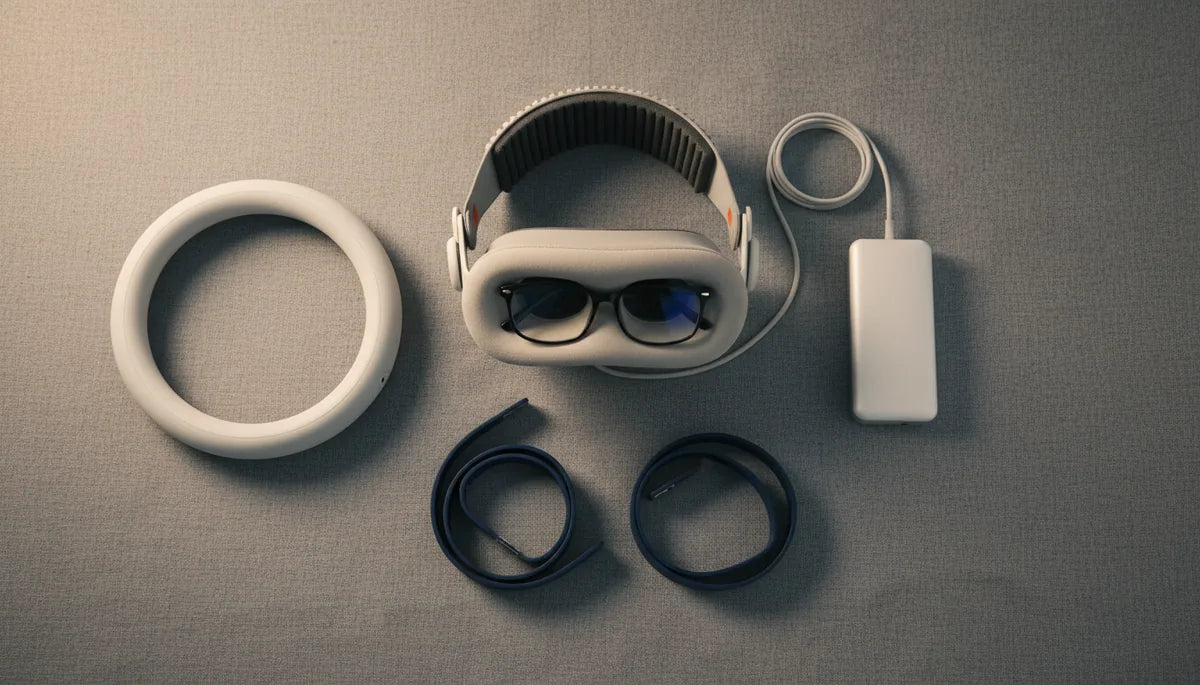
How to Choose a Quest 2 Comfort Strap That Fits Glasses Without Pressure
If you wear glasses, slipping a Meta Quest 2 on should feel like putting on a pair of headphones—not a medieval head clamp. Yet many glasses-wearing VR users end up with sore nose bridges, bent temple arms, or frequent adjustments that break immersion. This guide walks you through why that happens and how to choose—and tune—a comfort strap that protects your frames and your face. ⏱️ 11-min read
You'll learn which strap features matter most for glasses, how different strap types behave with frames, a clear installation and adjustment routine, plus accessories and troubleshooting tips that keep your vision sharp and your headset comfortable during long sessions. Read on for practical, experience-driven advice you can apply the next time you upgrade your Quest 2 setup.
Why Standard Quest 2 Straps Cause Problems for Glasses Wearers
The stock Quest 2 strap was designed for simplicity and affordability, but that design often creates predictable issues for people who wear glasses. The original strap places a lot of weight and contact pressure toward the front of the face—on the forehead, nose bridge, and cheekbones—because it lacks substantial rear support. When weight is forward, the headset tips and settles against the nose, clamping frames into the bridge and temples. The result: red marks, pressure points, and frames that feel like they’re being squeezed between foam and plastic.
Beyond pressure, stock straps usually have narrow contact surfaces and limited adjustability. That means temple arms can be pinched by rigid side connections and the headset angle is harder to fine-tune, which increases the chance of frames rubbing against the facial interface or the headset lenses. Repeated sessions can bend lightweight frames or wear out nose pads. Finally, the stock strap’s minimal padding and limited ventilation exacerbate heat and sweat around contact points—making fogging and sliding more likely. For anyone who relies on glasses, these problems compound: discomfort leads to shorter playtimes and more frequent headset adjustments, breaking immersion and increasing the risk of scratching either your glasses or the headset lenses.
Key Design Features for Glasses-Friendly Comfort Straps
When you shop for a Quest 2 comfort strap that genuinely accommodates glasses, don’t focus on aesthetics—look for engineering that changes how the headset carries weight and how it contacts your face. The most important feature is a rear head cradle that wraps toward the back of your skull. This cradle redirects the headset’s mass away from the nose and cheeks, reducing the downward force that presses your frames against your face.
Flexible side arms are another must: thin, pliable arms adapt to diverse temple shapes and angles, preventing pinching of glasses’ temples during head turns. A top strap that can be finely adjusted controls lift and tilt, so you can set the angle without squeezing the bridge. For padding, dense foam or memory foam with a breathable, moisture-wicking cover disperses load over a wider area and reduces hotspots. Look for wider contact surfaces—broad forehead pads rather than narrow strips—so pressure spreads instead of concentrating on a small patch.
Finally, choose straps with secure, repeatable adjustment mechanisms: micro-dial knobs or ratcheting rear adjusters are preferable to single-point Velcro. They let you lock in a fit that supports weight behind the head and keeps the headset seated without constant tightening. These design elements—rear cradle, flexible side arms, adjustable top strap, and quality padding—work together to keep glasses stable, avoid nose-bridge pressure, and preserve both your frames and the headset’s facial interface.
Types of Comfort Straps and Their Compatibility with Eyewear
Not all comfort straps are created equal. Knowing how the major types interact with glasses will speed up your decision and prevent surprises after purchase.
- Halo / Top-and-Back Cradle Straps: These use a ring-like frame or a padded cradle that transfers weight to the crown and back of the skull. Halo designs typically create more clearance around the face, which minimizes contact with temple arms and the nose bridge—ideal for bulky frames. Their balanced weight distribution reduces slippage and is frequently the best choice for glasses wearers.
- Rigid Battery Straps: These add a hard-mounted battery pack to the rear, which can greatly improve balance. If the strap integrates a cushioned rear pad and adjustable tilt, it pairs well with glasses. The downside is extra weight; but since that weight sits behind the head, it often reduces front pressure more than it adds neck strain.
- Flexible Silicone / Fabric Straps: Lightweight, inexpensive straps (neoprene or silicone) are compact but may lack the rear support needed to relieve nose pressure. They work when combined with a separate rear cradle or for users with thin frames who don’t need a large face gap. These are budget-friendly and portable, but you may trade off long-session comfort.
Examples: the BoboVR M2 Pro’s halo-style system is widely praised by glasses wearers for creating a generous face gap and including an adjustable rear knob. Brands like KIWI Design offer hybrid solutions—soft padding with rigid rear support—that work well for a range of frame sizes. When evaluating types, imagine the path of force: if the strap routes most weight to the rear and crown, it will almost always be kinder to glasses than a strap that pulls at the front or sides.
Step-by-Step Installation and Adjustment for Optimal Glasses Fit
Installing a new comfort strap is straightforward, but small adjustment steps make a big comfort difference—especially when you’re wearing glasses. Follow this sequence to minimize pressure points and keep your frames aligned.
- Remove the stock strap carefully. Rest the headset on a soft towel to avoid scratching. Depress the side clips and slide the original strap out. Keep any small parts in a safe place.
- Attach the new strap securely. Align the strap’s anchors with the Quest 2 slots and click them in. If your strap has a rear cradle or battery pack, position it behind the head and confirm clips are seated evenly on both sides.
- Set the top strap for gentle lift. Loosen the top strap and place the headset on while wearing your glasses. Tighten the top strap gradually until the headset stays in place without pressing the frames into your nose.
- Fine-tune the rear cradle height. Move the rear pad up or down so it sits behind the thickest part of your skull (not on top of it). This moves weight backwards; aim for a neutral head tilt with the display centered over your eyes.
- Adjust side arms for temple clearance. Position the side arms so they rest near the temples without pinching temple arms. If your strap allows, set the arm angle a few degrees outward to free up space for wider frames.
- Test movement and balance. Tilt your head, nod, and walk around a bit. If glasses shift or the headset slides, make incremental adjustments—small changes in top strap tension or rear cradle position often fix issues more effectively than dramatic tightening.
- Check for light leaks and alignment. A proper fit should seal the gap around the eye cups without pressing on the frames. If you see light intrusion or misaligned optics, slightly change the headset angle with the top strap, not by squeezing the facial interface.
Remember: avoid overtightening. Start snug enough to prevent wobble and then dial back until you eliminate red marks or numbness. The goal is consistent, distributed support that keeps your frames stationary, not compressing them.
Beyond the Strap: Essential Accessories for Glasses-Wearing VR Users
A good strap is the foundation, but the right accessories let you ditch common trade-offs and protect both your glasses and the headset optics.
- Prescription lens inserts — These are the single most impactful accessory for many glasses wearers. Inserts clip into the headset’s lens housing and let you remove your spectacles completely. Benefits: zero temple pressure, lower fogging risk, and a guaranteed lens-to-eye distance. Have your optometrist check PD (pupil distance) and lens type if you’re using high prescriptions.
- Anti-scratch and anti-reflective protectors — Thin protective films or glass protectors for the Quest 2’s lenses can prevent accidental scratches from glasses when frames rub. Ensure any protector you choose is compatible with the headset’s optical geometry to avoid distortion.
- Facial interface replacements — Different facial interfaces change cushion thickness and eye relief. Look for slimmer, softer interfaces if your glasses are already close to the headset lenses, or thicker ones if you need extra clearance. Silicone and foam alternatives often improve hygiene and comfort.
- Microfiber cleaning kits and anti-fog treatments — Regularly clean both headset and glasses lenses. Use lens-safe sprays and microfiber cloths to avoid scratching coatings. Anti-fog wipes can be applied to glasses before sessions to minimize sweating-induced fog.
- Counterweight or battery packs — If you choose a lightweight strap but still feel front-heavy, a small rear-mounted counterweight can rebalance the headset. Many halo and battery-style straps include this benefit by design.
Choosing the right combination depends on your vision needs and play style. If you prioritize comfort and long sessions, prescription inserts plus a halo-style strap will likely be the best investment. If you want portability and budget-friendliness, a slim facial interface and anti-scratch protector are low-cost upgrades that make a noticeable difference.
Troubleshooting Common Discomforts Even with a Comfort Strap
Even after upgrading, some issues persist—but most have straightforward fixes. Below are common problems and targeted solutions you can test in minutes.
- Fogging glasses: Fog often comes from heat and poor airflow. Try anti-fog wipes on your glasses and improve ventilation by loosening the top strap slightly to allow a small airflow channel at the forehead. Taking short breaks every 30–45 minutes also helps reduce moisture build-up.
- Nose bridge pain: If your nose still hurts, move the headset slightly higher on your face using the top strap so the pressure shifts away from the bridge. If that reduces clarity, consider prescription lens inserts to remove the need for glasses altogether.
- Glasses slipping down: Make sure the rear cradle is positioned high enough on the skull and that the top strap provides balanced lift. Lightweight rubberized temple sleeves (commercial or DIY) can increase friction and keep temple arms anchored.
- Temple pinching: Flexible side arms and angled adjustments usually fix this. If your strap doesn’t offer flexible arms, add a thin foam spacer between the headset and temple area to increase clearance. Avoid heavy padding that pushes glasses forward.
- Headset tilting: A tilted headset misaligns optics and increases localized pressure. Even out top strap tension, then adjust the rear cradle up or down. Use small increments; large changes can overcompensate and create new pressure zones.
If discomfort continues despite these fixes, test a different strap profile: halo straps tend to eliminate many persistent issues because they create a larger facial gap and shift weight to the crown. Finally, don’t ignore the fit of your glasses themselves—replacing worn nose pads or adjusting frame tightness can make a substantial difference in VR comfort.
Maintaining Your Comfort Strap and Glasses for Lasting VR Enjoyment
Comfort is not a one-time setup. Regular care for both your strap and glasses preserves fit, hygiene, and value—so you can enjoy longer, uninterrupted sessions without damaging equipment.
- Cleaning the strap: Wipe down foam and fabric parts weekly with a mild soap solution or lens-safe sanitizing wipes. For removable covers, machine wash on a gentle cycle if manufacturer instructions allow. Avoid harsh chemicals that break down padding or adhesives.
- Cleaning headset and glasses lenses: Use a microfiber cloth and a lens cleaner formulated for coated optics. Always clean glasses first, then the headset lenses. Power off the headset and remove smudges gently—pressing too hard can damage anti-reflective coatings.
- Inspect for wear: Check straps, anchor clips, and foam for tears or compression. Replace pads that have lost resilience; compressed foam loses its ability to spread pressure and will force you into tighter fits that increase facial force.
- Protect glasses during storage: When not in use, store glasses separately in a hard case to prevent accidental bending while transporting the headset. If you regularly leave glasses in the headset between sessions, consider an inexpensive protective sleeve to prevent rubbing against the facial interface.
- Maintain adjustment settings: Keep a small notebook or photo record of your optimal strap settings—top strap length, rear cradle position, and dial setting. These notes speed reassembly after cleaning or swapping accessories and prevent repeated trial-and-error that can wear out parts.
Routine care extends the life of both your strap and your glasses and prevents the slow creep of discomfort that comes from compressed foam, stretched straps, and dirty optics. A little maintenance keeps your VR time comfortable and immersive.
Next step: if you haven’t already, try swapping to a halo or rear-cradle strap and pair it with prescription lens inserts or a slimmer facial interface. Start with small adjustments—rear pad height and top strap tension—and log the settings that eliminate red marks and frame movement. Your most comfortable setup is the one you tune incrementally; a good strap gives you the room to do that without compromising vision or safety.







Share:
Elite vs Third-Party Straps for Quest 2: What Each Brings to Your Comfort
Best Face Gaskets and Cushions for Oculus Quest Two: Comfort, Fit, and Hygiene