

Third‑Party vs Official Quest 2 Straps: A Practical, Data‑Driven Cost, Comfort, and Durability Guide
If you play VR for more than an hour at a stretch, the Quest 2 strap you choose matters as much as the headset itself. This guide compares Meta’s official weight-distribution-on-meta-quest-2" rel="nofollow noopener noreferrer">Elite Strap (and the battery-equipped variant) against the strongest third‑party contenders, focusing on cost, comfort, and how long each design actually lasts in real use. You’ll get concrete buying criteria, installation steps for newcomers, and quick tests to judge fit and balance before committing. ⏱️ 11-min read
I write from hands‑on experience and a careful reading of user reports and specs. Expect clear examples (including common failure points), practical adjustments for glasses wearers, and a simple decision checklist you can use at the store or before hitting “buy” online.
Cost and value: official Elite Strap vs third‑party options
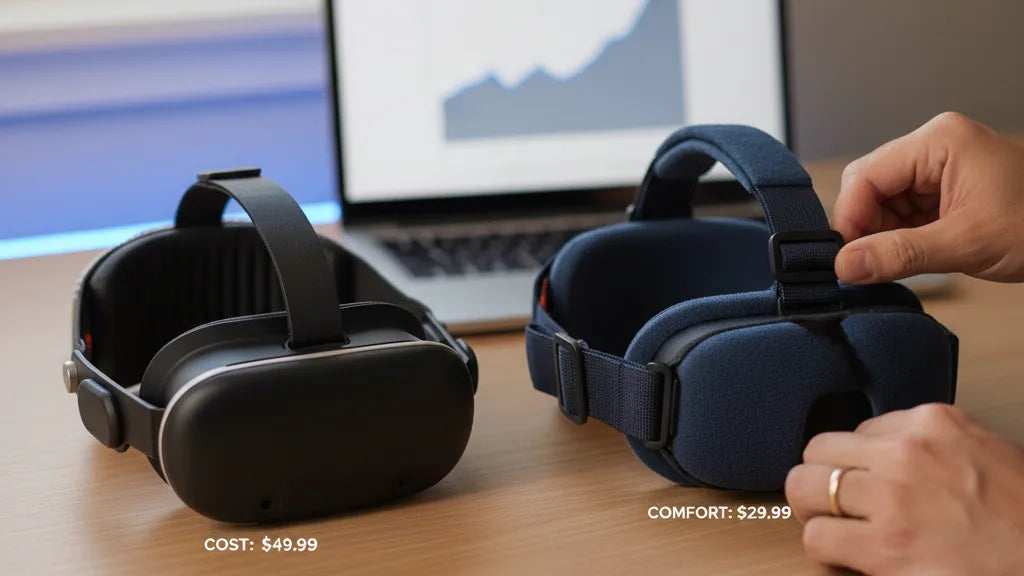
Price is often the first filter. Meta’s Elite Strap typically retails around $50–$60; the Elite Strap with an integrated battery commonly jumps above $100. By contrast, the third‑party market is crowded and competitive: decent halo and rigid straps often sell for $20–$40, while higher‑end third‑party models land in the $40–$80 band. Put bluntly, you can frequently buy two or three third‑party straps for the cost of one official battery model.
But sticker price isn’t the whole story. Consider total cost of ownership: how comfortable it keeps you during long sessions, whether it flexes or cracks, and whether its padding compresses after months. Meta’s official strap brings brand confidence and out‑of‑box compatibility, which matters if you want a no‑friction fit immediately. Historically, the Elite Strap has had some documented durability complaints—hinge and arm cracks for heavy users—but many owners still report years of dependable use.
Third‑party offerings are a mixed bag. Budget models that undercut Meta’s price by a wide margin sometimes cut corners—brittle plastics, cheap Velcro, or foam that crushes quickly. On the other hand, several third‑party designs match or exceed the Elite Strap in comfort and build quality. Notable examples in user communities include halo rigs and the well‑built BoboVR M2, which gets repeated praise for materials and balance. The practical approach: read recent reviews, watch teardown or durability videos, and favor vendors with explicit warranties or an easy return policy. If you want the best value for long sessions, a midrange third‑party strap often gives the strongest combination of comfort and cost savings.
Comfort and ergonomics for long sessions
Comfort comes down to how the strap distributes pressure and how its cushioning behaves over time. The official Elite Strap uses a soft removable foam pad and a fabric cover—simple and serviceable. Many third‑party straps push further: thicker foam layers, memory foam crowns, gel inserts, or wider halo bands designed to spread weight over the top and back of the skull rather than the face.
In practical terms, keep three things in mind when evaluating comfort for marathon sessions: padding quality, strap geometry, and moisture management. Padding that feels plush for five minutes can flatten into a pressure point after an hour, so prioritize materials that resist compression—memory foam or high‑density PU foam perform better than low‑grade open‑cell foam. Halo or rigid designs with a wider contact patch reduce facial pressure and can dramatically lower forehead discomfort.
Adjustability is equally important. Official straps give straightforward side adjustments and quick release, but many third‑party options add nuanced controls: a rear dial for circumference, a tensioning top band, or swivel hinges that let the headset follow your head movements. For people who wear glasses, look for straps with extra vertical room around the nose and temples or straps that pair well with a face‑pad spacer. A strap that pinches frames or sits too high will quickly undo any padding advantage.
Finally, sweat and heat matter. Breathable covers and removable, washable pads are better for long sessions and frequent use. When testing a strap in a store or at home, simulate activity—walk, turn quickly, and play a 20‑ to 30‑minute session to check for hot spots and foam collapse. The straps that maintain their low‑pressure feel after that test are the ones built for extended comfort.
Durability and materials: how long will they last?
The lifespan of a Quest 2 strap reflects a mix of materials, design, and how you treat it. Meta’s Elite Strap combines a rigid plastic frame with cushioned padding; many owners report multiple years of solid use, but documented failures often occur at mechanical stress points—the hinge joints or where the side arms connect to the headset—especially if users repeatedly slam them into place or overtighten.
Third‑party straps cover a wider materials spectrum. Higher‑end models typically use reinforced ABS or reinforced nylon plastics with quality hooks and metal or strong polymer dials; midrange choices often use TPU blends or thicker woven fabrics; budget models can rely on brittle injection‑molded parts and thin foam. Common failure points across all designs include cracked side arms, stripped adjustment gears, compressed foam, and fraying Velcro.
To judge longevity before buying, inspect the attachment points and hinges. Look for visible reinforcement, metal screws or reinforced polymer where the arms mate with the headset, and a replaceable cushion. Reviews mentioning months‑long daily use without structural cracks are a strong positive signal. Warranties are a practical proxy: Meta provides a limited warranty for defects, and reputable third‑party vendors often offer 90 days to a year. If a vendor provides spare parts or a replacement cushion, that increases the strap’s useful service life.
Finally, user behavior matters. Gentle attachment, avoiding overstressing the hinge, and keeping straps away from high heat extend life. If you plan to lend your headset or travel frequently, choose a strap with a proven mechanical design—reinforced latches and a smooth, positive click when mounting will save you headaches down the road.
Installation, fit tips, and beginner guidance
Installing a new Quest 2 strap should be straightforward, but small missteps are common—especially when swapping from the soft stock strap to a rigid or halo design. Follow this simple sequence for a secure, comfortable fit:
- Remove the original strap by unclipping the side arms from the headset temples and detaching the top strap from the central loop.
- Align the new strap’s side arms with the headset’s mounting points. Apply steady pressure until you hear a distinct click confirming the latch.
- Connect the top strap to the central loop, ensuring it sits centered over the crown.
- Start with all adjustments fairly loose. Place the headset on and vertically adjust the top strap until the display is centered and clear.
- Tighten the side straps or rear dial until the headset feels snug but not tight. The headset should remain stable during head movement without pinching.
Few practical tips new users miss: don’t overtighten to “eliminate” facial pressure—this often transfers pressure to the forehead. Use the top strap to set vertical position (this controls eye relief and clarity), then use side straps for horizontal stability. If your strap has a rear dial, small micro‑adjustments matter: a quarter‑turn can be the difference between comfort and a headache.
Do a short movement test: jog in place, look sharply left-right, and crouch. If the headset shifts or creates new pressure points, make incremental adjustments. For first‑time installers, a 15–30 minute trial session is the best validation—if discomfort appears, recheck pad placement and loosen the top strap a touch. Take photos of your final setup so you can replicate it after cleaning or traveling.
Weight distribution and headset balance
The Quest 2 is inherently front‑heavy because of its display, lenses, and batteries. The strap’s job is to change where that weight sits on your head. The stock soft strap spreads some load but usually lets the face bear significant pressure. The Elite Strap and many third‑party halo or rigid designs move the fulcrum rearward so weight is shared across the crown and the back of the skull, reducing facial pressure and neck strain.
Two broad approaches exist: rear‑supported and halo/halo‑style designs. Rear‑supported straps add a cradle or counterweight at the nape. They’re compact and effective at combating forward tilt but rely on a good fit around the back of the head. Halo designs wrap a band around the perimeter of your head and distribute force broadly; they tend to feel more stable during rapid movement and are often recommended for active gameplay.
Integrated battery straps use the battery as a counterweight. These can be highly effective—shifting the center of mass backward and extending playtime—but they add bulk and cost. If you try one, test for a new trade‑off: the added rear mass should reduce forehead pressure but may increase perceived weight on the nape for some users.
Quick tests to evaluate balance: with the headset mounted, tilt your head forward and back; it should stay in place without sliding. Do a gentle shake; the headset should feel stable but not tightly clamped. A practical measurement: if your cheeks feel pressured after 20 minutes, balance needs improvement—shift top strap tension or add a counterweight design. Ultimately, the best strap is the one that leaves your face and neck with the least fatigue after a two‑hour session.
Compatibility, accessories, and glasses wearers
Most Quest 2 straps use the same mount points, which makes cross‑compatibility good—but not perfect. The Elite Strap and many third‑party options attach directly; some manufacturers include adapters or offer alternative latching systems to fit unusual designs. Before buying, confirm that the strap supports the two‑arm assembly and whether a spacer or adapter is required for your headset version.
Accessories change compatibility dynamics. If you plan to use a custom facial interface, prescription lens inserts, or a counterweight battery, check clearances. Halo designs can interfere with full‑face covers if the cover extends to the sides of your head. Similarly, battery packs often require a flat rear area for secure attachment—cheap straps with narrow rear cradles might not hold a heavy battery snugly.
For glasses wearers, the good news is many straps are glasses‑friendly, but specifics matter. Look for extra vertical space over the nose and temples, or buy a face spacer to physically offset the headset away from your glasses. If you wear larger frames, choose straps with a top band that can sit a bit higher on the crown; this lets you loosen the vertical tension without sacrificing stability. Practical adjustments include repositioning glasses slightly higher on the nose and loosening the top strap marginally to avoid frame pressure.
Finally, community reports indicate that some official straps feel more secure for glasses wearers, but several well‑designed third‑party straps achieve the same comfort with the advantage of removable, washable padding. When in doubt, check vendor photos with model heads wearing glasses, or test quickly in person to confirm clearance.
Maintenance, warranty, and replacement options
Regular care extends the life of any strap. After active sessions, wipe down fabric and foam with a damp microfiber cloth and mild soap; avoid bleach, acetone, and strong solvents that degrade foam and fabric. Let parts air dry away from direct sunlight and heat sources. Removable cushions are a major convenience—wash them per the manufacturer’s instructions and rotate replacements if you have multiple pads.
Common signs it’s time to replace a strap: visible cracks at hinge points, foam that doesn’t spring back, strap fabric that frays or Velcro that fails to hold. If stitches loosen or a ridge wears thin, replacing the strap is safer than risking sudden failure mid‑play. Keep proof of purchase and register the product if the vendor offers it—this simplifies warranty claims.
Warranties differ: Meta typically offers a limited warranty covering manufacturing defects for a set period, while third‑party vendors vary from 90 days to a year or more. If a defect appears inside the window, contact the seller first; reputable vendors often replace faulty items or provide spare parts. For out‑of‑warranty issues, look for vendors that sell replacement arms, padding, or dials—this reduces long‑term cost.
Practical replacement workflow: 1) Document the defect with photos, 2) Contact the vendor with purchase proof, 3) Try to obtain a replacement part rather than a full unit if available. If you’re between options and care about uninterrupted long sessions, buy a midrange third‑party strap as a backup—its lower cost makes quick swaps painless and keeps you gaming while the warranty process unfolds.
Takeaway: compile a short checklist—budget, glasses use, preferred balance (rear vs halo), warranty length, and a 15–30 minute comfort test—and use it to compare models side‑by‑side. With the right strap, many Quest 2 owners find they can play longer, with less facial pressure and fewer neck complaints—so choose the strap that best matches your play style, not just the logo on the box.







Share:
How the Elite Strap affects balance and weight distribution on Meta Quest 2
A Practical Guide to Installing the Elite Head Strap on Oculus Quest two