

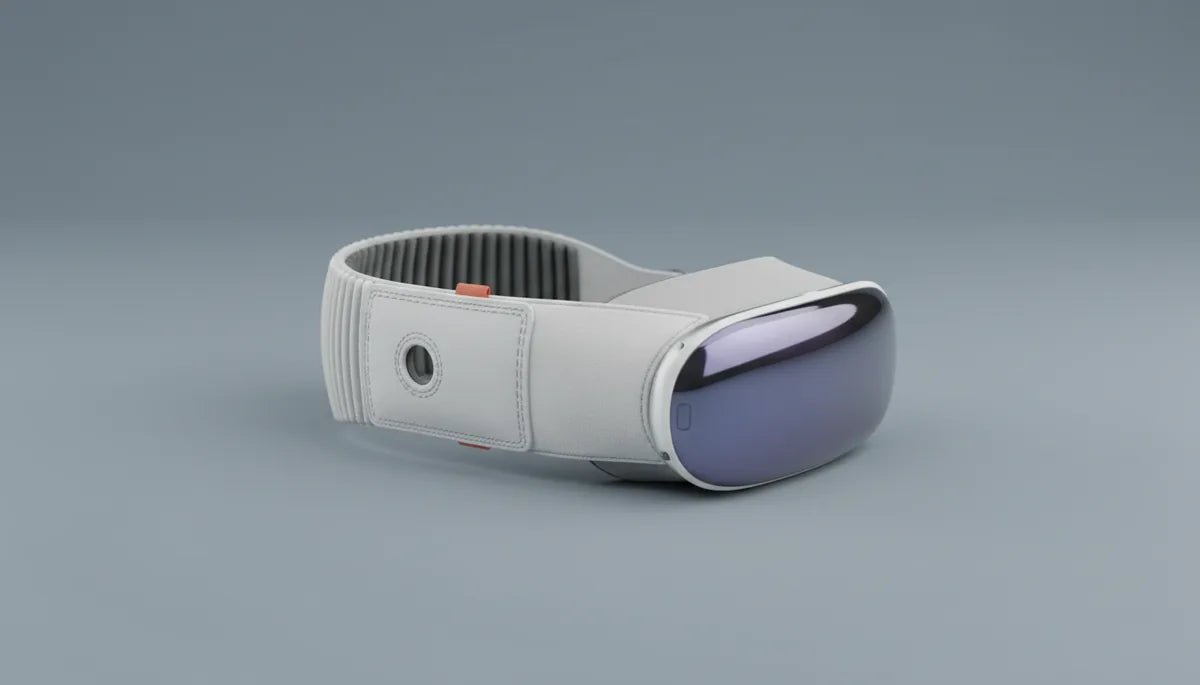
Vision Pro Comfort Strap: Materials, Durability, and How to Make Yours Last
Apple’s Vision Pro is a technical marvel, but the comfort strap is the quiet workhorse that determines whether comfort-strap-for-long-vr-sessions-a-step-by-step-tutorial" rel="nofollow noopener noreferrer">long sessions feel immersive or uncomfortable. This guide breaks down what the strap is made of, how it’s constructed, and the practical steps you can take to keep it comfortable and reliable for months or years of use. ⏱️ 10-min read
Whether you’re a Vision Pro owner logging marathon creative sessions or a prospective buyer weighing accessory options, you’ll find a materials-focused, real-world playbook here: how each material performs, what wear looks like, how to clean and store the strap, replacement choices, and simple adjustments that instantly improve fit.
Materials Used in the Vision Pro Comfort Strap
The Vision Pro comfort strap blends three material families to balance comfort, breathability, and stability: soft textiles, silicone, and elastic fibers. Each plays a specific role and knowing how they behave helps you optimize comfort and care.
The textile facing—the part that touches skin—is typically a finely woven or knit fabric. This choice emphasizes breathability and a soft hand, which reduces abrasion and hot spots during sessions. Many of these fabrics are engineered to wick moisture away from the skin; that’s why you’ll notice less clamminess than with older, non-wicking head straps.
Strategically placed silicone components add a smooth, hypoallergenic interface where the strap meets the headset body or the back of the head. Silicone gives a subtle grip so the headset sits without sliding, resists oils and sweat, and wipes clean easily. Because silicone doesn’t trap moisture like some foams, it helps prevent material breakdown where users sweat the most.
Elastic fibers are woven into the strap’s adjustment segments and crown band to provide stretch and recoil. Well-designed elastic keeps the fit snug without over-tensioning; it adapts to different head shapes and returns close to its original length across many uses. Over time elastic will relax—knowing this helps you detect when the strap is near end-of-life.
Construction, Durability, and Attachment Points
Beyond materials, the strap’s longevity depends on how those parts are joined. Production typically uses a high-strength webbing core, molded padding, reinforced connector housings, and careful stitching patterns. These choices determine whether the strap resists daily donning, sweat, and the odd tug.
High-quality straps use heat-sealed webbing edges and lockstitch sewing with bar-tacks at stress points—especially where the strap mates to the headset. In some assemblies, foam and fabric are ultrasonically welded to produce seamless joins that reduce abrasion and prevent delamination. Connector housings are often polycarbonate with corrosion-resistant metal pins or retention springs that withstand repeated use without loosening.
The Vision Pro’s strap attaches to two dedicated points on the headset. On proper assembly you should hear or feel a firm click; good designs make the load path run through the webbing and housings rather than a single tiny stitch. This spreads stress across multiple layers and reduces the likelihood that one seam fails under load.
Manufacturers also run endurance tests—cycling tension and temperature changes to see how padding compresses and how connectors behave after thousands of cycles. In practice, reinforced seams and molded housings are the features most likely to keep your strap serviceable when used as intended.
Comfort Design, Fit, and Weight Distribution
Comfort is the result of both materials and geometry. The Vision Pro strap leans into a halo-style rear band combined with lateral straps to distribute weight over a broader area. That design reduces forehead pressure and minimizes localized hotspots—critical for sessions that last an hour or more.
Padding strategy matters: molded pads that follow the curve of the skull help spread pressure at the crown and sides. The low-profile edges reduce chafing near the temples, while the rear band transfers much of the headset’s mass backward. The perceived device weight drops when the load shifts away from the face to the larger contact area on the back of the head.
Adjustability is equally important. Multiple tension and length adjustments let you tailor fit for head circumference, cheekbone height, and hair volume. When you adjust the crown tension and lengthen or shorten the side straps, you align the optical center with your eyes; that means less temptation to press the headset forward and less facial pressure.
For glasses wearers, a few micro-adjustments go a long way: raise the rear band slightly higher on the crown, leave a touch more slack on the sides, and ensure the temple area of the strap doesn’t compress your frames. Small shifts—often less than a centimeter—can eliminate pressure points without sacrificing stability.
Longevity, Wear, and Replacement Signals
How long a comfort strap lasts depends on usage patterns and care. For typical casual use—several sessions a week of one to two hours—expect reliable performance in the 12–24 month range. Heavy daily use or sweating can shorten that timeline to roughly 6–12 months. Light, infrequent use and careful storage can push a strap beyond 24 months.
Watch for these signs that replacement is due: stretched fabric near adjustment points, frayed edges, loose threads, and visible seam separation. Functionally, you’ll notice a drop in elasticity if the strap feels loose even at higher tension, increased slipping during use, a creak or grinding when adjusting, or flattened padding that no longer cushions the crown.
Environmental factors accelerate wear. Prolonged sun exposure, high heat, chlorine, and saltwater break down fibers and elastics faster. Sweat salts and body oils degrade elastic fibers and can cause sticky residues that attract dirt. Mechanical abuse—sharp bends, frequent yanking, or shipping the headset with a tightly cinched strap—also shortens lifespan.
Plan for periodic inspection: give the strap a quick look before long sessions and feel for consistent tension. If you see visible fraying or you must overtighten to achieve a secure fit, it’s time to replace the strap to maintain comfort and secure attachment.
Care, Cleaning, and Maintenance Practices
Cleaning and storage are the most powerful longevity boosters—and they’re simple. For routine care, use warm water with a small amount of mild dish soap or a gentle fabric detergent. Dampen a soft microfiber cloth, wipe the strap, then rinse the cloth and wipe again to remove soap residue. Avoid soaking, aggressive scrubbing, or hot water, which can harm adhesives and elastic fibers.
For sweat and oil stains, apply a light dab of detergent and work with gentle circular motions. Rinse with a clean, damp cloth and let air dry completely in a ventilated area away from direct sunlight or heat sources. For stubborn marks, a brief application of a baking soda paste can lift soils—apply sparingly, rinse thoroughly, and dry. Never use bleach, harsh solvents, or abrasive brushes; they degrade both textile and elastic components.
Storage matters: store the strap loosely laid flat or in the headset’s original case, ideally inside a soft pouch to prevent dust and creasing. Keep it in a cool, dry place out of direct sunlight. Make sure the strap is fully dry before packing it away to prevent mildew and adhesive weakening. Periodically check the connector housings for trapped dirt or lint—use a dry, soft brush to clear debris so the connectors seat cleanly.
Compatibility, Replacements, and Upgrades
When a strap reaches the end of its useful life, you have two main routes: official replacements or third-party alternatives. Start with Apple’s official channels for a guaranteed fit and warranty coverage—check the Apple Online Store, contact Apple Support, or visit an Apple Store or Authorized Service Provider. If you have AppleCare or AppleCare+, review your plan for potential accessory coverage.
Third-party manufacturers offer options across a range of materials and price points: nylon and textile straps for breathability, leather or vegan leather for a premium look, and silicone for a wipe-clean, low-maintenance interface. Some brands focus on modularity—quick-release or magnetic connectors, padded crowns, and extra adjustment ranges. Before buying, verify that the replacement uses the same attachment mechanism (magnetic/locking style and pin geometry) as the Vision Pro, and read return policies carefully; third-party warranties and fit guarantees vary.
Compatibility considerations extend to accessory behavior: a bulkier third-party pad may shift the headset’s optical center, requiring re-adjustment. Conversely, slimmer alternatives might feel cooler but concentrate pressure. If possible, try a replacement in-store or buy from sellers with flexible returns so you can test comfort during a typical session.
Installation, Adjustment, and Fine-Tuning
Swapping or installing the strap is straightforward but benefits from a few careful steps. Begin with the headset powered off and laid on a soft surface. Inspect the new strap for damage and verify that connector housings and quick-release parts are present and clean.
- Align the strap ends with the headset’s attachment points and press until you hear or feel a secure click. Gently pull to confirm each side is latched.
- Loosen the strap fully, don the headset, and cradle it in your hands while you settle the rear band on the crown. Start with a loose fit so you can center the optics without pressure.
- Gradually tighten the crown and side straps until the headset feels balanced—snug enough that it won’t shift when you move your head, but loose enough that no single spot feels pinched.
- Fine-tune while using the headset: if you feel forehead pressure, shift more load to the rear band; if the headset leans forward, raise the rear band slightly and increase crown tension to pull the center of mass back.
For micro-adjustments, small changes matter. Slide side locks a few millimeters, tweak crown tension in one-click increments, and test after each change. Glasses wearers should position the cushion so it doesn’t press the temples—leaving slightly more side slack often does the trick. If the headset loosens after hours, a mid-session quicken of the rear band can restore balance without removing the device.
Real-World Use and Comparative Insights
In practical terms, most users praise the Vision Pro strap for reducing facial pressure and delivering a balanced feel over lengthy sessions. The halo-style rear band is the key: it spreads load and reduces the tendency to press the headset onto your face. Padding is generally soft and breathable, helping for session lengths in the tens of minutes to an hour-plus range.
That said, long sessions in warm environments can produce warmth behind the ears or at the crown. Simple mitigations—short cooling breaks, a thin moisture-wicking cap, or an absorbent sweatband under the strap—make a noticeable difference. Some users also swap to lighter third-party straps for specific use cases like fitness or outdoor demos, where wipe-clean silicone performs better.
Compared to other premium headsets, the Vision Pro emphasizes even weight distribution and a low-profile edge at the temples. Alternatives sometimes offer deeper configurability: modular pads, denser foam, or leather finishes that feel luxurious but trap heat or shift slightly during head movement. In practice, the Vision Pro’s compromise—structured, breathable pads and reinforced connections—tends to feel more consistently stable and causes fewer facial hotspots across a range of users.
Actionable tips for long sessions: rotate between two straps if you use the headset daily; give padding time to rebound between long sessions; keep a microfibre cloth handy for quick sweat wipes; and inspect seams monthly if you use the headset heavily. Small rituals maintain comfort and postpone replacement.
Next step: Inspect your strap now—look for stretched elastic, frays, or flattened padding—and schedule a cleaning. If you rely on long daily sessions, consider lining up an official replacement or a tested third-party strap so you’re never caught out mid-project.







Share:
How to Tighten the Quest Two Comfort Strap for Long VR Sessions: A Step‑by‑Step Tutorial
Ergonomic Techniques to Minimize VR Fatigue During Prolonged Quest 2 Sessions