

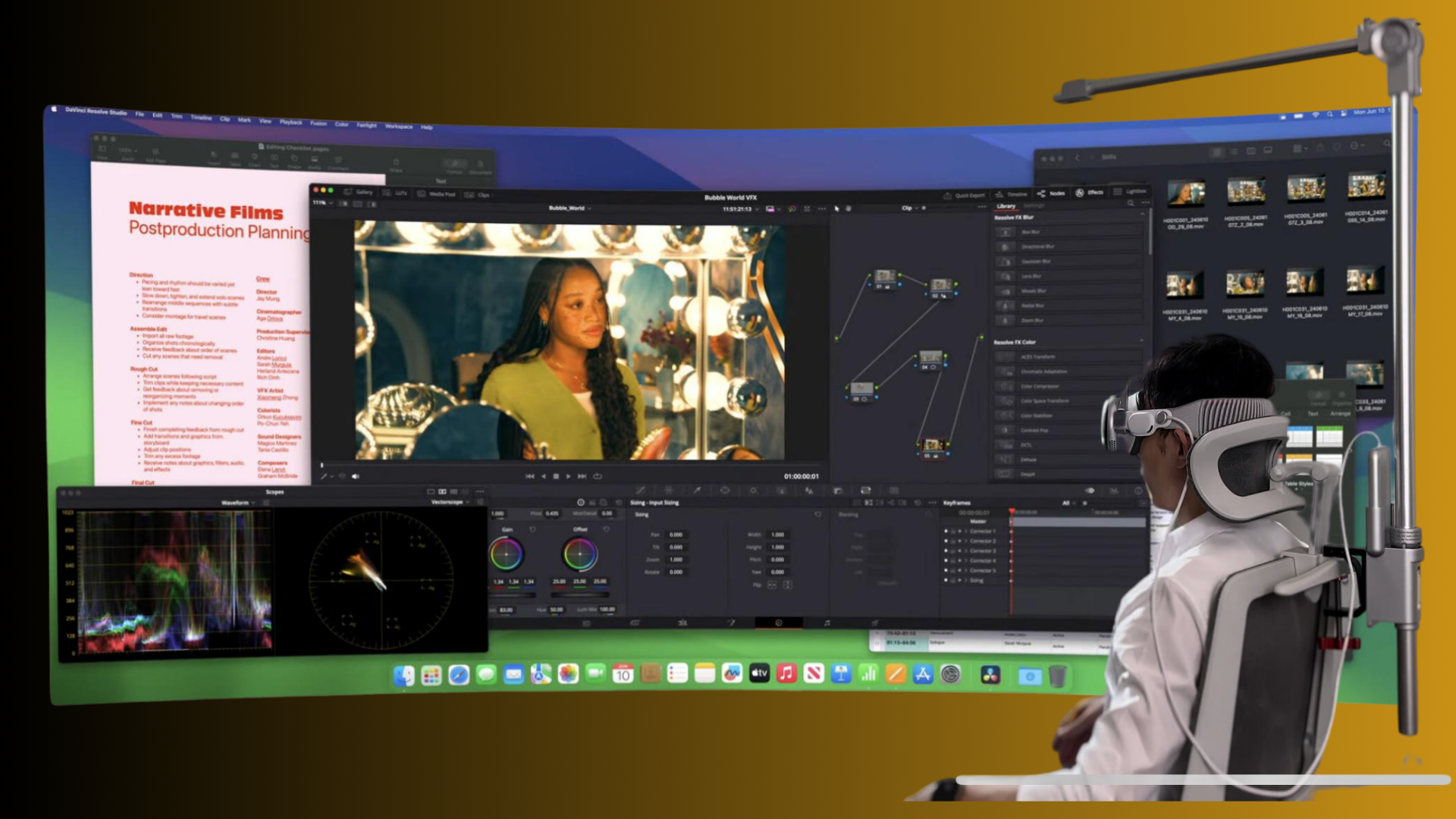
Ergonomic Breakthroughs for Pro VR: How GraviPro and Flit Lift Deliver Weightless, Posture‑Friendly Wearables
Professional VR demands more than crisp visuals and low latency — it requires a physical platform that lets users perform for hours without pain, drift, or cognitive drag. GraviPro and weightless-comfort-accessories" rel="nofollow noopener noreferrer">Flit Lift are two complementary approaches that move headset weight off the neck and onto the body in intelligent, dynamic ways. Together they create a “weightless” feeling that preserves posture, steadies tracking, and extends session time for pro gamers, studio artists, and simulation teams. ⏱️ 10-min read
This article explains the biomechanics behind weightless comfort, how each system works, practical integration advice for developers and engineers, setup and tuning tips for marathon sessions, measurable ergonomic gains from early adopters, and the accessories and standards shaping the ecosystem. Expect hands‑on recommendations you can apply to headset rigs, SDKs, and workstations today.
Why weightless comfort matters in professional VR
Weightless comfort is more than a marketing phrase — it’s a biomechanical strategy that changes how loads travel through the body. When a headset’s mass is supported by a balanced torso frame rather than hanging from the neck, axial loading on the cervical and upper thoracic spine drops significantly. That shift preserves a neutral spine: the head remains stacked over the shoulders, the pelvis retains a gentle lumbar lordosis, and the shoulder blades settle into a relaxed, slightly tucked position. The effect is immediate: reduced neck muscle activation, lower upper‑back tension, and fewer microadjustments as the user searches for balance.
These biomechanical changes matter for performance. When the torso does the bracing, leg and hip muscles don’t have to lock to keep the center of mass over the feet. Users stop “locking the knees” or making tiny corrective hip tilts to compensate for a heavy head‑mounted display. The result is a posture that can be held reliably for longer stretches — and steadier head motion that follows intent instead of compensatory drift. For professionals who rely on precise aim, fine hand movements, or long creative sessions, weightless support translates to measurable gains: lower perceived fatigue, steadier tracking, and fewer control errors over time.
How GraviPro dynamic lifting works
GraviPro approaches weightless comfort as an active, closed‑loop system rather than a fixed counterweight. At its core are precision actuators, load sensors, and a small suite of inertial measurement units (IMUs) that work together with control software to add or remove lift dynamically. Load sensors monitor the tension distribution across the harness; IMUs track orientation and body motion; and the controller continuously modulates actuator output to keep the user centered without making them feel buoyant or disconnected.
This real‑time loop is tuned for human comfort: conservative gains, rate limits, and a defined dead zone prevent jitter and overcorrection. Instead of fighting every twitch, GraviPro accepts small natural motions while offsetting sustained weight from the head and helmet. The system behaves like a trustworthy partner — it supports without anticipating every microadjustment the user might make.
From an engineering perspective, safety and usability are paramount. Actuators are sized for the expected payload and duty cycle, with thermal margins and redundant cutoffs. The setup routine includes power checks and cooling verification; the software helps technicians verify strap routing, anchor symmetry, and baseline center‑of‑gravity before a session begins. For pro workflows, that combination of hardware awareness and sensible control design yields predictable, high‑uptime performance across long sessions.
Flit Lift: the weightless comfort engine
Flit Lift complements dynamic systems like GraviPro with a focus on distributed, low‑latency levitation. Its architecture blends two concepts: per‑traction levitation and torso‑level support. Per‑traction actuators are small, localized units placed along limbs and attachment points that produce just enough upward force at joints to noticeably reduce perceived mass without isolating natural haptic input. This keeps controller feel and fine motor feedback intact — crucial for pro gamers and surgeons alike.
At the torso level, Flit Lift uses a broad support layer that shares load across the chest and back. That layer integrates pressure sensors and safety cutoffs so it can reduce overall burden while preserving immediate responsiveness to head and torso motions. The system is designed to be quiet and low‑latency — both essential for maintaining immersion and avoiding cue conflicts between visual motion and somatic sensation.
Flit Lift’s modular harnesses are configured for different body sizes and payloads, and they align mass with the user’s center of gravity. That alignment preserves natural balance and reduces compensatory movements. Built with a high duty cycle in mind, Flit Lift tolerates long sessions and frequent use without overheating or degrading performance. The practical outcome: a lighter, calmer, more sustainable feel that plays well with standard motion rigs and modern headset tracking loops.
Integrating GraviPro with VR headsets (developers’ guide)
For developers and hardware engineers, integrating a weightless system means thinking in two layers: the physical alignment with the user, and the data interfaces that let the headset and lift system act as one. GraviPro offers an API surface that exposes pose data (6‑DoF), weight distribution across harness zones, system status (battery, thermal, connection health), and haptic trigger endpoints. That gives applications the telemetry to sync events and tune feedback loops without compromising safety.
Practical integration steps include:
- Choose your data format: use JSON for tooling and logging; use a compact binary protocol or the provided OpenXR plugin for high‑rate pose streams.
- Align coordinate frames: ensure GraviPro’s IMU frames match the headset’s tracking origin to avoid transform drift when visual and somatic cues are combined.
- Latency validation: measure end‑to‑end latency between head motion and lift response; tune controller rate limits to keep action smooth but responsive.
- Haptic synchronization: map haptic triggers to in‑game events and verify timing under load so force feedback feels natural instead of delayed.
- Failover workflows: implement graceful degradation that returns the harness to a safe neutral support state if connectivity or power falters.
Reference steps exist for major platforms such as Vive, Valve Index, Varjo, and OpenXR‑native runtimes. In a typical Vive integration you’d enable the OpenXR runtime, install the GraviPro plugin, align coordinate frames, then run latency and haptic timing checks. The key is to treat the lift system as another synchronous sensor/actuator pair in the tracking chain — one that must remain predictable under load.
Practical setup and fine‑tuning for long sessions
Successful marathon sessions depend on meticulous setup. A few minutes of careful adjustment at the start saves hours of discomfort later. The following checklist is proven on studio floors and simulation labs alike:
- Unbox and inspect: lay out the frame, harness, anchors, counterweights, and cabling. Confirm parts and check for wear or damage before assembly.
- Harness placement: don the harness, snug shoulder straps, center the chest strap, and confirm there’s no pinching at the armpits. Comfort margins matter—tight enough to secure, loose enough to breathe.
- Anchor alignment: set anchors at recommended vertical and horizontal offsets so lift forces run through the torso’s major load‑bearing points. Symmetry left and right is critical for balance.
- Initial calibration: power up GraviPro/Flit Lift and run the guided calibration. The routine records baseline mass distribution and center‑of‑gravity for future sessions.
- Counterweight tuning: adjust in small increments until the system achieves a near‑neutral hang. Test with gentle torso sway and small head turns to confirm the harness doesn’t overcompensate.
- Strap tension and seat height: tighten straps evenly, then sit or stand in your normal working posture. Adjust seat so hips align with the VR center line and knees remain slightly flexed; feet should be flat or comfortably supported.
- Balance offsets: use the software’s microadjustment tools to dial out pitch or roll biases. Recalibrate after any hardware or clothing change that affects mass distribution.
During sessions, monitor thermal and battery indicators, and schedule short mobility breaks every 60–90 minutes even with weightless support. The system reduces fatigue but doesn’t eliminate the benefits of low‑intensity movement and hydration.
Ergonomic benefits: posture, balance, and immersion
Adopting weightless support yields measurable ergonomic improvements. Posture metrics typically show improved spine‑angle stability, reduced cervical axial load, and lower shoulder girdle activity. When the head’s apparent weight is redistributed through the torso harness, users are less likely to adopt forward head posture — a common, performance‑eroding response to heavy headsets.
Balance and motion flow also improve. With a steadier center‑of‑mass, users make fewer corrective micromovements: fewer head tilts, less hip/leg bracing, and fewer sudden shifts in hand posture. That freedom reduces cognitive load; operators and players can redirect attention to task‑relevant cues rather than managing discomfort. The practical effects are plain: faster target acquisition, higher tracking precision, and fewer input errors in sustained sessions.
Immersion increases as the physical system becomes less intrusive. Quiet actuation and low latency are important — if support feels laggy or noisy, it breaks presence. When implemented well, weightless systems remove a persistent sensory anchor (the heavy headset) and let visual and proprioceptive inputs align naturally. Users in simulation and design environments report deeper focus and smoother interaction patterns, while competitive players appreciate steadier aim and reduced tremor during clutch moments.
Real‑world feedback: early adopters and case studies
Case studies from aerospace, medical training, and creative studios show consistent gains from weightless support. AeroForge Labs — an engineering team working with mixed‑reality overlays — doubled their prototyping windows. Average session length rose from 60 to 90 minutes while perceived fatigue dropped from 6.2 to 3.1 on a 10‑point scale. Task throughput improved roughly 12%, and error rates declined from 2.8% to 1.9%. Their lead developer summarized the change bluntly: “We prototype twice as long without neck strain getting in the way.”
Medical training programs report similar outcomes. In simulated surgical rehearsals, sessions went from 45 to 70 minutes while fatigue scores fell from 6.0 to 2.9. Throughput rose around 15% and error rates dropped by 11% — important margins when realism and sustained concentration are critical. Design studios also saw meaningful productivity shifts: ideation blocks extended from 35 to 60 minutes, fatigue decreased from 5.1 to 2.3, and throughput increased by about 9% as teams remained engaged longer without mid‑session adjustments.
These numbers are early but consistent. The common theme is that when the physical burden is managed, cognitive and motor performance stabilizes: users don’t fight their bodies and can therefore apply more consistent skill to the task at hand. For operations where uptime and focus matter — simulation, training, or pro esports — that stability converts directly to better outcomes.
Building an ecosystem: compatible accessories and future roadmap
The future of ergonomic VR is modular. Manufacturers and developers are converging on standardized interfaces for harnesses, tracking modules, and attachable weight distribution tools so customers can mix and match components without reengineering entire rigs. Core accessory categories are already emerging:
- Harness options: chest harnesses, vest configurations, and shoulder rigs tailored for different movement profiles and torso shapes.
- Attachment rails: quick‑mount rails that accept counterweights, battery packs, forearm supports, or modular grips with tool‑free swaps.
- Weight distribution add‑ons: small rear plates, belt‑based counterweights, and pitch‑tuning weights that let users tune feel for different tasks.
- Tracking modules: external trackers and compact IMU units that provide resilient pose data as accessories change mass and inertia properties.
- Cloud calibration and profiles: save user‑specific fit and tuning data to the cloud so multiple stations can recreate exact setups quickly.
Modularity extends the hardware life cycle. Upgrade a harness or battery without replacing the entire headset; add a lighter counterweight or an integrated rigid rear plate as workflows evolve. Software standards — OpenXR plugins, shared telemetry schemas, and safe‑state APIs — make third‑party integrations safer and simpler. The roadmap also points to tighter sensor fusion between lifts and headsets, smarter adaptive controllers that anticipate task phases (e.g., heavy‑lifting gestures vs. fine manipulation), and broader ergonomics tooling that tracks long‑term user health signals.
For developers and operations managers planning large deployments, prioritize systems with modular rails, standardized data interfaces, and cloud profile support. That combination protects investment, simplifies scaling, and accelerates iterative improvements informed by real usage data.
Next step: if you’re deploying GraviPro or Flit Lift in a studio or lab, run a short pilot that pairs objective telemetry (session length, error rates, pose stability) with subjective fatigue surveys. Use those results to create baseline calibration profiles and to tune integration parameters in your engine or runtime. Small, measured pilots produce the fastest path to sustainably longer sessions and better outcomes.







Compartir:
Maximizing ergonomics: long-session VR posture with weightless comfort accessories
Maximizing VR endurance: battery life and efficiency with GraviPro tech