

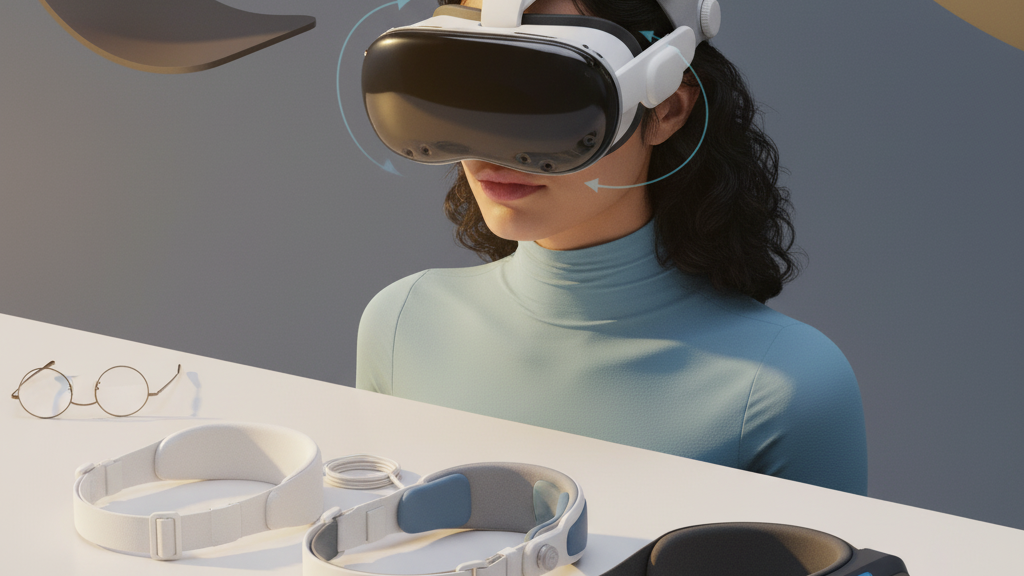
How to Choose a Quest Head Strap for Long Gaming Sessions: Balance, Adjustability, and Accessory Compatibility
If you plan to spend hours inside your Quest 2, the strap you choose matters as much as the headset itself. A better strap reduces forehead pinching, prevents neck fatigue, and keeps your setup stable during intense movement. The right choice isn’t just “more padding” — it’s about where the weight sits, how you tune it to your skull, and whether it plays nice with glasses and accessories. ⏱️ 12-min read
This guide walks Quest 2 owners through a practical decision path: assess what matters to you, compare the common strap types, measure balance and weight, install and fine-tune a weight-distribution-matters-in-quest-2-straps" rel="nofollow noopener noreferrer">comfort strap, and maintain it so long sessions stay comfortable. Expect concrete tests, step-by-step installation tips, and hands-on advice for glasses wearers and accessory users (battery packs, wireless mods). By the end you’ll have a short, prioritized checklist to pick and tune a strap that actually improves your endurance, not just the look of your rig.
Assess your comfort priorities for long sessions
Start by identifying what makes a session feel long: is it the slow burn of neck fatigue, sudden temple soreness, or the gradual pressure mark across your forehead? Turn those sensations into a short list of non-negotiables that guide your strap choice. Typical priority factors for extended play include weight distribution, adjustability, padding quality, glasses clearance, and how well the strap works with battery packs or wireless adapters.
Set a simple, repeatable test framework you can use when evaluating any strap. Baseline with your current stock strap and make quick notes at 15, 30, and 60 minutes: where do you feel pressure, when does your neck start to ache, is there fogging or lens contact with glasses? Then run a 60–90 minute session that mimics the gameplay and environment you usually use, and record hotspots, numbness, and any readjustments required. Your non-negotiables might look like:
- No forehead pinching or red marks after one hour
- Even crown support to stop shifting and reduce re-tightening
- Glasses fit without contact or fogging
- One-handed, repeatable adjustments to fine-tune fit mid-session
- Compatibility with a rear-mounted battery without creating a back-heavy pull
Keep the list short—three to five items. When you test straps, use the list to score each contender. That focused approach makes it obvious which trade-offs are acceptable and which aren’t for your typical sessions.
Understand Quest 2 strap options: stock, Elite Strap, and third-party
There are three practical families of Quest 2 straps: the stock strap, Meta’s Elite Strap (with or without the battery), and a growing set of third-party comfort options from brands like AMVR, Kiwi Design, and Victony. Each serves different priorities.
The stock strap is light and simple. It’s easy to swap in and out and won’t overwhelm the headset’s natural balance, but padding is minimal. Expect more pressure on the forehead and temples during sessions longer than 30–45 minutes. If you change games often or prefer a minimalist carry, the stock strap’s low profile has advantages.
The Meta Elite Strap improves balance noticeably. Its wider contact points and firmer crown support move weight away from the face and distribute it more evenly across the head. The Elite Strap with Battery adds runtime but also shifts the center of gravity toward the rear—often a benefit, but not always; it can reduce front pressure but the extra rear weight may fatigue the neck if not tuned properly. Installation is straightforward and well-documented, and pricing is premium compared to the stock strap.
Third-party options often hit a strong value proposition: better padding materials, different foam profiles, and creative attachment designs that improve glasses clearance or reduce heat transfer. AMVR and Kiwi Design focus on plush padding and wider contact areas; Victony offers compact, adjustable systems that balance cost and durability. Before buying, check mounting compatibility, warranty terms, and how the strap attaches—some third-party straps require a little more hands-on installation than Meta’s official parts.
Weight and balance: what to measure and why it matters
Weight is only half the story; balance is the other half. The Quest 2 headset is lighter than many competitors, but even a modest imbalance will turn an otherwise comfortable session into neck ache after 20–30 minutes. If the load sits too far forward, you’ll feel forehead and nasal bridge pressure. If it sits too far back, the headset can pull on the occipital muscles and produce an odd backward tilt that affects tracking.
Measure these points when comparing straps: front vs. back load at anchor points, crown pressure, and any lateral tilt while standing and seated. A simple practical test: with each strap fitted, turn your head steadily left-to-right and pause at the extremes. Where does the weight feel concentrated? Do you get even contact across the crown, or does one temple press harder than the other? Note whether the headset tilts when you switch posture from standing to sitting—small changes in posture reveal imbalances.
Choose straps that bias support toward the crown or sides rather than the face. Crown-mounted padding spreads load across a larger area and often reduces hot spots. Back-mounted battery packs can improve front pressure by counterbalancing the front-heavy optics, but they must sit low and tight so they don’t create a pendulum effect during quick pivots. Small lateral tilts may be resolved by simple side-strap adjustments; persistent tilt usually signals a strap architecture problem and should guide your selection.
Installation guide: swapping in a comfort strap (step-by-step)
Swapping a strap should be deliberate. Follow these steps to remove the stock strap and attach a comfort option without damaging connectors or padding.
- Power down the headset and unplug any accessories. If you have an external battery, remove it first and let the headset sit for a minute to discharge residual power.
- Inspect how the current strap attaches. Locate quick-release tabs, screws, or clip points. Take a photo if orientation or cable routing looks complex—photos save time when reattaching things.
- Detach the existing strap carefully. Press release tabs while lifting; avoid forcing plastic clips, which can snap. If a screw secures the strap, use the correct screwdriver and keep screws in a safe place.
- Prepare the new strap: align its mounting points with the headset shell. If the strap includes a rear battery plate or clip, loosely position it so you can fine-tune angle after the strap is mostly installed.
- Seat the new strap: snap or screw the side anchors into place, then set the top strap over the crown and fasten any back panels. Make sure connectors click or threads seat fully—loose attachments can create wobble and wear.
- Do a preliminary fit: tighten just enough for a snug feel, check padding alignment, and ensure no cables are pinched. If you hear a rubbing or creak during head turns, re-check anchor seating.
- Run a short 10–15 minute test session before full use. Re-check screws and clips after first use; new straps can settle a bit and require a small retighten.
Care during installation helps prevent cracked mounts and keeps the headset’s fit consistent session to session.
Fine-tuning fit: height, strap length, and customizing pressure
Once the strap is installed, the work begins: dial in height, left-right balance, and tension so weight sits on the crown, not the nose or temples. Aim for even pressure and the ability to move your head freely without slip or numbness.
Height adjustment: move the top strap anchors to align with your crown. The goal is to shift load onto the upper skull where muscles are stronger and less sensitive. If you notice a single pressure point, slide the anchor up or down by about a finger’s width and test again. Small increments matter.
Left-right balance: set both side straps to equal lengths and check for any tilt. Unequal lengths cause persistent slanting that gets worse the longer you play. After adjusting, rotate your head gradually to both sides and feel for balanced support—use a mirror or record a short video to verify symmetry.
Pressure customization: tighten gradually and simulate real movement. Tightness should be enough to prevent bounce but loose enough to avoid pinching or numbness around the temples. If you experience numbness, loosen a notch and re-evaluate. For long sessions, check your fit after 20–30 minutes and tweak as needed; many people find a slightly looser fit for endurance and re-tighten only for high-intensity moments.
Small mods can help: micro-pads or adhesive foam placed at the crown can redirect pressure, while silicone strap covers reduce friction and heating. Keep notes on what you change so you can replicate the setup next time.
Glasses wearers: ensuring clearance and comfort with long sessions
Playing with glasses introduces extra variables: clearance, lens contact, pressure on the nose bridge, and fogging. The right strap and facial interface will create enough room so your frames aren’t pressed against the headset foam.
Start by checking the facial interface—some third-party pads offer deeper foam around the nose and temples, which creates more clearance without breaking the seal. When testing a new strap, put your glasses on and adjust the top strap height so the headset sits slightly further from the face; this shifts force away from the bridge and reduces lens contact. Recalibrate your IPD if you change headset position significantly.
Practical checks to run during your 60–90 minute trial:
- Put on the headset and perform quick head turns—do your frames stay behind the bridge or do they press forward?
- After five minutes of moderate movement, check for fogging and whether the frames have shifted.
- If you feel pressure on the temples, try a softer pad or a thinner frame; round frames often tuck more comfortably than wide rectangular ones.
Anti-fog wipes and a modest break schedule (five minutes every hour) help with moisture. If you continually have issues, look for straps and interfaces explicitly marketed for “glasses-friendly” use—these often include a deeper nose well or modular padding swaps that restore comfort without sacrificing optical alignment.
Compatibility with accessories: battery packs, wireless mods, and Vision Pro cross-notes
Accessories extend playtime and freedom, but they change how your strap must perform. A rear-mounted battery pack is one of the most common additions; when mounted low and close to the skull it acts as a counterweight to the front-heavy optics, often improving comfort. Look for packs in the 5000–7000 mAh range that mount with secure clips or silicone grips and sit flush to avoid creating a pendulum effect during fast pivots.
Wireless adapters and external antennas add bulk; prioritize kits that are slim and have dedicated mounting points. Avoid adding an accessory that presses into the scalp or forces the strap into an awkward angle. Cable management matters—route cables along the headset frame using clips so they don’t tug the front of the headset and alter balance.
Regarding cross-compatibility with devices like Apple Vision Pro: accessories designed specifically for one headset rarely fit another without adapters. Vision Pro accessories are not directly compatible with Quest 2; bridging options exist in the modding community but often require custom mounts or 3D-printed adapters and can void warranties. If you plan to run mixed hardware, choose a strap system with modular mounting—one that accepts a variety of clip-on plates—so you can adapt accessories without stressing attachment points.
Before attaching any accessory, run a short session to see how the new weight affects your starting list of non-negotiables. If a battery pack reduces forehead pressure but creates neck fatigue after 45 minutes, you may prefer a lighter battery or a different mounting position.
Maintenance and durability: cleaning, padding wear, and replacements
Comfort is sustained only through proper care. Sweat, oils, and dirt degrade padding and stitching over time, so set a simple maintenance routine. Wipe straps and padding with a microfiber cloth dampened with mild soap and water after heavy sessions. Let components air-dry away from direct sunlight or heat sources; excessive heat warps foam and adhesives.
Watch for padding wear indicators: flattened foam that no longer springs back, delamination between foam layers, or cracked outer surfaces. These signs mean the cushion’s effective height and pressure distribution are compromised—replace pads before you notice a sudden loss of comfort mid-session. Inspect seams and attachment points monthly if you use the headset frequently; fraying or loose stitches at the anchors can lead to failure and should be addressed before they worsen.
Replacement cadence depends on usage. Casual users can expect to check components every two to three months, while heavy daily users should do a monthly review. Keep spare pads or a backup strap if you have long sessions planned or attend events. Store your headset and strap in a cool, dry place, ideally on a stand that keeps the unit off rough surfaces and prevents straps from deforming.
Budget decisions and quick recommendations: best value options and where to start
Budget is a practical constraint and it influences which trade-offs you accept. For the majority of extended sessions, the safest starting point is the official Meta Elite Strap (or the Elite Strap with Battery if you need extended runtime). The Elite strikes a balance between improved padding, predictable fit, and straightforward accessory compatibility—its weight and center-of-gravity behavior are well-documented, and many users find it a clear upgrade over stock for sessions longer than one hour.
If price is a concern, reputable third-party brands offer strong value. AMVR and Kiwi Design sell thicker, softer pads and wider contact points at lower prices than Meta’s battery option; Victony and similar makers provide modular systems that balance padding and adjustability for less money. When choosing third-party, prioritize measured improvements: firmer crown support, predictable attachment points, and positive reviews about long-session comfort. Avoid impulse buys that advertise “more padding” without better balance; extra cushion alone can make the headset sit too far from your face and disrupt optics.
Quick starter recommendations:
- Want the surest single upgrade: Meta Elite Strap (with or without battery)
- Want value and thicker padding: AMVR or Kiwi Design comfort kits
- Want modular adaptability and lower price: Victony-style adjustable straps
Whatever you pick, use the test framework you created in the first section: baseline, 15/30/60-minute checks, and a 60–90 minute continuous run. That simple process will tell you whether the strap is a temporary novelty or a real comfort win.
Next step: pick two straps—one official and one third-party—that meet your top three non-negotiables, install each using the step-by-step guide above, and run your side-by-side 60–90 minute tests. Record results and choose the strap that keeps you in-game longer without the unwanted trade-offs you wrote down at the start.







Compartir:
Ergonomic breakdown: where weight distribution matters in Quest 2 straps
Upgrading Quest two comfort: top aftermarket straps and how they change fit