

Choosing the Best Quest 2 Head Strap for Sensitive Skin: Materials, Padding, and Fit for Long Sessions
If you have sensitive skin, wear glasses, or simply play VR for hours, the right Quest 2 head strap can make the difference between irritation and effortless comfort. This guide walks through skin‑safe materials, padding design, breathability, fit, installation, and upkeep so you can pick a strap that reduces rubbing, wicks sweat, and distributes weight without constant fiddling. ⏱️ 8-min read
Read the practical tips, quick setup steps, and real examples to help you identify hypoallergenic options and retrofit your headset for longer, more comfortable sessions.
Materials that minimize skin irritation
The first line of defense for sensitive skin is what actually touches your face and scalp. Look for straps that use breathable, low‑irritant materials: cotton and high-quality microfiber feel soft against the cheeks, while medical‑grade or lightweight silicone linings reduce friction against temples and ears. Silicone also wipes clean easily after sweaty play.
Not all “soft” materials are equal. Favor products with independent certifications like OEKO‑TEX Standard 100 or clear vendor testing that confirms low chemical residues. Ask about dyefastness and low‑toxicity finishes—strong dyes, harsh adhesives, or leftover manufacturing residues are common culprits behind itching and redness. For hardware, choose nickel‑free buckles or coated ceramic/metal fittings to avoid metal allergies.
Finally, pick straps with durable colors and washable covers. A machine‑ or hand‑washable sleeve prevents buildup of oils and detergents that can aggravate skin over repeated sessions.
Padding design and density for sensitive skin
Padding is where comfort and pressure distribution meet. The ideal design balances softness, support, and rebound so pressure points don’t develop on your forehead, temples, or cheekbones.
Key considerations:
- Foam density: Low‑density foam feels plush but can compress quickly; higher‑density foam keeps shape longer and spreads load. For sensitive skin, a medium density with a soft outer layer often works best.
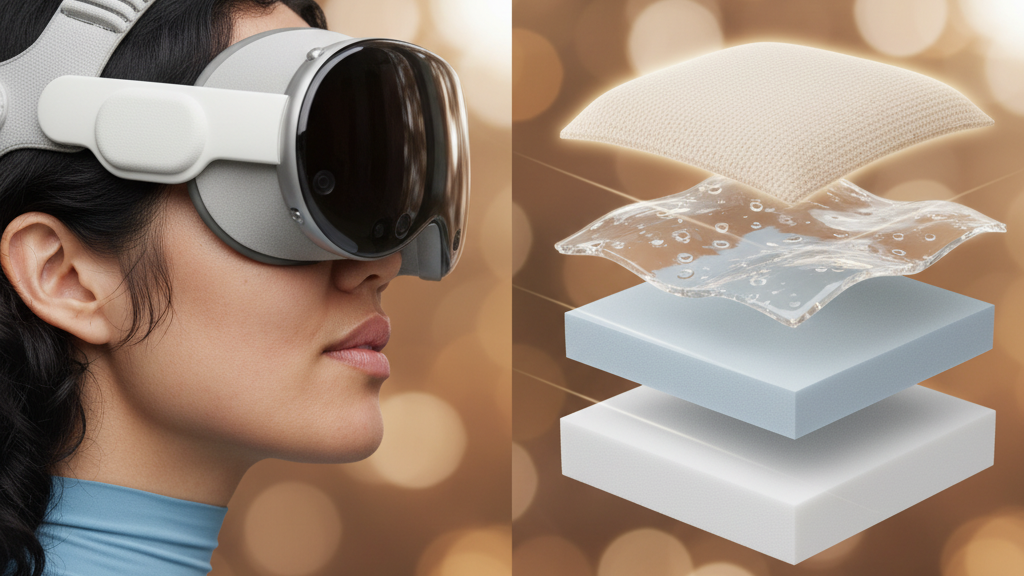
- Layering: Many premium straps use a soft top layer (memory foam or low‑resistance foam) over a firmer base. Memory foam conforms to facial contours and reduces hotspots, while a firmer base preserves overall shape and keeps the headset stable.
- Gel and silicone inserts: Gel or silicone layers add cooling contact and reduce shear (sliding) forces—helpful if your skin reacts to friction.
- Contact width and seams: Wider pads (aim for 2–3 cm of continuous contact) and flat, minimal seams prevent concentrated pressure and rubbing on sensitive areas.
Remember that thicker padding can add comfort but also trap heat. If you value cooling, prioritize breathable covers and perforated foams rather than simply adding bulk.
Breathability and moisture management
Heat and sweat dramatically increase the likelihood of irritation. Breathable construction and moisture‑management fabrics keep skin drier and reduce friction-related redness.
Look for these features:
- Perforated foam and mesh panels that create air channels between skin and strap.
- Moisture‑wicking covers that pull sweat to the outer layer to evaporate faster—think technical fabrics used in sportswear rather than plain polyester.
- Quick‑dry and washable materials so you can clean and reuse without trapping moisture in the padding.
- Antimicrobial treatments if you sweat heavily; these slow odor and microbial buildup that can irritate sensitive skin. Verify treatments are skin‑safe and not irritating themselves.
Practical maintenance habits make a big difference: wipe silicone covers after sweaty sessions, launder removable fabric sleeves weekly (or after heavy use), and let pads air‑dry fully before storage to avoid lingering dampness.
Fit and adjustability for long sessions
A properly distributed fit reduces hotspots and prevents the strap from squeezing your temples or glasses. Strap geometry is as important as padding material.
What to check:
- Wide, evenly padded straps that distribute load across the scalp rather than concentrating it behind the ears.
- Crown or top‑strap designs that lift some weight off the forehead and keep the headset stable during movement. A well‑positioned crown strap reduces downward drift over long sessions.
- Micro‑adjustments—ratchets, dials, or repeatable notch systems—so you can make small, reliable changes and return to the same setting later.
- Glasses clearance: ensure the strap provides room for temple arms without pinching. If your frames press into your cheeks or cause lens misalignment, raise the strap slightly and tilt the headset to ride above the frames.
- Durable hardware: sliders and dials should lock reliably. Replaceable parts or reinforced plastic/metal fittings last longer under repeated adjustments.
Installation and beginner-friendly setup
Installing a comfort strap doesn’t need to be fiddly. Follow this step‑by‑step routine to get a balanced, non‑irritating fit on your Quest 2:
- Unpack and inspect: confirm you have the crown band, side straps, pads, screws/fasteners, and any adapters. Wipe the headset’s mounting areas with a microfiber cloth to remove dust or oils.
- Align and attach: position the crown slider at the headset’s top center. Attach side straps evenly—don’t fully tighten yet.
- Tighten gradually: tighten screws and straps in small increments while testing balance after each adjustment. Keep parts aligned to avoid twisting the cushions.
- Test for hotspots: wear the headset for five minutes and examine the forehead, temples, and cheeks. If you feel pressure, loosen or raise the crown slightly and re‑test.
- Record settings: note notch numbers or take a quick photo so you can reproduce the fit later.
- Fine‑tune for glasses: if you wear glasses, check temple clearance and tilt the headset slightly up to reduce cheek pressure. If lenses fog or shift, try a thin silicone anti‑slip pad or a lightweight counterweight at the back.
Common mistakes include overtightening (causes pressure and skin blanching) and failing to fully seat cushions so edges rub the skin. Small incremental adjustments are better than big jumps.
Comfort strap comparisons: Quest 2 vs Elite Strap and third‑party options
Choosing between the stock Quest 2 strap, the Oculus/Meta Elite Strap, and third‑party alternatives depends on how much you prioritize balance, materials, and cleaning ease.
Stock Quest 2 strap: lightweight fabric with a thin foam pad mounted to a simple plastic frame. It’s minimal and breathable but can concentrate pressure on the forehead and its narrow edges may rub sensitive skin during long sessions.
Elite Strap: heavier, with thicker cushioning and sometimes an offset hinge that moves pressure away from the center of the forehead. Materials usually mix memory foam and rigid plastic for stability. Better for longer sessions, but adds weight—consider back counters or a balanced strap design to keep front pressure low.
Third‑party options: a wide range—from budget fabric pads to premium silicone, cork, or memory‑foam systems. Fabric covers tend to breathe well but wear faster; memory foam is supportive but can trap heat; silicone stays cool and wipes clean easily. Many third‑party manufacturers offer hypoallergenic or medical‑grade options and removable covers for washing.
Compatibility and cost: most aftermarket pads fit via standard attachment points, but check for required adapters. Prices vary widely—compare longevity and cleaning needs rather than buying by price alone. If you have sensitive skin, prioritize washable, certified materials over a cheaper but untested option.
Maintenance and cushion replacement
Regular care prevents skin irritation and extends the life of your cushions.
Cleaning cadence and methods:
- Foam cushions: wipe down every 1–2 weeks with a damp cloth and mild soap; avoid soaking. Allow complete air‑drying.
- Fabric covers: remove and machine‑wash on a gentle cycle if the manufacturer allows; otherwise spot‑clean and air‑dry fully.
- Silicone covers: wipe with mild soap or isopropyl alcohol and dry before reuse.
When to replace cushions: look for permanent compression (pads that don’t rebound), cracks, creases, uneven firmness, or visible deformities. Replace if you notice increased hotspots, slipping, or loss of support. Most users benefit from quarterly checks and replacing cushions every 6–18 months depending on use and material.
Finding replacements: buy from OEMs or reputable third‑party vendors that specify Quest 2 compatibility. Clean attachment points before swapping pads and test the fit immediately. Check warranties and return policies—pads that compress prematurely are often covered.
Weight distribution and glasses‑wearer considerations
Proper weight distribution relieves the pressure glasses can amplify. When the headset is front‑heavy, the forehead and cheekbones bear most of the load; this pushes glasses into the skin and can cause pain after an hour.
Practical solutions:
- Add a light rear counterweight (or use a strap with a rear stabilization pad) to shift load toward the back of the head. Even a small counterweight dramatically reduces forehead pressure.
- Raise the crown strap slightly so the headset rides above the temple arms instead of pressing them into your cheeks. A slight upward tilt often keeps lenses aligned and reduces cheek pressure.
- Use wider straps and flatter seams to avoid the band digging into the sides of your glasses. Silicone anti‑slip pads beneath the strap stop slipping without extra tightening.
- If your frames are wide, test strap height and geometry in short sessions, increasing session length by 15–25 minutes as you confirm there’s no irritation.
Real examples: one Quest 2 user with chafing after 40 minutes switched to a third‑party strap with medical‑grade silicone and a microfiber cover—irritation disappeared and playtime extended to 90 minutes. Another user replaced the stock band with a breathable mesh liner and a wider crown pad and found that 120‑minute sessions no longer produced redness or sweat buildup.
Next step: try a strap with certified, washable materials and medium‑density layered padding, set it up with small incremental adjustments, and test in short sessions—then extend playtime while monitoring any skin response. Keep a spare washable sleeve or silicone cover on hand so you can rotate and clean without losing comfort.
Powered by Trafficontent







Compartir:
Quest 2 Strap Length Adjustments: Finding the Ideal Fit for Different Head Sizes
Quest two Strap System Showdown: Stock vs Elite Strap vs Third-Party Options