

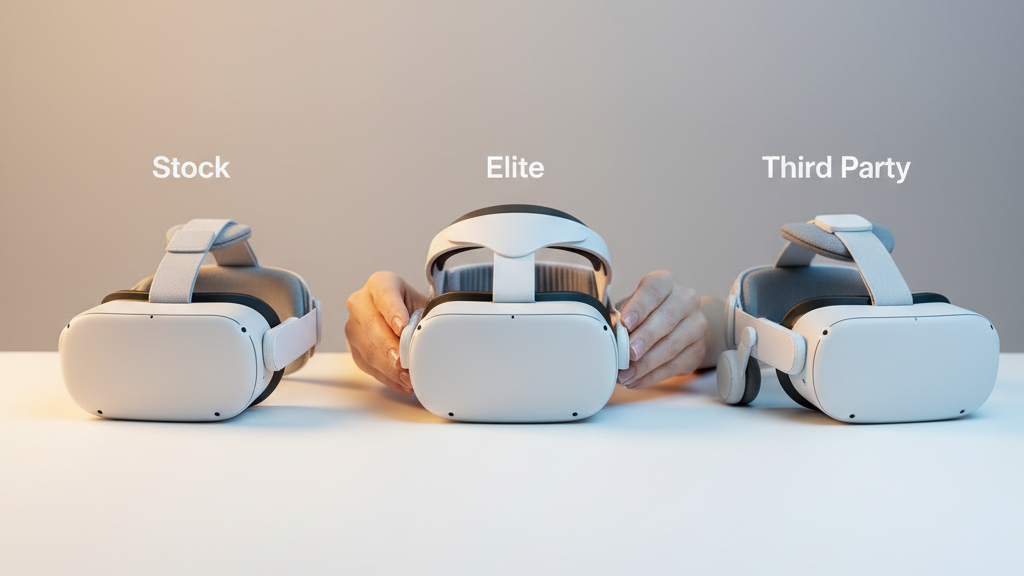
Quest 2 Strap System Showdown: Stock vs Elite Strap vs Third‑Party Options for Long‑Session Comfort
If you use a Quest 2 for more than an hour at a time, the strap you choose will dictate whether you finish a session energized or sore. This guide gives a practical, no‑hype comparison of the stock Quest 2 strap, Meta’s Elite Strap (with and without the battery), and the best third‑party alternatives—focusing on comfort, fit, weight distribution, and long‑session durability. ⏱️ 7-min read
I'll walk through what each option does well, the common tradeoffs, simple installation and tuning steps, and care tips that keep straps feeling fresh for months of play. The goal is to help you pick a strap that suits your head shape, glasses, and typical play length—without guessing.
Stock Quest 2 Strap: Baseline Comfort
The stock Quest 2 strap is the baseline for most owners: a lightweight fabric band with a Velcro closure that wraps around the back of your head. Its strengths are speed and simplicity—put it on, pull to tighten, press the Velcro, and you’re ready in under a minute. For casual sessions (30–60 minutes) it stays unobtrusive and keeps headset weight low.
That simplicity is also the limitation. The stock strap concentrates most of the load on the crown of your head. Over longer sessions you’ll usually notice pressure behind the ears, a hot spot on the top of the head, and heat under the fabric. Glasses wearers often report frame pressure and occasional fogging during quick head movements because the headset sits a little lower and lacks extra rear support. If you plan multi‑hour sessions, expect to outgrow the stock strap’s padding and adjustability.
Elite Strap: Features, Fit, and Battery Options
The Elite Strap trades the stock band’s softness for a rigid frame with side sliders and a curved rear pad that cradles the back of the head. That structure reduces front‑end wobble and stabilizes the display during active movement. The side sliders provide finer tension control than the stock Velcro, so you can dial in a more secure fit for different head shapes.
Adding the optional Elite Strap Battery brings real benefits—longer playtimes without tethering—but it also moves mass rearwards. That back‑mounted power pack can improve balance by countering the front weight, but it increases overall heft and may add neck strain during extended sessions if not adjusted properly. Expect to retune the side sliders and crown tension after installing a battery pack; people with longer necks or high foreheads may feel different pressure patterns and should test balance in short increments before long sessions.
Third‑Party Straps: What to Consider and Top Brands
Third‑party straps span a broad range of designs: halo/halo‑style frames, padded rear panels with counterweights, lighter metal frames, or soft padded systems. When evaluating options, use these metrics as your checklist:
- Padding quality: foam density, cover fabric (breathable cloth vs faux leather), and replaceable pads.
- Adjustability: micro‑sliders, quick‑release levers, and multi‑point attachments reduce wobble and let you fine‑tune balance.
- Weight and frame material: plastic keeps weight down; aluminum or reinforced frames add durability with a small weight penalty.
- Compatibility and warranty: clear compatibility specs, an easy return policy, and at least a one‑year warranty are worth paying for.
Notable makers to consider include KIWI Design, AMVR, FlitLift, and Bobo. KIWI Design often focuses on comfortable rear pads and counterweights; AMVR and FlitLift offer robust halo systems and replaceable pads; Bobo produces cost‑effective padded solutions. Tradeoffs are typical: a strap with a rear counterweight will reduce forward tilt and neck strain but add mass; lighter frames feel less cumbersome but may transmit more wobble during quick turns. Read reviews about fit for glasses wearers and check whether parts are replaceable—stitching or foam wear is the most common failure over time.
Installation and Adjustment: Quick Guide for Beginners
Installing most straps is straightforward, but getting the fit right takes a few minutes. Follow this sequence whether you’re swapping the stock band for the Elite Strap or a third‑party unit:
- Power off the headset. Remove the existing front and rear strap clips (the front clips first, then the rear).
- Attach the new strap: connect the front segment first, then secure the rear. Ensure clips seat firmly and latches click into place.
- Put the headset on with a loose initial fit. Adjust crown (top) tension and rear sliders so the display sits centered without pressing hard on the forehead.
- Perform a shake and nod test: look up/down and shake gently. If the display shifts, tighten in small increments and retest.
- After 5–10 minutes of wear, recheck for pressure marks and hotspots and fine‑tune. Lock settings once comfortable.
Tools: most installs don’t require tools. Some third‑party straps add screws or small brackets—keep a Phillips screwdriver handy. Avoid overtightening screws; follow manufacturer torque guidance to prevent stripped threads. If a strap feels unstable, check for missing spacers or improperly seated clips before blaming the strap design.
Weight, Balance, and Comfort in Long Sessions
Comfort over hours comes down to two things: where the mass sits, and how the load is distributed. The stock strap focuses load on the crown, which often creates a hotspot. The Elite Strap spreads load to the sides and rear, reducing crown pressure at the cost of added heft. Third‑party straps often introduce a rear pad or counterweight to move the center of mass backward, reducing forward tilt and neck strain.
Aim for this practical balance target: the headset should be "snug enough to keep the display from shifting, loose enough to avoid pinching." Specific tuning tips:
- If the front of the headset feels heavy: loosen the top strap slightly or slide the crown pad forward so the rear pad takes more load.
- If the rear rises when you look down: tighten the rear strap or lower the crown to shift tension back toward the halo.
- For glasses wearers: choose a wider, softer strap with more rear padding and a lower headset placement to reduce nose‑bridge pinch and temple pressure.
Practical test: after a strap change, try a 30‑minute session with a mix of head movement. If you feel a hotspot forming in less than 30 minutes, re‑adjust or consider a strap with a rear counterweight and thicker padding.
Compatibility, Accessories, and Cross‑Brand Considerations
Compatibility mainly hinges on mounting posts and the shape of the crown or halo. The stock Quest 2 strap and Elite Strap share side posts, but the Elite’s back panel and its battery pack alter geometry. Many third‑party makers claim broad compatibility—check product specs for "Quest 2" specifically rather than general headset language.
If you mix brands, watch for these common issues:
- Missing spacers or mismatched clip geometry that causes tilt or pinching.
- Battery modules not seated correctly because the third‑party back panel uses different thicknesses.
- Warranty anomalies: using non‑OEM accessories can sometimes affect support for unrelated hardware issues—keep receipts and document installation steps.
For perspective, Apple Vision Pro strap designs put a lot of emphasis on broad surface contact, breathable padding, and modularity. You can borrow the principle—look for straps that increase contact area on the rear of the skull and offer breathable materials—without necessarily needing Vision Pro‑level cost.
Care, Maintenance, and Longevity of Quest 2 Straps
Routine care extends strap life and keeps foam and stitching from failing mid‑session. Follow a simple maintenance schedule:
- Every few weeks: inspect screws, clips, and the halo ring for looseness, wobble, or hairline cracks; tighten loose screws gently.
- After heavy sessions: wipe cushion surfaces with a damp cloth and mild detergent, then air‑dry completely before storage.
- Storage: keep the headset in a cool, dry place away from direct sunlight; use a breathable bag or case to avoid compressing foam pads.
- Rotation: if you own multiple straps, rotate them to spread wear. Consider removable sleeve covers to reduce oils and sweat on foam.
When to replace parts: replace a strap if clips develop significant play, stitching unravels, foam compresses permanently, or you detect stripped mounting threads. Many manufacturers offer replaceable pads and a one‑year hardware warranty—use it when needed rather than jury‑rigging a damaged mount.
Next step: pick the simplest upgrade that addresses your biggest pain point. If you’re crown‑sore after an hour, an Elite Strap or a third‑party halo with a rear pad will help. If you need longer battery life and don’t mind extra weight, add a battery module but tune the rear and crown tension before a marathon session.
Powered by Trafficontent







Compartir:
Materials and Padding: Choosing the Best Quest 2 Head Strap for Sensitive Skin
Glasses wearers guide to Quest 2 strap height and padding comfort