

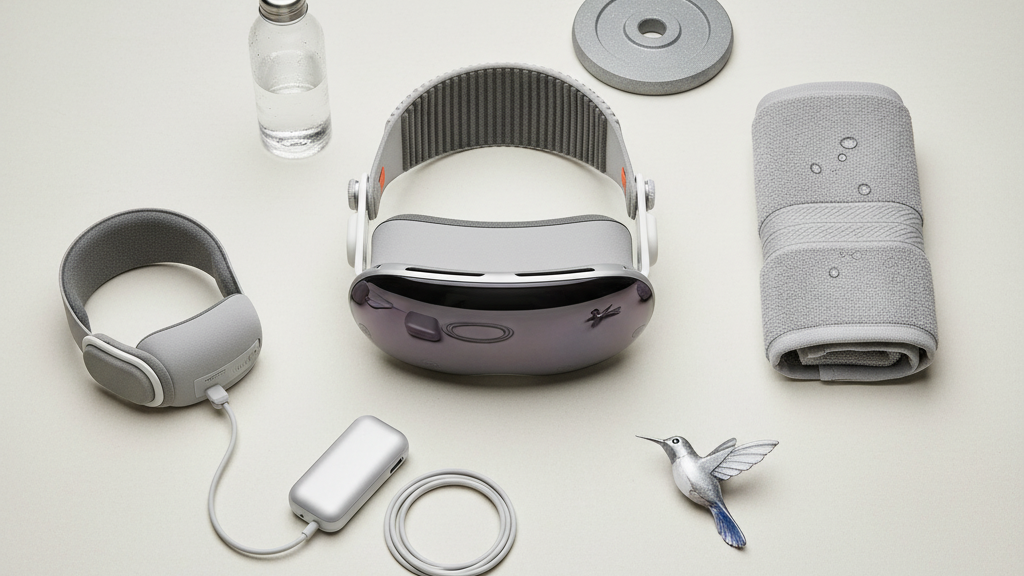
Sweat‑Proofing Your Vision Pro Workouts with FlitLift: Practical, Equipment‑Backed Strategies for Secure Fit and Comfort
Intense workouts expose weaknesses in even the best headsets: sweat loosens straps, fog creeps across lenses, and pressure points flare up. If you use an Apple Vision Pro for training—running, HIIT, weightlifting, or extended cardio—you need more than reassurance; you need tactics that keep the headset stable, breathable, and clean when things get heated. ⏱️ 10-min read
This guide walks through a practical, equipment‑backed routine centered on FlitLift—how it redistributes weight and reduces forehead pressure, what to tweak for different head shapes and glasses, moisture management on the go, display and passthrough settings for safer movement, sweat‑friendly accessories, and long‑term care. Read it for step‑by‑step setups, quick tests you can do between sets, and real‑world examples that show what works when you’re sweating hard.
Assess Sweat-Impact on Vision Pro Comfort
Sweat affects headset comfort in predictable ways, and recognizing those patterns is the first step to managing them. In cardio sessions—running, cycling, or HIIT—the forehead and temple area are the primary trouble spots. Sweat pools there, pressing against the face seal and creating small gaps that let warm, humid air reach the lenses. That rising moisture increases fog risk and can cause intermittent slipping as the strap encounters slick skin. During strength workouts, sweat accumulates more steadily and repetitive tightening or bracing motions can shift the seal, producing rubbing along the nose bridge and cheeks.
Set realistic expectations for comfort: you’ll likely feel more heat and need brief micro‑adjustments during longer or higher‑intensity blocks. A useful field method is to divide your session into 5–10 minute blocks and note a few simple indicators after each block: seal snugness, perceived weight, heat under the unit, and any moisture pooling. Keep a short log—Block 1, Block 2—with one line observations. Over several sessions this builds a baseline you can tune: which strap tension feels right for runs vs. circuits, whether a headband reduces fog on outdoor routes, or when to swap out cushions.
Watch for these signs of trouble: slipping on the nose, lens contact with eyelashes, a ring of dampness around the foam seal, or hotspots that cause redness. Catching these early reduces the need for emergency adjustments mid‑set and protects both your skin and the Vision Pro seals from excess wear.
Leverage FlitLift for a Sweat-Ready Fit
FlitLift’s design purposefully redistributes the headset’s load and reduces frontal pressure—exactly what a sweat‑heavy session needs. When skin becomes slick, narrow straps can slide and concentrate force on the forehead; FlitLift’s extension plate and wider contact area spread tension across the crown so the headset resists shifting even when you’re breathing hard.
Installation is straightforward but worth doing carefully: tuck the FlitLift extension plate beneath the Vision Pro’s main strap so the load sits across a wider surface. Secure any anchors per the included guide and set initial tension to snug—but not pinching. Then run a short movement test: a quick three‑step jog on the spot, a couple of aggressive head turns, and a simulated squat or deadlift setup. Watch for any hair‑catching or sliding. If you notice movement, tighten incrementally and re‑test; FlitLift is designed so you can make those micro‑adjustments without removing the headset.
Practical benefits you’ll notice during intense training: reduced strap slip, fewer forehead pressure hotspots, and faster re‑tightening between sets. Because the extension plate keeps the strain off a single narrow band, you can achieve a more reliable seal against the face foam—cutting down fog—and you’ll find you’re less likely to remove the headset mid‑workout to re‑position it. For interval workouts, the ability to quickly dial tension between rounds without disassembly is a real time saver.
Optimize Fit for Different Heads and Glasses
No two heads are identical; getting a sweat‑proof fit means tailoring anchors, pads, and strap tension to your anatomy. Begin with the Vision Pro’s interface aligned to the shape of your skull: position the band so it sits evenly across the crown and temples rather than riding high or low. Use the adjustable strap anchors to fine‑tune where the band pulls, and add or reposition cushioned pads to follow your forehead contour. The aim is even pressure—enough to hold the seal but not so tight it pinches or restricts blood flow.
Glasses wearers face special concerns. The headset’s frame and the arms of your glasses can compete for space, causing temple pressure or squeezing at the nose bridge. A simple strategy: set the Vision Pro slightly forward and tilt it gently upward so the frame doesn’t press your glasses into the temples. Confirm there’s adequate clearance—glasses should not contact the lenses or crowd the nose area. Wipe the lenses and nose surfaces with anti‑fog wipes or an approved anti‑fog spray before starting, and check the nose bridge clearance again after a brief dynamic test (nod, twist, jog in place).
For smaller faces, reduce strap length and move pads inward to prevent gaps that invite fog. For larger heads, spread pads outward and use FlitLift’s extension to keep pressure distributed. Perform a dynamic fit test: nod to settle the unit, shake your head laterally, and jog on the spot. If seals lift during any of these moves, reposition pads or tweak tension. Repeat until the headset feels secure for multiple types of movement—jumps, lateral shuffles, and quick pivots—without any pinching or lens contact.
Moisture Management: Sweat Control and Cleaning On the Run
Moisture management is both prevention and maintenance: stop sweat from reaching critical contact points, and keep the headset clean between bursts so fog and irritation don’t mount. The simplest preventative step is a moisture‑wicking barrier: a 1–1.5 inch wide performance headband or forehead shield made from polyester or a synthetic blend absorbs sweat before it contacts the foam seal. Choose a band with a light silicone lining if you need extra grip during fast head turns.
Adopt a quick, repeatable on‑the‑run routine. Between intervals or sets, use a microfiber cloth to dab the forehead area and wipe the exterior shell and lenses with gentle, circular motions. Never spray cleaners directly onto the device—apply them to the cloth first and avoid harsh solvents around foam or seals. For rapid mid‑session cleanups, carry a compact kit: a folded microfiber cloth, a small spray bottle with a mild soap solution (or a recommended electronics cleaner), and a zip pouch to keep items hygienic.
After the workout, follow a two‑step post‑session routine: first, pat dry all visible surfaces with a clean microfiber cloth to remove salt and residues; second, remove any washable pads and let cushions air‑dry completely before reassembly. Store Vision Pro in a breathable bag away from damp gym gear and consider using moisture‑absorbing sachets (silica gel or clay desiccants) in the storage case to keep humidity low. Rotating cushions—using a fresh pad for consecutive sessions—helps prevent skin irritation and extends the life of foam seals.
Workout‑Optimized Vision Pro Settings
Beyond physical fit, tuning the Vision Pro’s settings for training reduces eye strain and keeps visuals legible when sweat, bright lights, or glare could otherwise interfere. Create a dedicated Fitness profile in the settings and start with brightness dialed to roughly 40–60%. This range reduces glare from overhead lighting and sweat highlights while keeping the display readable in a gym or sunlit outdoor environment. If your unit supports ambient‑aware auto‑dimming, enable it so the headset can adapt in real time to changing light conditions.
Overlay intensity and dynamic effects matter: during heavy sweating, bright HUDs and rapid transitions can make content harder to read. Lower overlay intensity to low or medium and favor static elements or slow transitions for timers and workout cues. That steadier visual field makes it easier to focus on form without being visually startled by sudden changes.
Passthrough and safety are critical during movement. Increase passthrough sensitivity slightly so the headset more readily captures your surroundings during fast lateral motion, but test this in a controlled area first—too much passthrough can reduce immersion or introduce lag. For audio, emphasize midrange frequencies so auditory cues and trainer prompts cut through heavy breathing and gym noise. If you use voice cues or alerts, set them to deliver clearly at a moderate volume rather than blasting baseline music louder; clarity keeps you safer during dynamic drills.
Accessories and Gear That Enhance Sweat Comfort
Use accessories as a system: FlitLift paired with sweat-absorbing liners, breathable caps, and face‑pad covers can transform a wet, uncomfortable session into a secure one. A lightweight, moisture‑absorbing headband does the heavy lifting on sweat control, while anti‑slip covers or silicone overlays on the facial interface reduce lateral movement. Seek hypoallergenic materials—open‑cell foam or silicone—for replacement cushions to increase breathability and minimize irritation during extended use.
Here are practical gear recommendations and why they matter:
- Performance headband (1–1.5 in): absorbs forehead sweat before it reaches seals; washable and quick‑drying.
- Anti‑slip covers or silicone overlays: provide extra grip against sweaty skin and reduce sliding during sprints or rapid change‑of‑direction drills.
- Replacement cushions (open‑cell foam, washable covers): extend comfort, let air flow, and lower heat buildup under the headset.
- Portable care kit: microfiber cloth, small mild soap spray bottle, and silica gel sachets for dry storage.
FlitLift’s kit is designed to work with these accessories: the extension plate stabilizes the unit while breathable cushions and liners manage sweat at the contact points. When shopping, verify compatibility with Vision Pro sensors and avoid any cover that could obstruct passthrough cameras or proximity sensors. Properly combined, these accessories let you push harder without sacrificing clarity or skin comfort.
Care, Maintenance, and Long‑Term Comfort
Long‑term comfort depends on consistent care and timely replacement of wearable parts. Inspect straps, buckles, and cushioning weekly if you train several times a week. Look for fraying on straps, compression set or cracks in foam seals, and loose studs or buckles. Gently flex the strap to detect hidden wear. When you spot degradation—sagging foam, torn covers, or weakened fasteners—replace cushions promptly to maintain an even seal and prevent increased pressure on other areas of the headset.
Cleaning follows a careful regimen. Use a microfiber cloth and a mild soap solution for external shells and removable pads; avoid acetone or harsh solvents that can break down foam or adhesives. Apply cleaners to the cloth instead of directly onto components and allow all parts to air‑dry fully before reassembling. For lenses, use approved lens cleaners and soft circular motions to avoid scratching. Store the Vision Pro in a ventilated case, away from damp towels and gym shoes. Toss a silica gel pack into the storage bag for added protection against humidity.
Rotate cushions if you train daily—having two sets to swap between sessions reduces prolonged moisture exposure to a single pad and lowers the chance of skin irritation. Monitor your skin: if you notice redness, chafing, or itchiness, take a break, clean the contact surfaces thoroughly, and try a different cushion material. Real‑world testing shows that a triad of consistent fit tuning, moisture control, and cushion rotation yields the most durable comfort over months of use.
For a quick, actionable next step: before your next workout, install FlitLift, set up a Fitness display profile, pack a small microfiber kit, and run a three‑minute movement test that includes brisk jogging, head turns, and a few squats. Make small adjustments until slips stop and the view remains clear—then note your final settings in a short log to reuse next time.







Share:
Beyond the Headset: Must-Have Comfort Accessories for Immersive VR Experiences
GraviPro cooling solutions to prevent headset overheating in marathon play