

Halo Strap vs Elite Strap for Quest 2: Which Gives You Better Stability — and How to Choose
Upgrading the strap on your Meta Quest 2 can transform comfort, reduce image wobble, and make long sessions genuinely enjoyable. Two of the most common paths owners take are a halo-style strap (a top-and-forehead ring that redistributes load) and Meta’s official Elite Strap (a rigid rear cradle with a dial). Both improve on the stock soft strap, but they solve stability and comfort in different ways. ⏱️ 11-min read
This guide compares the Halo strap and the Elite Strap across stability, weight distribution, fit, long-session comfort, glasses compatibility, installation and maintenance, durability, and cost. Read on for specific tuning tips, real-world examples for common VR activities, and a short decision framework so you can pick the option that matches your head shape, wearing time, and budget.
Halo Strap vs Elite Strap: Core design and stability implications
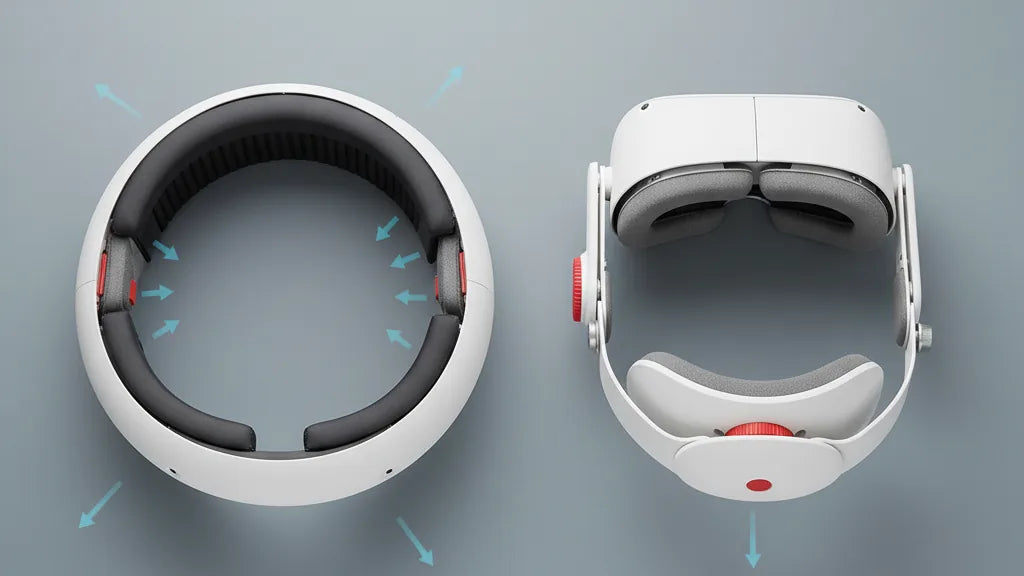
The difference between a halo-style strap and Meta’s Elite Strap is obvious once you put them on: the halo uses a continuous ring that sits across the forehead and over the crown, whereas the Elite Strap replaces the stock fabric with rigid arms and a back cradle tightened by a dial. Those design choices shape how the Quest 2 feels during play.
Halo straps focus on distributing force across the forehead and the top of the head, letting the headset "float" a little off your face. That reduces direct cheek and nose pressure and can be kinder during long, seated sessions or media viewing. Stability comes from broader contact, not brute clamping — the headset stays secure as long as the halo sits evenly and the forehead pad is aligned.
The Elite Strap takes the opposite approach: rigid side arms anchor into the headset and the dial pulls the rear cradle in, clamping the headset snugly against the face. This direct connection reduces wobble during fast head turns or vigorous movement, making it a natural fit for action-heavy titles. The firm rear support maintains lens alignment more consistently, though that firmness can concentrate pressure at the rear or sides if not properly cushioned.
In practice, halo straps often feel lighter and less intrusive on the face, while Elite Straps deliver a tighter, more locked-in experience. Which is "better" depends on your priorities: fewer facial pressure points and breathable comfort, or maximum steadiness for demanding, high-motion games.
Weight distribution and center of gravity: how each strap shifts load
The Quest 2 is front-heavy by design — the display and optics sit ahead of the face. A strap’s job is to counter that forward torque so you don’t feel the headset pulling on your nose or shifting during play. How the halo and Elite straps move the center of gravity changes both perceived balance and neck fatigue.
Halo straps redirect some of the forward weight upward and across the crown, using a forehead pad and a top band to create an upward counterforce. This reduces pressure on the cheeks and nose and can make the headset feel like it sits higher on the head. The trade-off is load on the scalp where the halo contacts; some users sense a higher center of mass and more head-tugging during quick downward motions until they find the sweet spot.
The Elite Strap pushes weight backward via its rear cradle. By anchoring at the occipital area, it shifts the effective center of gravity closer to your natural head balance, reducing forward tilt and keeping lenses aligned during quick turns. That rear mass can feel heavier initially, but it reduces the need for constant posture correction and generally lessens mid-session lens drift.
To optimize load placement for long sessions:
- For halo straps: move the forehead pad slightly up or down to let the crown band carry more load; loosen side connectors just enough to reduce forehead hotspots.
- For Elite Straps: use the dial to pull snug but not tight; add a thin top strap if you prefer some upward counterweight to relieve the rear cradle.
- Either setup: periodically stand, roll your neck, and reset the headset position during long sessions to avoid localized fatigue.
Fit and adjustability across head shapes and sizes
Fit matters as much as stability. A strap that’s technically stable but doesn’t conform to your skull will feel sloppy or create pressure points. Halo and Elite approaches each cover a broad range of heads, but they do so with different mechanisms.
Halo straps are usually "one-size-fits-most," relying on the halo’s geometry and flexible side connectors. That simplicity is convenient: it works well for a variety of skull shapes and hairlines without fiddly parts. Users with rounder or smaller heads often appreciate how the halo cradles the top and sides, while people with high foreheads or very short hair may need to experiment with pad placement to avoid slipping.
The Elite Strap provides more precision. The rear dial (or sliders on variants) allows you to micro-adjust tension, and many Elite configurations also include a top strap or additional padding to tune vertical fit. This structured adjustability locks the headset in more firmly, which benefits those with wider or flatter skulls who otherwise get lateral movement.
Practical tips for dialing a snug, slip-free fit:
- Sit upright while adjusting: gravity changes how the headset sits compared to bending over or lying back.
- For halo users: place the forehead pad low enough to prevent the headset from sliding down the face but not so low it pushes on the brow bone.
- For Elite users: tighten the dial until the display sits steadily; then back off one click to avoid over-clamping.
- If you have long hair or a high bun, loosen the crown area and slide the halo/Elite cradle lower to clear the bun; alternatively, use a thinner bun or pull hair through a gap to reduce pressure.
Comfort and pressure points during long gaming sessions
Two-plus-hour VR sessions expose weaknesses in any strap. Hotspots, numbness, and headaches usually come from concentrated pressure or poor ventilation. Knowing where each design tends to create issues helps you prevent them.
Halo straps concentrate contact at the forehead and crown. If aligned well, that spreads pressure and reduces facial squeeze, but misalignment can place focal pressure along the brow or near the temples. Dense foam pads on some halos cushion well, but they can trap heat — expect some sweat buildup during intense sessions. Good positioning and breathable pad materials make a huge difference: move the pad slightly around to find where the skull tolerates pressure best.
The Elite Strap places pressure mainly at the rear of the skull and along the side arms. With sufficient cushioning, this distribution can feel softer over long sessions, because it spreads the load across a wider area at the back. However, over-tightening the dial or using hard foam can create soreness behind the ears or at the occiput. Padding thickness and contour are important; swap to memory foam or perforated cushions if you notice hotspots.
Tuning strategies to minimize numbness and hotspots:
- Rotate the headset position every 30–60 minutes — even a small shift relieves sustained pressure.
- Use thin gel or memory foam inserts under pads to smooth pressure gradients.
- For halo straps, keep the crown band snug but not bearing all weight; for Elite Straps, avoid maxing out the dial — aim for steady hold with some give.
- Consider breathable covers or cotton headbands under the halo to wick sweat during workouts.
Eyewear compatibility and glasses wearers
If you wear glasses, strap choice affects both comfort and lens safety. Temple clearance, frame size, and how much the strap pulls the faceplate toward your eyes determine whether your frames get pinched or your display fogs.
Halo straps generally leave more vertical clearance because the crown band sits high, which can be friendlier to medium-sized frames. The forehead pad can add stability without forcing the faceplate inward, giving glasses wearers more room. Thick temple arms can still rub where the halo curves near the sides, so always check alignment after you seat the headset.
The Elite Strap’s rear pad and adjustable crown can draw the headset closer to your face as you tighten the dial, which sometimes reduces space for bulky frames. The fix is straightforward: loosen the dial slightly until you regain clearance, or use thinner foam inserts on the facial interface to keep lenses a little farther from your eyes. A top strap (if your Elite variant includes it) spreads the load and helps keep the rear cradle from over-clamping the faceplate.
Tips to maximize comfort with glasses:
- Seat the headset slowly while watching the temple area — if you feel contact, pause and reposition the headset before tightening.
- Use low-profile frames or thin temple tips when possible; silicon temple covers reduce rubbing.
- Try alternative facial interfaces with more depth if you regularly use large frames.
- For halo wearers, move the forehead pad slightly upward to increase vertical clearance; for Elite users, loosen the dial and add a thinner facial foam to preserve space.
Installation, quick-tips, and maintenance for your strap
Installing a halo or Elite Strap is straightforward, but small mistakes change stability and comfort. Follow these cues to attach securely, tune adjustments, and keep parts in good shape over time.
- Start with a clean headset and remove the stock strap if present. Align the connection points — halo bands usually clip to the same anchor points the stock strap used; Elite Straps replace the side arms and lock into the headset chassis.
- Seat the facial interface against your face and gently pull the strap over your head. For halo straps, position the forehead pad where it feels natural — just above the brow ridge is usually best. For Elite Straps, set the rear cradle against the occiput and tighten the dial a few clicks until the display is steady.
- Adjust side connectors and any top straps so the headset sits level. Check for lens alignment and comfort; if you feel pressure points, shift padding or back off the tension slightly.
- Test with movement: look up/down and do a quick headshake to evaluate wobble. Re-adjust as needed.
Maintenance tips:
- Wipe foam and silicone parts with a damp cloth and mild soap; avoid soaking electronics or metal components.
- Inspect mounting points and clips for stress or cracks every few months—plastic fatigue on third-party halos can occur at attachment points.
- Replace foam pads once they lose shape or develop tears; breathable aftermarket pads can extend comfort life.
- Consider upgrading to an Elite Strap variant with battery or better padding if you frequently need extra runtime or durability.
Durability, price, and long-term value: choosing by budget
Budget matters. Halo-style straps are often less expensive, especially from third-party makers, while Meta’s Elite Strap sits in a higher price bracket but includes build quality and brand-level fit assurance. Both options have long-term considerations beyond sticker price.
Halo straps: many third-party halo-style options use molded plastic frames and replaceable foam pads. They are typically affordable and provide good comfort for casual users. Durability varies: cheap halos may develop loose clips or cracked plastic if dropped or if the plastic around attachment points is thin. The long-term value comes from replaceable pads and the fact that they’re easy to store and swap. If you’re price-sensitive and primarily do seated or media VR, a quality halo strap is a cost-effective upgrade.
Elite Strap: costing more, the official Elite Strap (and premium third-party rigid straps) generally use sturdier materials and a more refined dial system. They last longer under heavy use and feel more integrated with the headset. Extras like battery packs add both weight and value by extending playtime—factor that into cost-per-hour if you game a lot. The Elite’s replaceable padding and robust dial mechanism mean fewer mid-year upgrades.
Long-term value checklist:
- Are pads replaceable and readily available? (big plus)
- Does the strap feel integrated or bolt-on? Integrated feels more durable.
- Is there a power/battery option that justifies additional expense?
- Are clips and mounting points standard, so you can swap components easily?
Decision guide: selecting the right strap for your use case
Match your choice to how you use VR. Think of the halo as a comfort-first, lighter-feel option and the Elite as a stability-first, performance option. Below is a simple framework to pick the right strap based on priorities.
Pick a Halo strap if:
- You prioritize facial comfort for long sessions (watching, social VR, story-driven games).
- You wear glasses and need extra clearance or gentle pressure distribution.
- You want a budget-friendly upgrade that’s easy to fit and maintain.
- Your sessions are moderate intensity and you don’t need rock-solid lens stability during violent movements.
Pick an Elite Strap if:
- You play fast-paced, room-scale, or fitness VR and need minimal wobble (Beat Saber, Superhot, Pistol Whip).
- You want a precise fit and are willing to trade a bit more rear weight for consistent lens alignment.
- You prefer a refined build with replaceable padding and optional battery accessories for longer sessions.
- Your head shape benefits from rear-anchored support and you don’t mind a slightly bulkier profile.
Final selection tips:
- If possible, test both styles at a friend’s system or a store. Real-world feel matters more than specs.
- Consider a hybrid solution: some users pair an Elite rear cradle with a slim top strap or use aftermarket pads to combine benefits.
- Factor in additional accessories—deeper facial interfaces, lens spacers, or breathable pads can tip a marginal decision one way or the other.
Next step: if you’re undecided, start by trying a halo for comfort and glasses-friendliness; if you find lens wobble during active play, trade up to an Elite Strap for steadier performance. If you already know your most-played titles (e.g., workouts vs story games), let that be the tiebreaker.







Compartir:
Adjusting Quest 2 Comfort Straps for Even Pressure Across the Skull
Strap design showdown: top strap vs halo for reduced perceived weight