

Beyond the Specs: Unlocking True VR Comfort for Quest 2, Valve Index, and PSVR2
In the immersive world of virtual reality, your experience is only as good as your comfort. While breathtaking visuals and responsive tracking are vital, the physical sensation of wearing a headset for extended periods often dictates how deeply you can lose yourself in a digital realm. For many, the nagging pressure on the face, the strain in the neck, or the constant readjustment of a wobbly device can pull them right out of the illusion. This is especially true for long-session users, from dedicated sim racers to casual social VR explorers. Today, we're diving deep into the often-overlooked science of VR comfort, pitting three leading headsets – the Meta Quest 2, Valve Index, and PlayStation VR2 – against each other. We'll strip away the marketing gloss to examine hard numbers, crucial design philosophies, and the real-world impact of weight and its distribution. Whether you're a Quest 2 owner seeking an upgrade path to blissful, marathon sessions or a prospective buyer weighing your options, this guide will equip you with the knowledge to choose and optimize for true, lasting comfort.Head-to-Head Weight Specs: Quest 2, Valve Index, and PSVR2 (Numbers You Can Trust)
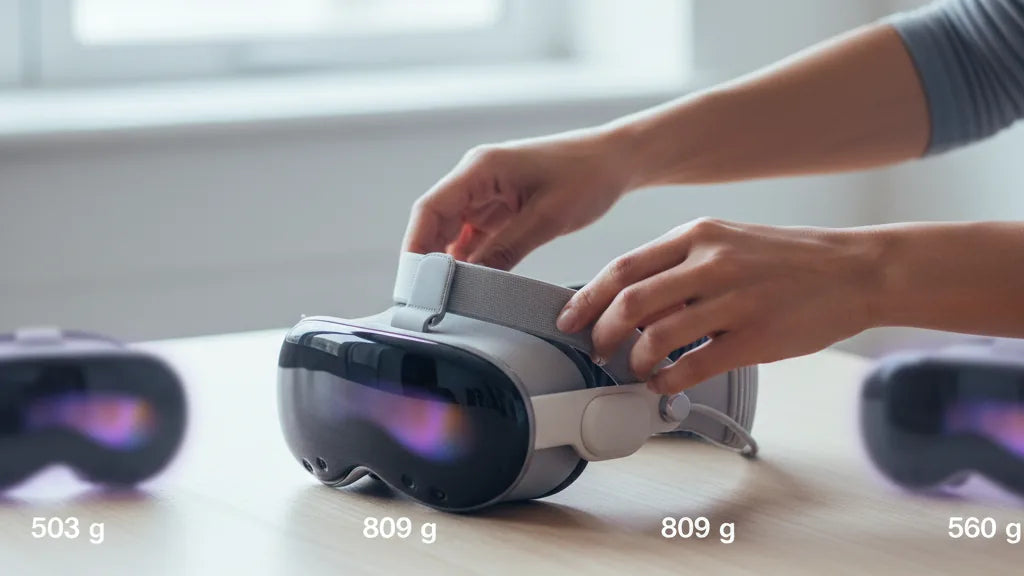
When you first consider a virtual reality headset, your eyes might gravitate towards resolution, field of view, or processing power. Yet, for sustained comfort, the most straightforward metric to consider is often the first: its weight. Understanding the true mass of each device is the foundational step in deciding what might feel best during those extended play sessions. Let's lay out the core numbers for the three headsets in question, keeping in mind what these official specifications actually entail. The **Meta Quest 2**, a trailblazer in standalone VR, comes in at approximately **503 grams (around 1.11 pounds)**. This figure is typically cited for the headset unit itself, paired with its standard, lightweight fabric strap. It’s designed to be portable and relatively unburdened, making those initial moments of putting it on feel remarkably light. Shifting to the high-fidelity PC VR space, the **Valve Index** headset carries a more substantial **809 grams (about 1.78 pounds)**. This measurement refers to the main headset unit, excluding its often lengthy tether cable and integrated audio. Finally, Sony's next-generation **PlayStation VR2 (PSVR2)** positions itself between the two, with an official weight of **560 grams (roughly 1.23 pounds)**. Like the Index, this weight focuses solely on the main headset body, separate from its accompanying USB-C cable. It's critical to note that these figures represent the *base* headset. They generally do not include additional accessories such as premium headstraps, external battery packs (common for the Quest 2), or even built-in headphones on some models. While the raw gram count gives us a baseline, it's merely the first chapter in the story of VR comfort. As we’ll explore, how this mass is actually managed and distributed across your head profoundly impacts the real-world sensation.Why Distribution Matters More Than Headline Weight
Peering at the headline weight of VR headsets like the Quest 2, Valve Index, or PSVR2 can be remarkably misleading. While a lower number certainly sounds appealing, true comfort during extended VR sessions often has less to do with the total mass of the device and far more to do with how that weight is meticulously distributed across your head. This crucial factor dictates your overall experience, transforming what could be a heavy burden into a surprisingly comfortable fit. One primary consideration is the headset's **center of gravity**. If the bulk of the weight is positioned too far forward, especially towards the display, it creates a significant lever effect. This constant forward pull forces your neck muscles to work overtime, straining them and leading to rapid fatigue and discomfort. This is often described as feeling "front-heavy" and is a common complaint with many stock VR setups, including the Quest 2. Conversely, a well-designed headset, even if it carries a bit more total weight, can paradoxically feel significantly lighter if its center of gravity is carefully balanced. This balance is often achieved by strategically placing components, such as batteries or counterweights, at the rear of the strap system. Furthermore, comfort is heavily influenced by specific **pressure points**. Headsets that concentrate pressure on sensitive areas like the forehead, temples, or the bridge of the nose can cause discomfort and leave noticeable red marks surprisingly quickly. Think of wearing a tight pair of glasses for hours – the pressure on your nose bridge or behind your ears becomes unbearable. Optimized designs aim to spread the load evenly across broader, more robust parts of the head, including the top and back of the skull, and sometimes even the cheekbones, minimizing localized hotspots. So, while the Valve Index is demonstrably heavier than the Quest 2 on paper, its superior weight distribution system can make it *feel* lighter and more balanced during long play, demonstrating that numbers alone don't tell the whole story.Stock Strap Ergonomics Compared: Quest 2 vs Valve Index vs PSVR2
The out-of-the-box comfort and adjustability of a VR headset are heavily influenced by its default head strap. Each of our contenders — the Meta Quest 2, Valve Index, and PlayStation VR2 — employs distinct ergonomic philosophies that translate directly into how they feel during sessions ranging from a quick 30-minute dive to an epic two-hour odyssey. The **Meta Quest 2** adopts a minimalist, almost utilitarian approach with its default fabric strap. This simple, elastic design comprises two split straps that cradle the back of the head, meeting a single top strap that runs over the crown. While it’s undeniably lightweight and flexible, its reliance on securing the headset primarily against the face can lead to noticeable front-heaviness. The force needed to keep the headset stable is often borne by the face, resulting in uneven pressure distribution across the cheeks and forehead, especially as sessions extend beyond 30 minutes. Adjustments are basic, relying on simple velcro fasteners, which can make fine-tuning challenging and often lead to overtightening in an attempt to combat the forward pull. In stark contrast, the **Valve Index** takes a robust, integrated approach to headstrap design. Its integrated "halo" system cradles the entire head, distributing the headset's weight much more evenly. A prominent, satisfyingly tactile rear adjustment knob allows for precise tightening or loosening with a ratchet mechanism, while a single top strap offers vertical positioning to lift the front of the headset. This rigid, well-padded design enhances stability and comfort, making the 809-gram device feel far less like a weighty object strapped to your face and more like an extension of your head. Even during two-hour sessions, the Index excels at mitigating pressure points, allowing users to focus on the virtual world rather than physical discomfort. Its design even allows the visor to flip up, offering quick glances at the real world without removing the entire unit. Sony's **PlayStation VR2** continues the tradition of excellent halo design seen in its predecessor, offering a sophisticated and comfortable experience. Its system features a prominent ring that cinches around the back of the head via a rear adjustment knob, combined with a top strap to support vertical weight. The ingenious design ensures that the headset's 560-gram mass is primarily supported by the sturdy cranial structure of your forehead and the back of your head, rather than pressing directly onto your face. This significantly reduces facial pressure, allowing for comfortable, stable wear during extended play. The quick-release button and smooth sliding mechanism for adjusting the visor's distance from your eyes further enhance its ergonomic appeal, providing quick, intuitive adjustments that maintain comfort without interrupting immersion.Best Quest 2 Strap and Upgrade Roadmap for Long Sessions
The standard Quest 2 head strap, while functional for short bursts, frequently proves inadequate for extended virtual reality sessions due to its basic design and inherent front-heaviness. If you’re serious about immersing yourself for longer periods without discomfort, upgrading this essential component is not just an improvement—it's crucial. Fortunately, the market offers a vibrant ecosystem of aftermarket options designed to transform your Quest 2 experience. For those aiming for an optimal comfort upgrade path, a staged approach is often advisable, balancing budget with desired comfort levels:Stage 1: The Essential Comfort Boost (Entry-Level)
Begin by replacing the default fabric strap with a quality rigid strap. The official Meta Quest 2 Elite Strap offers enhanced rigidity and better distribution than the stock elastic band. It clicks directly into the headset, providing a much more stable platform and reducing the constant need for adjustment. While it still leaves the Quest 2 front-heavy, it's a significant improvement in stability and basic support. For a similar experience from a third party, options like the Kiwi Design vr-comfort/how-the-quest-two-head-strap-affects-weight-distribution-and-immersion" rel="nofollow noopener noreferrer">Elite Strap are celebrated for their enhanced rigidity and superior padding, often at a competitive price. ⏱️ 10-min read
Stage 2: The Balanced Powerhouse (Mid-Range)
To truly combat the Quest 2’s front-heaviness and extend playtime, a battery strap is the next logical step. The Elite Strap with Battery from Meta not only provides the rigid support of the standard Elite Strap but integrates an external battery pack at the rear. This ingenious design serves a dual purpose: it acts as a much-needed counterweight, shifting the center of gravity towards the back of your head, and it significantly extends your playtime. Popular third-party alternatives like the BoboVR M2 Pro (or its successors) are highly regarded for their halo-style design combined with an optional, magnetically attachable battery pack. Halo designs cradle the top of the head, effectively lifting pressure from the face and distributing the headset’s weight across the top and back of the skull, mimicking the superior balance of the Valve Index and PSVR2. This redistribution significantly reduces painful pressure points on the cheeks and forehead, allowing users to immerse themselves for much longer without discomfort.
Stage 3: Premium Plushness and Customization (High-End)
Once you have a stable, balanced strap, focus on the facial interface. Options like those from VRCover provide thicker, softer padding made from materials like PU leather or memory foam. These dramatically improve comfort by distributing pressure more broadly across your face, reducing red marks and sweat buildup. Some VRCover sets also include a larger foam replacement for the back of the head strap, further enhancing comfort and stability. For those with specific facial structures, aftermarket interfaces can also help with light leakage or provide more room for glasses.
Each upgrade builds upon the last, tackling different aspects of comfort: basic stability, weight distribution and battery life, and finally, direct facial contact. Investing in these changes transforms the Quest 2 from a good headset into an excellent one for sustained, comfortable VR adventures.Modifications and Accessories That Trade Weight for Comfort (and When They Help)
It might seem counterintuitive, but sometimes adding weight to a VR headset can actually improve comfort. The key lies not in chasing "heavier equals better," but in achieving superior balance and pressure distribution. For the Quest 2, Valve Index, and PSVR2, strategic modifications and accessories can drastically reduce hotspots and neck strain during long sessions by redefining the headset's center of gravity and cushioning.Counterweights to Rebalance the Headset
The most common and effective modification for front-heavy headsets like the Quest 2 is adding a counterweight. Back-mounted weights or external battery packs shift mass towards the back of the head, directly counteracting the forward pull created by the display and main components. This significantly lessens neck fatigue and helps keep the visor aligned during movement, preventing it from slipping down your face. While this undeniably increases the total mass of the headset, the perceived weight can feel lighter due to the improved balance. Look for clip-on or strap-integrated counterweights, or simply utilize a power bank mounted to the rear of your strap. Expect a small increase in overall weight, but a much more stable, comfortable ride for extended gameplay. A heavier-but-balanced setup is almost always preferable to a lighter-but-front-heavy one for long-term comfort.
Thicker Interfaces and Extra Padding
The standard foam facial interface on many headsets, particularly the Quest 2, can be thin and abrasive. Upgrading to a thicker, plush facial interface or adding extra padding can make a world of difference. Wider, softer padding made from memory foam or multilayer foam with a skin-friendly cover distributes pressure across a larger facial area, drastically reducing hotspot load on cheeks, the forehead, and the bridge of the nose. This also often improves the seal against ambient light and can cut down on the need to cinch the strap excessively tightly, further alleviating pressure. However, added padding can slightly increase the distance between your eyes and the lenses. This means you may need to re-adjust your Interpupillary Distance (IPD) and strap tension to preserve visual clarity and maintain your optimal field of view.
Other Comfort-Enhancing Accessories
- Lens Spacers/Prescription







Compartir:
How the Quest Two Head Strap Affects Weight Distribution and Immersion
From Pressure Points to Pain-Free: Ergonomic Strategies for Oculus Quest 2 Straps